Home Appliances / Vacuum Cleaners
User Manual for Bissell Auto-Mate Lithium Ion Cordless Hand Vac 2284W
Quick guide for the Bissell Auto-Mate Lithium Ion Cordless Hand Vac 2284W. Includes assembly, charging, cleaning, filter maintenance, and troubleshooting steps.
Quick answers from the manual
Quick answer
- The Bissell Auto-Mate Lithium Ion Cordless Hand Vac (2284W) is a handheld vacuum cleaner. It requires an 8-hour initial charge and uses a specific E-TEK charger (Model ZD5F230030US). p. 1, 5
Key actions
- Charge the unit p. 5
- Empty the dirt tank p. 8
- Clean the filter p. 9
First start
- Charge the unit completely for 8 hours prior to first use. p. 5
Show 4 more answers Show less
Problems and fixes
Vacuum won't turn on
Charge battery.
p. 11
Low suction
Empty dirt container, clean/replace filters, or remove clogs.
p. 11Maintenance and reset
- Always turn unit off prior to charging. p. 5
Technical specifications
| Parameter | Value | Meaning | Pages |
|---|---|---|---|
| Charger Model | ZD5F230030US | Required charger model | p. 2 |
| Charging Time | 8 hours | Initial charge time | p. 5 |
Where to find it in the PDF
- Safety Instructions p. 2
- Assembly and Charging p. 5
- Maintenance p. 8, 9
Table of contents
Manual images
Click an image to enlargeQuick Guide
The Bissell Auto-Mate Lithium Ion Cordless Hand Vac is designed for household cleaning. Before first use, charge the unit completely for 8 hours. Always turn the unit off before charging. The LED light indicates battery status: solid green for in use, blinking red for low power, and solid red for no power.
Assembly and Charging
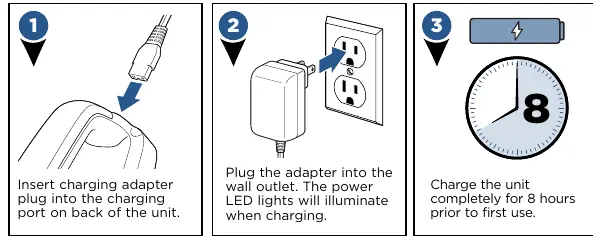
To charge the vacuum, insert the charging adapter plug into the port on the back of the unit and plug the adapter into a wall outlet. The power LED lights will illuminate during charging. Use only the E-TEK charger, Model ZD5F230030US.
Using the Hand Vacuum
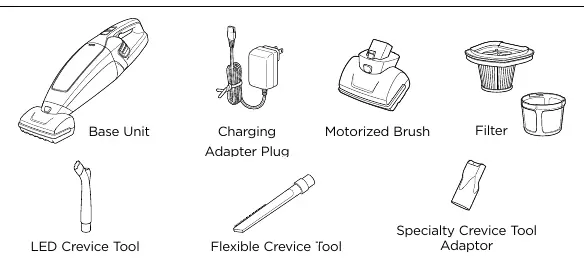
To operate, unplug the machine from the charging adapter and push the power button on top of the handle to the ON position. The motorized brush can be attached by firmly inserting it into the nozzle until it snaps into place. To detach, turn the machine off, press the button on top of the motorized brush, and pull out.
Maintenance and Cleaning
Emptying the Dirt Collection Tank
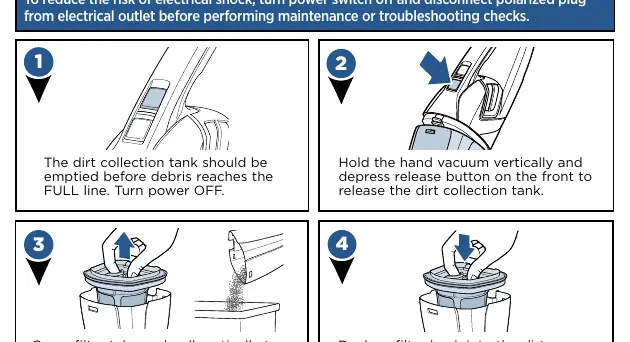
Empty the tank before debris reaches the FULL line. Turn the power off, hold the vacuum vertically, and depress the release button on the front to release the tank. Pull the filter cup out to empty the dirt.
Cleaning or Replacing the Filter
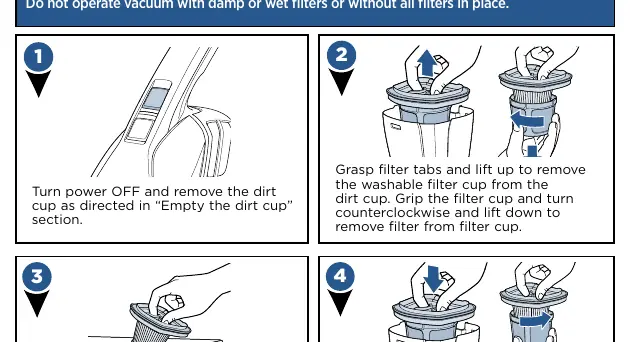
Remove the dirt cup, grasp the filter tabs, and lift the washable filter cup out. Turn the filter cup counterclockwise to remove the filter. Tap the filter against a waste container to remove dirt. After heavy usage, wash the filter and filter cup by hand in warm water and mild dish detergent. Ensure it is completely dry before replacing.
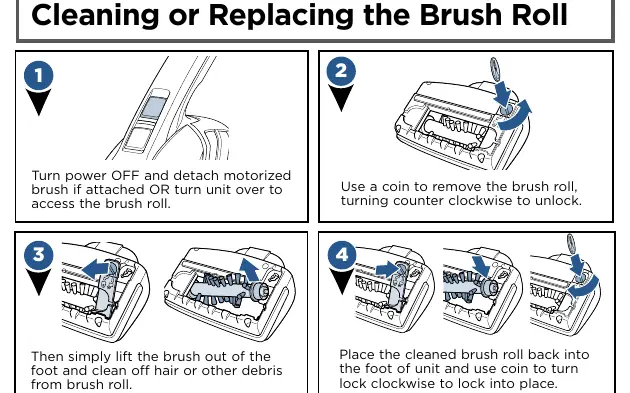
Cleaning the Brush Roll
Turn the power off and detach the motorized brush. Use a coin to turn the lock counterclockwise to unlock the brush roll. Lift the brush out to clean off hair or debris. Place the cleaned brush roll back and use a coin to turn the lock clockwise to lock it into place.
Safety and Battery Disposal
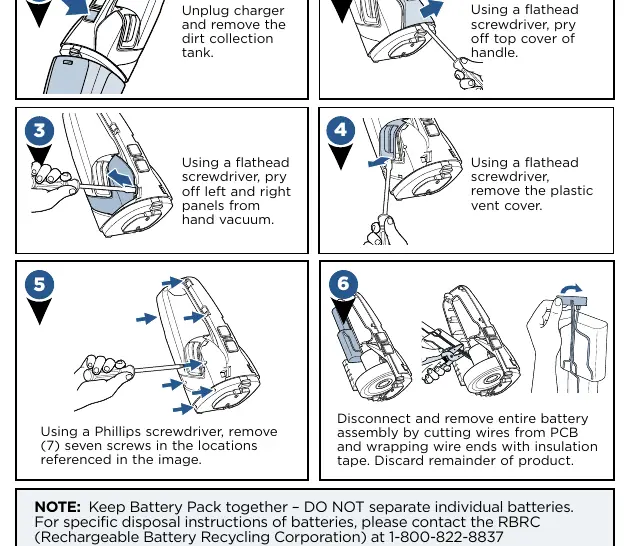
This product contains Lithium Ion rechargeable batteries. Do not incinerate the appliance. For battery removal, ensure the unit is disconnected from the charger and the dirt tank/brush are removed. Use a flathead and Phillips screwdriver to disassemble the unit as described in the manual. Keep the battery pack together; do not separate individual batteries.
Manufacturer information
Bissell Inc.
Practical help
Common problems
Vacuum won't turn on
Battery is fully discharged. Charge the battery following the instructions on page 5.
Low suction
Check if the dirt container is full, not installed properly, or if filters need cleaning/replacing. Also, check for clogs in the tool.
Hand vacuum won't charge
Ensure the machine is in the OFF position. Use only the charger that came with the machine (Model ZD5F230030US).
Visible dirt escaping
Empty the dirt container or check if the filter is missing or installed incorrectly.
Before use
- Charge the unit completely for 8 hours before first use.
- Ensure the dirt cup and filters are properly installed.
- Verify the power switch is in the OFF position before charging.
- Check that the charger model is ZD5F230030US.
Show more Show less
Specs in practice
- Battery Type
- Lithium Ion rechargeable battery.
- Charger Model
- E-TEK charger, Model ZD5F230030US.
- LED Status (Charging)
- Blinking red while charging; green when fully charged.
Images and diagrams
- The dirt collection tank release button is located on the front of the unit.
- The power button is located on top of the handle.
- The charging port is located on the back of the unit.
Model compatibility
- Use only manufacturer-recommended attachments.
- Motorized brush is suitable for stairs and upholstery.

Manual page author
Emily Carter
User documentation editor