Home Appliances / Carpet Cleaners
User Manual for Bissell Stain Eraser 2005N
Comprehensive user guide for the Bissell Stain Eraser 2005N. This manual provides step-by-step instructions for charging, filling the tank, cleaning surfaces, performing routine maintenance, and safely removing the battery for disposal.
PDF source: polski · summary: English
Quick answers from the manual
Quick answer
- The Bissell Stain Eraser 2005N is a portable spot cleaner. To use it, charge the device, fill the tank with solution, apply to the stain, scrub, and suction the liquid. p. 1, 4, 5, 6
Key actions
- Charging the device p. 4
- Filling the tank p. 5
- Cleaning surfaces p. 6, 7
First start
- Charge the device fully before first use. p. 4
Show 2 more answers Show less
Maintenance and reset
- Clean the tank and nozzle after each use to maintain performance. p. 8, 9
Where to find it in the PDF
- Charging p. 4
- Cleaning p. 6, 7
- Maintenance p. 8, 9
- Battery Removal p. 10, 11
Table of contents
Manual images
Click an image to enlargeQuick guide from the manual
The Bissell Stain Eraser 2005N is a portable spot cleaner. This guide covers the essential operations: charging the battery, preparing the cleaning solution, using the device on stains, and performing necessary maintenance to keep the unit functioning correctly.
What's in the box
- Stain Eraser device
- Battery charger
- Cleaning solution
Charging the device
Before first use, the device must be fully charged.
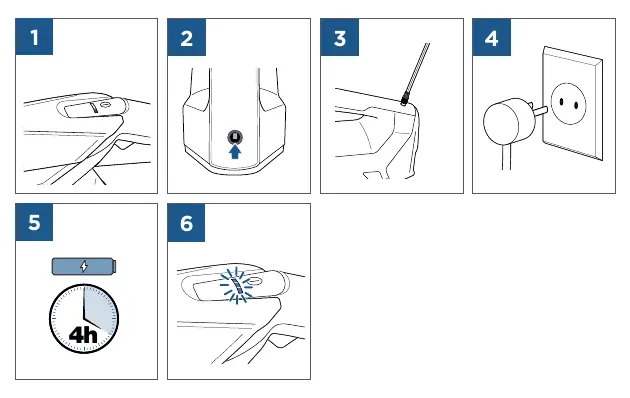
- Connect the charger to the charging port on the device.
- Plug the charger into a wall outlet.
- The LED indicator will show the charging status. A full charge typically takes 4 hours.
- Refer to the LED indicator table in the manual to understand the battery level (solid vs. flashing lights).
Filling the tank
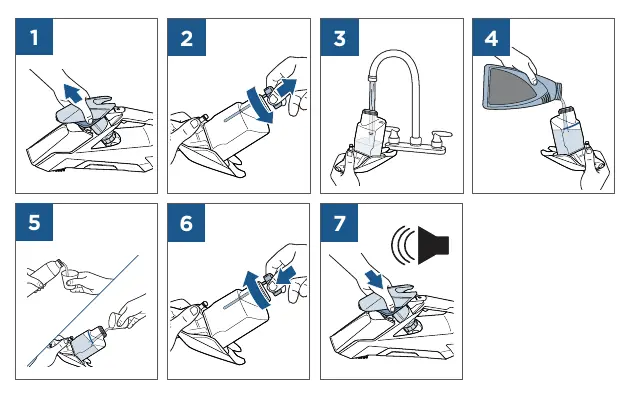
- Remove the tank from the device.
- Open the tank cap.
- Fill the tank with water and the appropriate cleaning solution.
- Secure the cap back onto the tank.
- Reattach the tank to the device until it clicks into place.
Cleaning procedure
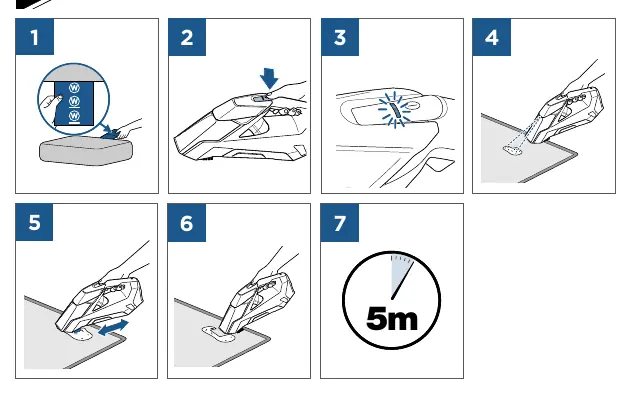
- Ensure the device is charged and the tank is filled.
- Place the nozzle on the surface to be cleaned.
- Press the spray button to apply the cleaning solution to the stain.
- Use the brush to scrub the area.
- Use the suction function to remove the dirty solution from the surface.
- Repeat as necessary until the stain is removed.
Maintenance and cleaning
Regular maintenance is required to ensure optimal performance.
Cleaning the tank
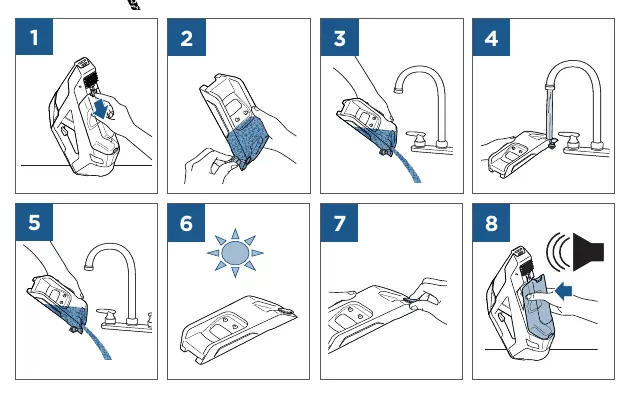
- Remove the tank from the unit.
- Empty any remaining liquid.
- Rinse the tank thoroughly with water.
- Allow the tank to air dry completely before reattaching.
Cleaning the nozzle
- Remove the nozzle cover.
- Rinse the nozzle under running water to remove debris.
- Clean the area around the nozzle intake.
- Reassemble the nozzle and ensure it is securely attached.
Battery removal and disposal
The battery must be removed before the device is disposed of.
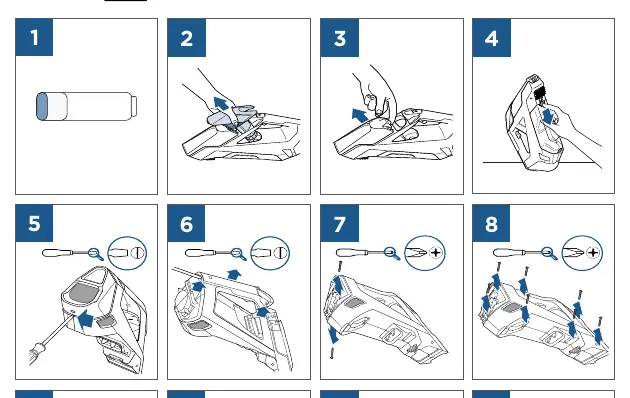
- Ensure the device is unplugged.
- Use a screwdriver to remove the screws from the device casing.
- Carefully open the casing to access the battery pack.
- Disconnect the battery wires.
- Remove the battery pack and dispose of it according to local recycling regulations.
Manufacturer information
Bissell Inc.
Practical help
Common problems
Device does not spray
Check if the tank is properly seated and filled with cleaning solution.
Device does not charge
Ensure the charger is securely connected to both the device and the wall outlet.
Weak suction
Check the nozzle for clogs and ensure the tank is properly attached.
Before use
- Charge the device fully (approx. 4 hours).
- Ensure the tank is filled with water and cleaning solution.
- Check that the nozzle is clean and free of debris.
- Verify the tank is securely attached to the unit.
Show more Show less
Images and diagrams
- The manual uses a series of numbered icons to illustrate the steps for charging, filling, cleaning, and maintenance.
- LED indicators on the device provide feedback on battery status.
Model compatibility
- Use only with Bissell-approved cleaning solutions.

Manual page author
David Miller
Documentation analyst