Electronics / Amplifiers Receivers
Blackstar Debut 100R Guitar Amplifier User Guide
Comprehensive user guide for the Blackstar Debut 100R all-analogue guitar amplifier, covering setup, channel selection, EQ, effects loop, and safety instructions.
Table of contents
Product Overview
The Blackstar Debut 100R is an all-analogue guitar amplifier designed to deliver premium boutique sound and feel. It features two channels, a full three-band EQ, and Blackstar's patented Infinite Shape Feature (ISF), which allows you to seamlessly transition between UK and American tonal characteristics. The amplifier is equipped with a selectable Plate or Hall digital reverb for added depth and versatility, making it an ideal choice for both stage and studio environments.
Getting Started and Setup
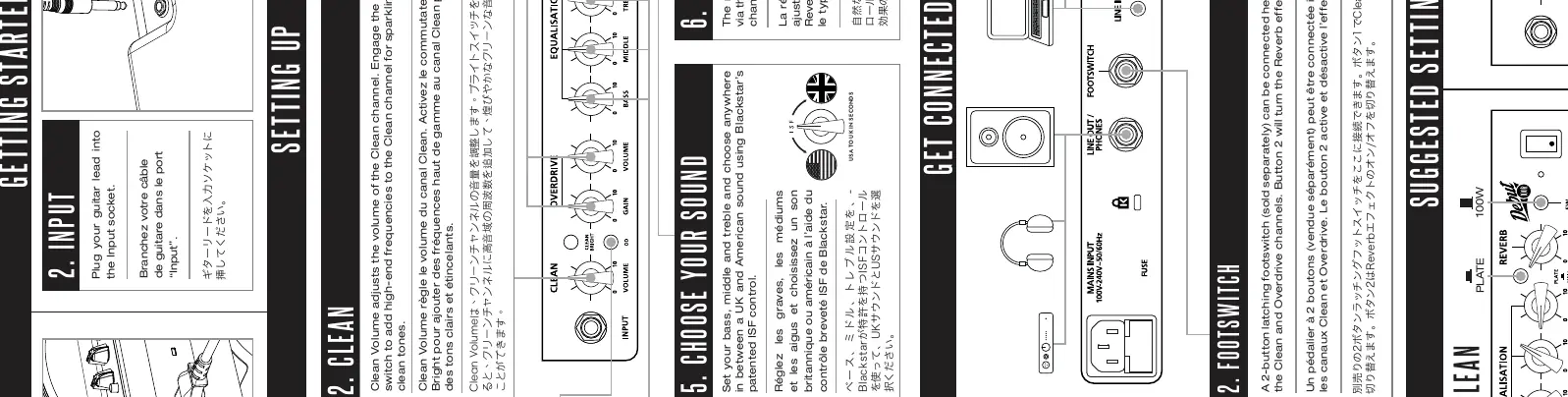
To begin, connect the provided mains lead to the amplifier's power input and plug your guitar into the input socket. Use the power switch to turn the unit on. The amplifier features two channels: Clean and Overdrive. You can toggle between these using the OD switch on the front panel or via an optional two-button latching footswitch. The Clean channel includes a Bright switch to add high-end sparkle, while the Overdrive channel features independent Gain and Volume controls to dial in your preferred level of distortion.
Tone Shaping and Connectivity
The Debut 100R offers extensive tone-shaping capabilities through its shared Bass, Middle, and Treble controls, complemented by the ISF control. For practice and performance, the amplifier includes a stereo line input for playing along with external audio sources like phones or MP3 players. Additionally, a dedicated Line Out/Phones jack allows for silent practice using headphones. The series effects loop enables you to integrate external effects units by connecting the send and return jacks to your external gear.
Power Management and Safety
The Debut 100R is a 100W amplifier, but it includes a power reduction switch that allows you to drop the output to 5W, perfect for home practice without sacrificing tone. Always ensure the amplifier is used in a well-ventilated area and kept away from moisture or heat sources. Do not attempt to open the casing, as there are no user-serviceable parts inside. For maintenance, clean only with a dry cloth. If the unit fails to operate normally, consult a qualified service technician. Always dispose of electronic equipment according to local environmental regulations.
Manufacturer information
Blackstar Amplification
Practical help
Common problems
No sound output
Check that the mains lead is connected, the power switch is on, and the guitar lead is properly inserted into the input socket.
Excessive noise or distortion
Adjust the Overdrive Gain settings or ensure the guitar volume is appropriate. If using external effects, check the loop connections.
Before use
- Ensure the mains lead is securely connected.
- Check that the amplifier is placed on a stable surface.
- Verify that ventilation slots are not obstructed.
- Ensure the environment is dry and away from liquids.
- Set the power switch to the desired wattage (100W or 5W).
Specs in practice
- Effects Loop
- Series loop for connecting external effects units via Send and Return jacks.
Images and diagrams
- The front panel features controls for Clean and Overdrive channels, including Gain, Volume, and a shared 3-band EQ.
- The Reverb section allows selection between Plate and Hall types with level control.
- The rear panel includes the Mains Input, Line Out/Phones jack, Line In, and Footswitch connection.
Model compatibility
- Compatible with 2-button latching footswitches for channel switching and reverb control.
- Supports stereo aux cables for connecting external audio devices.
- Designed for use with standard mono guitar leads.

Manual page author
David Miller
Documentation analyst
Organizes user manual content into clear summaries, with attention to model details, product context, and everyday usability.