Electronics / Amplifiers Receivers
Owner's Manual for JOYO JAM BUDDY II 10W Portable Electric Guitar Amp
Comprehensive user guide for the JOYO JAM BUDDY II 10W portable guitar amplifier, covering setup, tone channel switching, built-in effects, looper, drum machine, and advanced parameter adjustments.
Table of contents
Manual images
Jump to the sectionProduct Overview
The JOYO JAM BUDDY II is a 10W portable electric guitar amplifier designed for practice and performance. It features built-in amp models, modulation, delay, and reverb effects, along with a drum machine and a 30-second looper. The unit is powered by an internal 7.4V 2200mAh lithium-ion battery.
Getting Started
To charge the device, use a USB Type-C cable with a charger providing at least 10W (5V/2A). The unit features an automatic power-off function that activates after 20 minutes of no audio signal input to conserve battery life. A phone mount is included for convenience; ensure it is removed when not in use to prevent damage if the unit is dropped.
Tone Channels and Amp Models
The JAM BUDDY II offers three independent channels: CLEAN, RHYTHM, and LEAD. You can switch between CLEAN and DRIVE channels using the CHANNEL footswitch, and select between RHYTHM and LEAD modes using the DRIVE MODE footswitch. There are 14 selectable amp head models, each tailored to different musical genres, ranging from jazz and blues to high-gain metal.
Effects and Advanced Adjustments
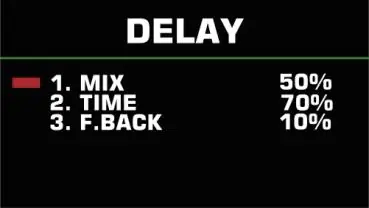
The amplifier includes three built-in effects modules: Modulation, Delay, and Reverb. You can edit these effects by rotating the corresponding knobs. Advanced tone shaping is available through the POST-EQ settings, which include high-pass and low-pass filters, as well as adjustable frequency centers for high, mid, and low bands. You can also adjust the input/output phase of the amp model.
Drum Machine and Looper
The built-in drum machine can be activated via the TRE./D.CTRL knob. Note that if the LOOPER function is active and recording, the drum machine's type and speed settings are locked to ensure synchronization. The LOOPER allows for up to 30 seconds of recording, overdubbing, and playback, controlled via the footswitches.
Connectivity
The device supports Bluetooth for playing backing tracks and features a USB-OTG port for recording directly to computers or mobile devices. The guitar output jack supports balanced signals, allowing for direct connection to PA systems using appropriate cables.
Maintenance and Safety
Do not expose the device to water, moisture, or extreme heat. Clean only with a dry cloth. If the battery is low, charge it promptly to avoid irreversible capacity loss. If the unit is not in use for a long time, store it in a cool, dry place and charge it every two months.
Official resources from the manual
Manufacturer information
JOYO TECHNOLOGY CO., LTD
Practical help
Common problems
Drum machine settings are locked.
The drum machine settings are locked when the LOOPER function is active and content is recorded to ensure synchronization.
Unit does not respond to operations.
If the tuner function is turned on, the unit will not respond to any operations other than turning off the tuner.
Effects are not audible.
If the first parameter of an effect module is turned down to 0, the corresponding effect will be bypassed.
Battery life is decreasing.
Ensure the battery is charged every two months if the unit is not in use for a long time to prevent irreversible loss of capacity.
Before use
- Ensure the charger provides at least 10W (5V/2A) via USB Type-C.
- Check that the phone mount is securely installed if needed.
- Verify the guitar cable type (mono 6.35mm or TRS-to-XLR for balanced output).
- Charge the battery fully before first use.
- Ensure the device is kept away from water and heat sources.
Specs in practice
- HPF (High-pass filter)
- Also known as a bass-cut filter; removes unwanted low frequencies.
- LPF (Low-pass filter)
- Also known as a high-cut filter; removes unwanted high frequencies.
- PHASE.IN/OUT
- Adjusts the signal phase of the amp head model; 'NOR' is normal, 'INV' inverts the signal.
Images and diagrams
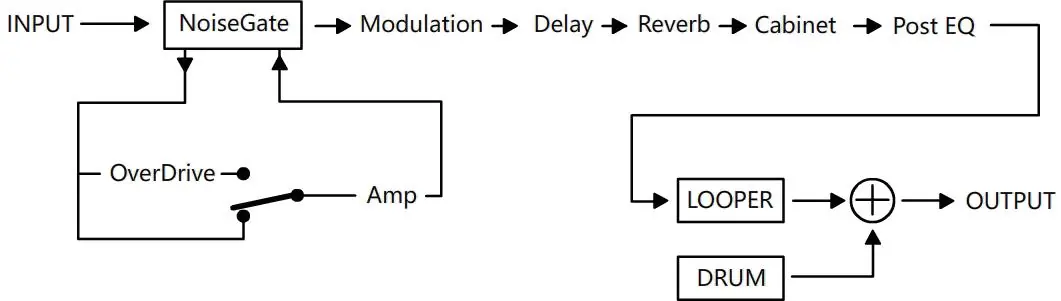
- The effects chain flows from Input -> Noise Gate -> Modulation -> Delay -> Reverb -> Cabinet -> Post EQ -> Looper/Drum -> Output.
- The Overdrive module is integrated into the signal path before the Amp model.
Model compatibility
- The unit is not compatible with fast charging (PD/QC).
- The guitar output jack supports balanced output when using TRS-to-XLR cables.
- The internal speaker is full-range; for higher volume, use the LINE OUT jack to connect to external amplification.

Manual page author
Emily Carter
User documentation editor
Prepares concise manual descriptions and highlights the most useful setup, operation, and maintenance information for readers.