Music / Instruments
Blackstar AMPED 1 100W Amp Pedal Owner's Manual
Quick guide for the Blackstar AMPED 1 100W Amp Pedal, covering front and rear panel controls, CabRig speaker simulation, preset management, and technical specifications.
Table of contents
Quick guide from the manual
The Blackstar AMPED 1 is a 100W floorboard amplifier pedal featuring traditional amp controls, power valve responses, and integrated CabRig DSP speaker simulation. This manual provides instructions for operation, preset management, and connectivity for live and recording applications.
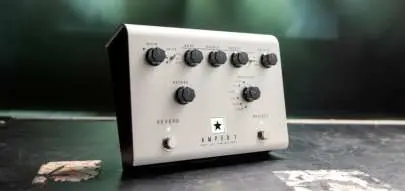
Front Panel Controls
- Voice: Selects preamp character (USA, UK, or Flat).
- Gain: Adjusts overdrive/distortion levels.
- Tone Controls: Bass, Middle, and Treble adjust frequency response tailored to the selected voice.
- Reverb: Controls reverb amount. Holding the Reverb footswitch activates the 'Freeze' effect.
- Response: Selects power valve response (KT88, 6L6, EL34, 6V6, EL84) or Linear mode.
- Power: Toggle between 100W, 20W, and 1W output settings.
- Master: Controls overall volume.
- Preset: Recalls stored settings. Hold for 2 seconds to save current settings.
Rear Panel and Connectivity
- Mains Input: Universal power supply (100-240Vac, 50/60Hz).
- In: Input for guitar or preamp/modeller.
- Loop: Mono effects loop (TRS connection). Can be configured as series or parallel via Architect software.
- Speaker Outputs: Connect to 8 or 16 ohm cabinets. Warning: Do not use both outputs simultaneously.
- Outputs: Two 9V DC outputs for external pedals (max 500mA combined).
- USB: Connects to a computer for recording (4 channels) and using Blackstar Architect software.
- MIDI In: Receives MIDI messages via TRS to 5-pin adapter.
Side Panel and CabRig
The side panel provides professional outputs for recording and live use:
- Balanced XLR CabRig Output: Low noise, processed signal.
- Line Out (TRS): Stereo processed signal for recording or headphones.
- Level Control: Attenuates XLR, Line Out, and USB channel 3 output by up to 20dB.
- CabRig Switch: Selects between three stored CabRig patches.
Use the Blackstar Architect software to customize CabRig settings, including cabinet selection, microphone placement, room ambience, and EQ.
Safety and Maintenance
- Operating Temperature: Max 35°C.
- Altitude: Designed for use up to 2000m.
- Cleaning: Use only a dry cloth.
- Ventilation: Do not block ventilation slots.
- Service: No user-serviceable parts inside. Refer all servicing to qualified personnel.
Manufacturer information
Blackstar Amplification
Practical help
Common problems
Recall Indicator LED flashing
This indicates a mismatch between the current parameter value and the physical knob position. Turn the knob until it 'passes through' the stored value to regain control.
No sound from speaker output
Ensure the speaker cable is connected to the correct impedance output (8 or 16 ohm) and that the amplifier is not in low power consumption mode (triggered if speaker lead is disconnected at the amp end).
Effects loop level boost
If the effects loop is set to parallel, effects containing a dry signal will cause a level boost when mixed with the dry pass-through signal.
Before use
- Ensure the power adaptor is connected to an earthed socket.
- Connect the loudspeaker cabinet to the correct impedance output (8 or 16 ohm) before switching on.
- Use a high-quality screened instrument lead for the guitar input.
- Allow the unit to reach room temperature if moved from a cold environment.
- Ensure ventilation slots are not blocked.
Specs in practice
- Mains Voltage
- Universal input (100-240Vac, 50/60Hz) suitable for worldwide use.
- Speaker Impedance
- Supports single 8 ohm or 16 ohm cabinets.
Images and diagrams
- Top View: Shows layout of Voice, Gain, EQ, Reverb, Response, Power, and Master controls.
- Rear View: Shows Mains Input, Power Switch, Guitar Input, Effects Loop, Speaker Outputs, USB, and MIDI.
- Side View: Shows CabRig switch, Level control, XLR output, and Line Out jack.
Model compatibility
- Compatible with 8 or 16 ohm speaker cabinets.
- USB-C connection for PC/Mac audio interface functionality (no drivers required).
- Supports 3rd party IR loaders via the DI option in CabRig.
- MIDI control via TRS to 5-pin adapter.

Manual page author
Michael Turner
Technical manual editor
Reviews PDF manuals for structure, safety notes, and practical product details so readers can find the right information quickly.