Automotive / Parts & Accessories
Installation Guide for BMW Seat Occupancy Emulator
Step-by-step installation guide for the BMW seat occupancy emulator and belt simulator. Compatible with BMW 1 Series (E87) and 3 Series (E90, E91, E92, E93). Includes safety warnings, wiring instructions, and post-installation diagnostic...
Quick answers from the manual
Quick answer
- The seat occupancy emulator is used to bypass a faulty passenger seat occupancy mat in BMW vehicles. Installation involves replacing the seat mat connector with the emulator and installing a belt-simulator, followed by a mandatory diagnostic reset of the fault memory. p. 1, 2
Key actions
- Disconnect the vehicle battery. p. 1
- Clear fault memory using a diagnostic system. p. 1
Problems and fixes
Airbag light stays on
Clear the fault memory at a garage using a diagnostic system.
p. 1Maintenance and reset
- Clear fault memory via diagnostic system. p. 1
Where to find it in the PDF
- Seat Occupancy Emulator Installation p. 1
- Belt-Simulator Installation p. 2
Table of contents
Manual images
Click an image to enlargeImportant Safety Information
Warning: It is strictly forbidden to mount a child seat if the emulator is installed. The passenger airbag system will be active and will deploy in an accident, regardless of whether the passenger seat is occupied by a person or not.
Always wear your seat belt while driving. The emulator is designed to bypass a faulty seat occupancy mat to resolve airbag system faults.
Installation: Seat Occupancy Emulator
Before beginning, ensure the vehicle is turned off and the battery is disconnected.
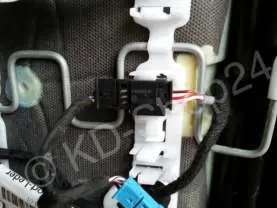
- Locate the yellow connector situated under the passenger seat.
- Disconnect the existing connector for the seat mat.
- Connect the emulator to the vehicle's harness using the same connector type.
Installation: Belt-Simulator
The belt-simulator (Gurt-Simulator) must be installed in addition to the seat occupancy emulator.
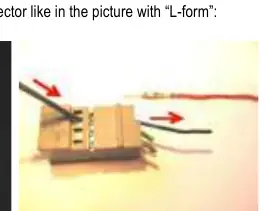
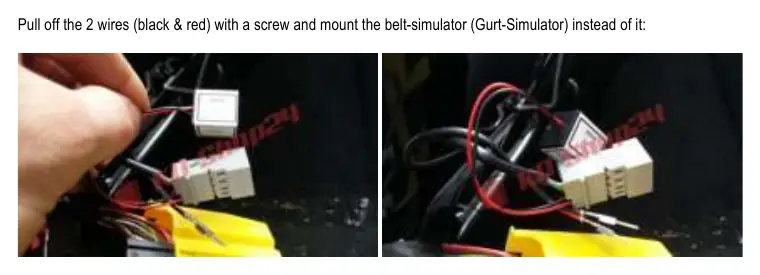
- Locate the yellow connector under the passenger seat and disconnect it.
- Pull off the three sub-connectors (two grey, one black).
- Identify the grey connector with an "L-form" shape.
- Remove the two wires (black and red) from this connector using a screw.
- Install the belt-simulator in place of the removed wires.
- Reconnect the big yellow connector.
Post-Installation Requirements
After the physical installation is complete, the vehicle's fault memory must be cleared. You must visit a garage to have the car connected to a diagnostic system. The airbag warning light will only turn off after the fault memory has been successfully deleted.
Manufacturer information
BMW
Practical help
Common problems
Airbag warning light remains on after installation
The vehicle's fault memory must be cleared using a professional diagnostic system at a garage.
Child seat safety
Do not use a child seat with this emulator installed, as the airbag will deploy regardless of seat occupancy.
Before use
- Disconnect the vehicle battery before starting work.
- Ensure access to the area under the passenger seat.
- Verify the vehicle model is compatible (BMW E87, E90, E91, E92, E93).
- Ensure you have access to a diagnostic tool or garage service to clear fault codes.
Specs in practice
- L-form connector
- A specific grey connector located under the passenger seat that requires modification to install the belt-simulator.
- Belt-Simulator (Gurt-Simulator)
- A device installed to bypass the seat belt sensor fault.
Images and diagrams
- The manual provides visual references for identifying the yellow connector under the seat.
- Visual guides show the specific grey 'L-form' connector and the red/black wires to be removed.
Model compatibility
- Compatible with BMW 1 Series (E87) from 2004 onwards.
- Compatible with BMW 3 Series (E90, E91, E92, E93) from 2004 onwards.

Manual page author
Emily Carter
User documentation editor
Prepares concise manual descriptions and highlights the most useful setup, operation, and maintenance information for readers.