Lighting / Work Lights
Bosch GLI 12V-300 Professional Cordless Worklight User Manual
Quick guide for the Bosch GLI 12V-300 Professional cordless worklight. Includes setup, battery operation, maintenance, and safety instructions.
Table of contents
Manual images
Click an image to enlargeQuick guide from the manual
The Bosch GLI 12V-300 Professional is a cordless worklight designed for mobile, temporary illumination in dry indoor and outdoor areas. It is not intended for general room lighting. Ensure the battery is fully charged before first use.
Safety instructions
Handle with care: The worklight generates intense heat, increasing the risk of fire and explosion. Do not use in potentially explosive areas.
Battery safety: Do not open the battery. Protect it from heat, continuous sunlight, fire, dirt, water, and moisture. If the battery is damaged or used incorrectly, vapours may be emitted; ensure the area is well-ventilated and seek medical attention if necessary.
Operation safety: Do not direct the light beam at persons or animals and do not stare into the light beam. Do not cover the lamp head during operation as it becomes hot and can cause burns.
Product features
The numbering refers to the product illustration:
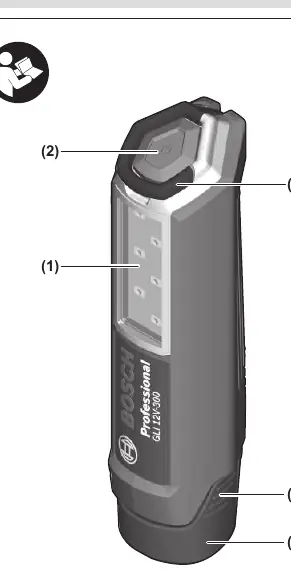
- (1) Lamp head
- (2) On/off switch
- (3) Utility hook
- (4) Rechargeable battery release button
- (5) Rechargeable battery
Technical data
The worklight operates at a rated voltage of 12V and provides a luminous flux of 300 lumens. The lighting duration is approximately 180 min/Ah.
Battery operation
Charging: Use only the chargers listed in the technical data. Lithium-ion batteries are supplied partially charged.
Inserting the battery: Push the charged battery into the battery holder until it clicks into place.
Removing the battery: Press the battery release buttons and pull the battery out. Do not use force.
Operation
Switching on and off: Press the on/off switch (2) to switch the worklight on. Press it again to switch it off.
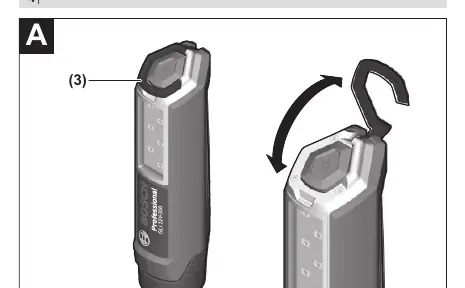
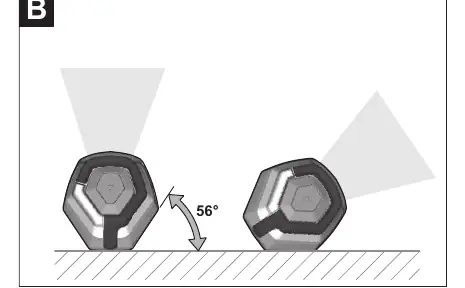
Orienting the light: The worklight can be used in an upright, hanging, or lying position. The hexagonal shape allows the light to be oriented to suit the application.
Maintenance and cleaning
The worklight is maintenance-free and contains no parts that need to be replaced or maintained. Clean the plastic lens only with a dry, soft cloth to prevent damage. Do not use detergents or solvents. The light source cannot be replaced; if it is defective, the entire worklight must be replaced.
Transport and disposal
The recommended lithium-ion batteries are subject to dangerous goods legislation. When shipping by third parties, special requirements on packaging and labelling must be observed. Dispose of worklights, batteries, accessories, and packaging in an environmentally friendly manner.
Manufacturer information
Bosch
Practical help
Common problems
Light does not turn on
Check if the battery is charged and properly inserted into the holder.
Significantly reduced operating time
The battery is likely worn out and needs to be replaced.
Before use
- Ensure the battery is fully charged.
- Check that the lamp head is clean.
- Verify the battery is securely clicked into place.
- Ensure the worklight is not covered during operation.
Specs in practice
- Luminous flux
- 300 lumens, indicating the brightness of the light output.
- Rated voltage
- 12V, the required voltage for the compatible battery pack.
Images and diagrams
- Figure A: Demonstrates how to use the utility hook to attach the worklight to an object.
- Figure B: Illustrates the 56-degree orientation capability of the hexagonal lamp body.
Model compatibility
- Compatible with GBA 12V batteries.
- Use only with recommended chargers (GAL 12..., GAX 18...).

Manual page author
David Miller
Documentation analyst
Organizes user manual content into clear summaries, with attention to model details, product context, and everyday usability.