Lighting / Work Lights
User Manual for Streamlight Super Siege Rechargeable Lantern
Quick guide for the Streamlight Super Siege rechargeable lantern. Learn how to operate light modes, change colors, use the built-in USB power bank, and understand battery indicators.
Table of contents
Manual images
Click an image to enlargeQuick Start Guide
The Streamlight Super Siege is a rechargeable scene light and work lantern. It features multiple lighting modes, a built-in USB power bank, and a rugged, waterproof design. Ensure the unit is fully charged before first use.
Operating Instructions
The lantern is controlled by a single recessed power button designed to prevent accidental activation.
- Changing Light Color: Press and hold the on/off button for two seconds to toggle between white and red light modes. Release the button once the color changes.
- Switching Output Modes: Push the button within 1.5 seconds of the last button press to cycle through the available light levels and eventually turn the light off.
Battery and Charging
The device is powered by an 8800 mAh Lithium Ion battery. The power button features a built-in battery level indicator to help you monitor charge status:
- Green: Sufficient charge.
- Yellow: Moderate charge.
- Red: Low charge.
- Flashing Red: Needs immediate recharging.
The lantern also functions as a portable USB charger for other devices, such as smartphones, tablets, and other Streamlight USB-rechargeable products.
Features and Usage
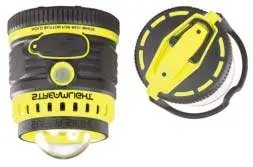
- Glare Guard: Use the Glare Guard attachment to focus light for specific tasks.
- Storage: The base of the lantern includes a watertight storage compartment.
- Hanging: The bottom of the lantern features a spring-loaded D-ring for hanging. The handle is ergonomic and can be locked in an upright or stowed position.
- Durability: The unit is IPX7 waterproof (submersible to 1m), floats, and is impact-resistant up to 2 meters.
Technical Specifications
- White C4 LED: High (1,100 lumens, 5 hrs), Medium (550 lumens, 10.5 hrs), Low (125 lumens, 35 hrs).
- Red LED: High (2.7 lumens, 110 hrs), Low (1 lumen, 228 hrs), Flash SOS (2.7 lumens, 230 hrs).
- Construction: Tough polycarbonate thermoplastic with elastomer over mold.
Practical help
Common problems
Light color will not change
Press and hold the power button for a full two seconds until the color switches.
Cannot cycle through light modes
Ensure you are pressing the button within 1.5 seconds of the previous press.
Battery indicator is flashing red
The battery is low and requires immediate recharging.
Before use
- Charge the battery fully before the first use.
- Ensure the charging port cover is securely closed to maintain waterproof integrity.
- Check that the D-ring and handle are in the desired position for your task.
Specs in practice
- White C4 LED High
- Provides 1,100 lumens of brightness for up to 5 hours.
- Red LED High
- Provides 2.7 lumens for 110 hours, designed to preserve night vision.
- IPX7 Waterproof
- The lantern can be submerged in water up to 1 meter deep.
Images and diagrams
- The base of the lantern contains a watertight storage compartment.
- The D-ring on the bottom is spring-loaded to stow away when not in use.
- The Glare Guard attachment is used to direct light for task-specific illumination.
Model compatibility
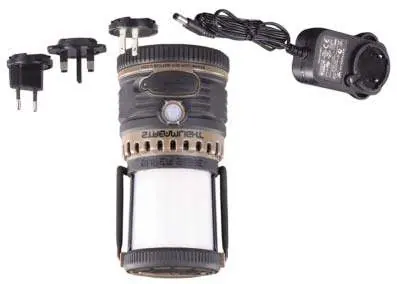
- Compatible with 120V AC, International AC, and 12V DC charging cords.
- USB port can charge most smartphones, tablets, and Streamlight USB products.

Manual page author
Emily Carter
User documentation editor
Prepares concise manual descriptions and highlights the most useful setup, operation, and maintenance information for readers.