Industrial / Electrical
User Manual for Southwire WobbleLight 111301LED & 111303LED
Quick guide for the Southwire WobbleLight 111301LED and 111303LED work lights. Includes installation steps, safety precautions, electrical requirements, and warranty information.
Table of contents
Quick Guide
The Southwire WobbleLight is a professional work light. Before use, ensure the unit is assembled correctly and connected to a 120V, 60Hz power source protected by a GFCI and over-current protection. Always operate the unit in an upright position. Note that metal halide and halogen bulbs become extremely hot during operation and remain hot for a period after being turned off.
Installation Instructions
- Remove and verify the contents of your WobbleLight carton.
- Install the bulb into the socket by screwing the lamp firmly.
- Tighten the bulb until it is secure in the socket. Do not over-tighten.
- Reinstall the WobbleLight dome/cap assembly by aligning the five mounting holes with the five mounting nuts. Secure the dome with the five mounting screws.
Safety Precautions
- Do not connect the WobbleLight to a power source until the bulb is installed and the unit is completely assembled.
- Do not attempt to remove the protective lens to change bulbs unless the unit is disconnected from the power source and the bulb has completely cooled.
- Do not use in wet locations or where there is potential for exposure to excessive moisture (rain, snow, ice, water spray, or standing water).
- Do not leave the unit operating unattended for extended periods.
- Keep away from flammable materials.
- Do not exceed the labeled amperage for the WobbleLight accessory outlet.
Warranty and Claims
The product includes a one-year limited warranty for the original purchaser. The warranty covers manufacturer defects in material, assembly, and workmanship under normal use. It does not cover damage from accidents, misuse, abuse, transit, or normal wear and tear (such as surface scratches or corrosion). To begin a claim, contact the Customer Service Department at 855-SWTOOLS (855-798-6657). You will need to provide the part/model number, date of purchase, and retailer information.
Compliance
This equipment complies with FCC Class B digital device limits and Canadian ICES-5B/NMB-5B standards. If interference with radio or television reception occurs, try reorienting the antenna, increasing separation between equipment, or connecting to a different circuit.
Practical help
Common problems
Bulb is extremely hot
This is normal for metal halide and halogen bulbs. Allow the unit to cool completely before attempting to change the bulb or touch the lens.
Radio or TV interference
Reorient or relocate the receiving antenna, increase separation between the equipment and receiver, or connect the unit to a different circuit.
Warranty void
Warranty is void if the unit is connected to a power source without GFCI and over-current protection, or if the unit is modified/tampered with.
Before use
- Verify all contents are present in the carton.
- Ensure the power source is 120V, 60Hz.
- Confirm the circuit has GFCI and over-current protection.
- Ensure the bulb is installed and the dome is secured with all five screws.
- Verify the unit is placed in an upright position.
Images and diagrams
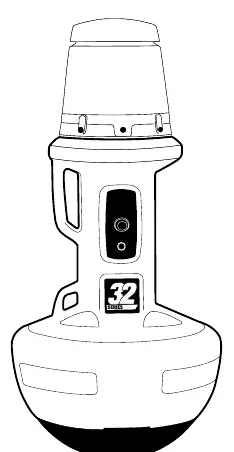
- The unit features a base, a central handle/body, and a top dome/cap assembly.
- The dome is secured to the body using five mounting screws aligned with five mounting nuts.
Model compatibility
- Must be operated in the upright position only.
- Not for use in wet locations or areas with excessive moisture.

Manual page author
Emily Carter
User documentation editor
Prepares concise manual descriptions and highlights the most useful setup, operation, and maintenance information for readers.