Tools / Measuring Tools
Bosch EasyLevel Line Laser User Manual
Quick guide for the Bosch EasyLevel line laser. Includes setup, battery installation, operating instructions, alignment, and maintenance tips.
Table of contents
Manual images
Click an image to enlargeQuick guide from the manual
The Bosch EasyLevel is a consumer laser tool designed for determining and checking horizontal and vertical lines. It is suitable for indoor use. This guide provides essential information for setup and operation.
Safety Instructions
Warning: Read all instructions to ensure safe operation. The integrated safeguards may be compromised if the tool is not used according to these instructions. Never make warning signs on the tool unrecognisable.
- Do not direct the laser beam at persons or animals.
- Do not stare into the direct or reflected laser beam.
- Keep the magnet away from implants and other medical devices (e.g., pacemakers, insulin pumps).
- Keep the tool away from magnetic storage media and magnetically-sensitive devices.
Product Features
The numbering refers to the illustrations in the manual:
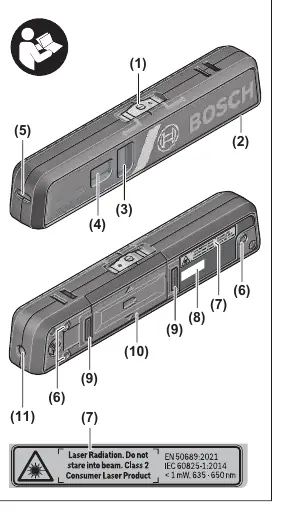
- (1) On/off switch with operating mode selector
- (2) Supporting surface (aluminium)
- (3) Level for vertical alignment
- (4) Level for horizontal alignment
- (5) Laser outlet aperture for line operation
- (9) Magnet
- (14) Holder
Assembly
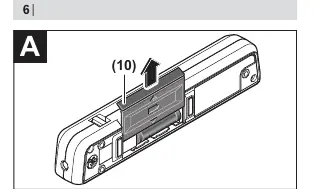
Inserting/Replacing Batteries: Use alkaline manganese batteries. Open the battery compartment cover (10) by pushing it away from the compartment. Insert batteries, ensuring correct polarity as shown inside the compartment. Always replace all batteries at the same time.
Operation
Switching On/Off: Push the on/off switch (1) to the '—' position for line operation or the '●' position for point operation. To switch off, push the switch to the centre position.
Measuring Functions
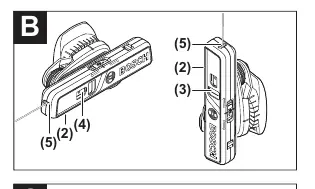
The levelling accuracy applies to the alignment of the laser beam with reference to the spirit levels (3) and (4). For precise alignment, the tool must be positioned correctly:
- Horizontal alignment: The aluminium supporting surface (2) must face downward.
- Vertical alignment: The laser outlet aperture (5) must face upward and the aluminium supporting surface (2) must face to the side.
Alignment
- Horizontal alignment: Align the tool using the spirit level (4).
- Vertical alignment: Align the tool using the spirit level (3).
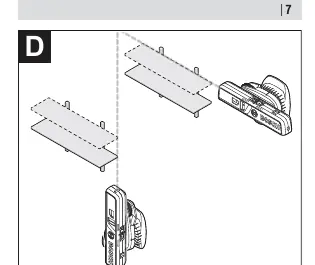
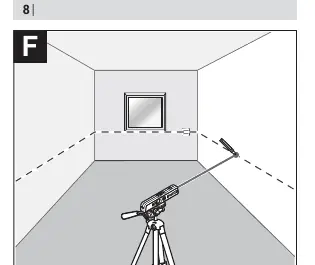
- Reference points: Turn the tool to any required angle to align the laser line with reference points.
- Height transfer (Point operation): Use the laser point to align items like sockets or hooks at the same height. Rotate the upper section of the holder (14) to adjust, not the tool itself.
Maintenance and Cleaning
Keep the tool clean at all times. Do not immerse in water or other liquids. Wipe off dirt with a damp, soft cloth. Do not use detergents or solvents. Clean the areas around the laser outlet aperture regularly, checking for lint.
Manufacturer information
Bosch
Practical help
Common problems
Laser line not horizontal on transverse wall
Horizontal alignment using the laser line is only possible on the surface against which the measuring tool was placed.
Spirit level not central after turning holder
Realign the holder using the adjusting screw until the spirit level is central again.
Before use
- Check batteries are installed correctly
- Ensure the tool is clean
- Check for damage from drops or knocks
- Ensure the surface is suitable for magnetic attachment or screw mounting
Specs in practice
- Working range (line)
- 5 m
- Working range (point)
- 20 m
- Levelling accuracy
- ±0.5 mm/m
Images and diagrams
- (1) On/off switch
- (2) Supporting surface
- (3) Vertical level
- (4) Horizontal level
Model compatibility
- Suitable for indoor use
- Consumer laser product (EN 50689)

Manual page author
Michael Turner
Technical manual editor
Reviews PDF manuals for structure, safety notes, and practical product details so readers can find the right information quickly.