Tools / Measuring Tools
User Manual for Bosch D-tect 200 C Wallscanner
Quick start guide for the Bosch D-tect 200 C Wallscanner. Learn how to operate the device, interpret screen icons, scan for objects, and mark findings on the wall.
Table of contents
Manual images
Click an image to enlargeQuick Guide
The Bosch D-tect 200 C is a professional wallscanner designed to detect objects behind walls. This guide provides essential steps for setup and operation based on the visual instructions provided.
Device Overview
The device features a high-resolution display, navigation buttons, and physical ports for data management.
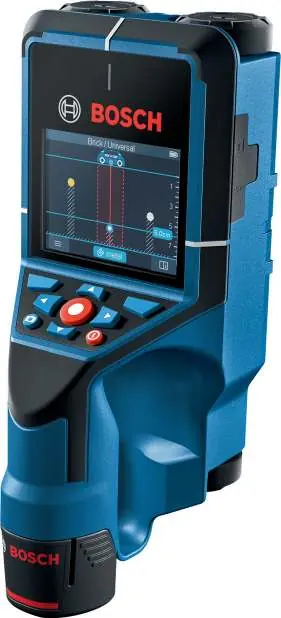
- Display: Shows real-time scanning data, object depth, and material classification.
- Navigation: Use the directional pad and center button to navigate menus and select modes.
- Ports: Includes an SD card slot for data storage and a USB port for connectivity.
Getting Started
Before using the device, ensure it is powered correctly:
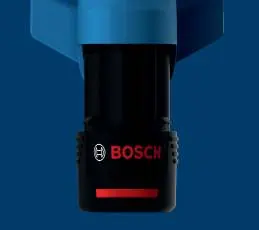
- Battery Installation: Insert the battery pack into the handle base as indicated by the arrow. Ensure it is securely locked.
- Power On: Use the power button to activate the device.
Operation and Scanning
To perform a scan, move the device slowly and steadily across the surface of the wall.
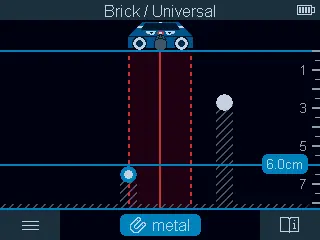
- Selecting Modes: Use the menu to select the appropriate material mode (e.g., metal, non-metal, live wire) to optimize detection accuracy.
- Interpreting the Screen: The display provides visual feedback on detected objects. The graph shows the depth and type of object detected.
- Live Wire Detection: The device is capable of identifying live electrical wires. Always exercise caution when drilling near these areas.
Marking Objects
Once an object is detected:
- Stop the device over the detected object.
- Use the marking hole or the edge of the device to accurately mark the location on the wall surface.
- Verify the position by scanning from different directions if necessary.
Maintenance
Keep the sensor area clean and free of debris. Ensure the battery is charged regularly for optimal performance. Store the device in a dry, safe environment when not in use.
Manufacturer information
Bosch
Practical help
Common problems
No classification icon
The device cannot identify the material type. Proceed with caution when drilling.
Unclear detection results
Ensure the device is moved slowly and is in full contact with the wall surface.
Before use
- Ensure the battery is fully charged and correctly inserted.
- Check that the sensor area is clean.
- Select the correct material mode for the wall type (e.g., brick, universal).
- Ensure the device is calibrated according to the on-screen prompts.
Specs in practice
- Metal detection
- Identifies ferrous and non-ferrous metals.
- Non-metal detection
- Identifies objects like plastic pipes or wooden studs.
- Live wire detection
- Detects electrical cables carrying current.
Images and diagrams
- The screen displays a graph indicating the depth and signal strength of detected objects.
- Icons on the side of the screen indicate the current detection mode (metal, non-metal, live wire).
Model compatibility
- Designed for professional use on various wall types including brick and universal surfaces.

Manual page author
Michael Turner
Technical manual editor
Reviews PDF manuals for structure, safety notes, and practical product details so readers can find the right information quickly.