Electronics / Speakers & Soundbars
User Manual for JBL Wireless Microphone 109WRLSMIC
Quick start guide and user manual for the JBL Wireless Microphone 109WRLSMIC. Learn how to set up, charge, and operate your wireless microphone system.
Table of contents
Manual images
Click an image to enlargeQuick guide from the manual
This guide provides essential information for setting up and using your JBL Wireless Microphone system. Ensure you read the safety sheet before use. The system consists of two microphones and a rechargeable receiver.
What's in the box
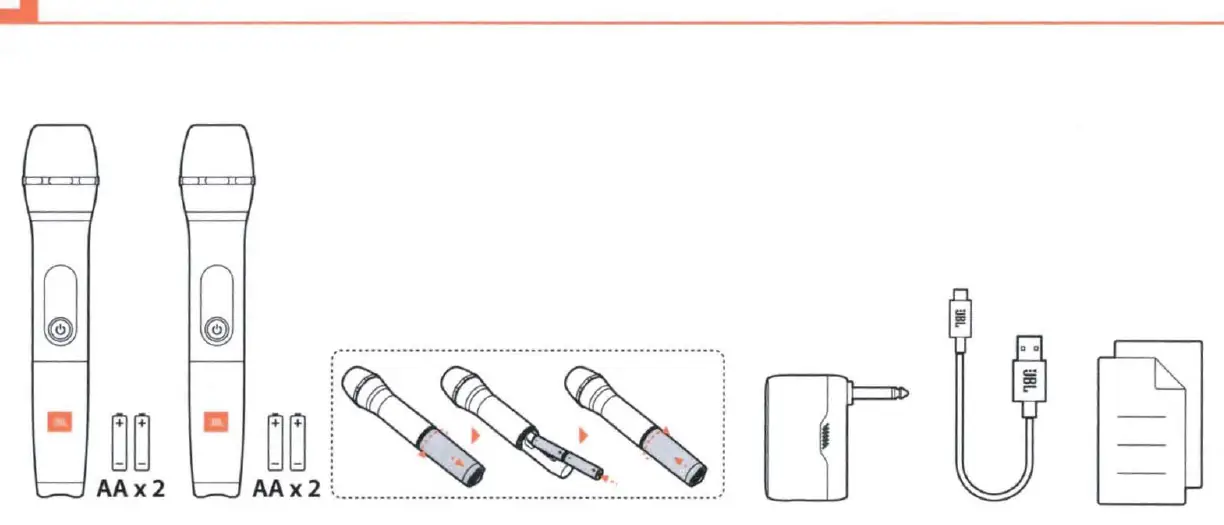
- 2 x Wireless Microphones
- 1 x Receiver
- 4 x AA Batteries (for microphones)
- 1 x USB Charging Cable
Setup and Installation
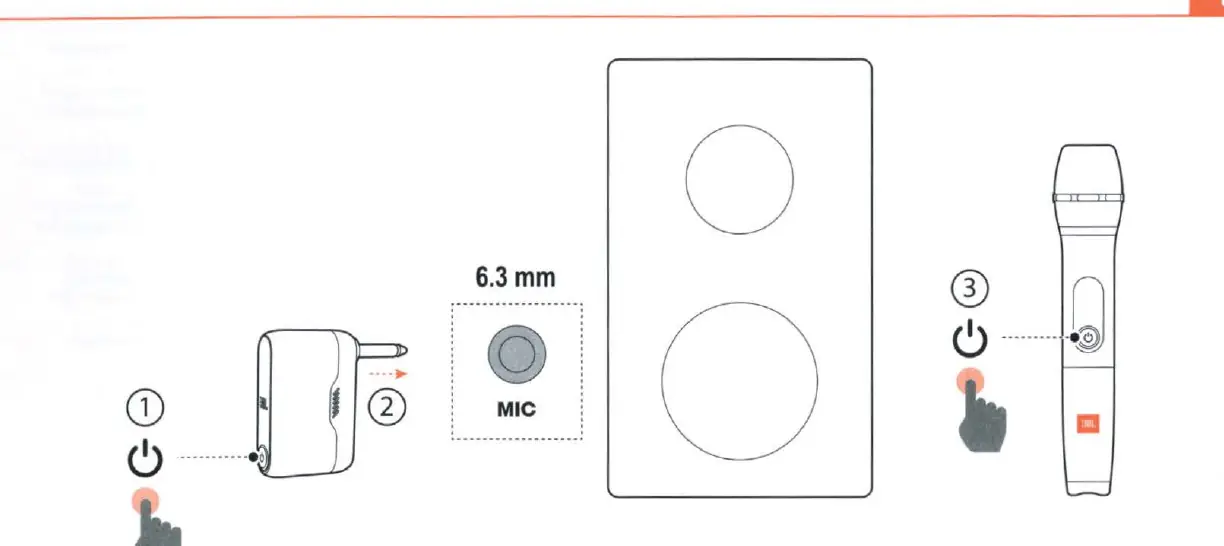
- Prepare Microphones: Insert 2 AA batteries into each microphone.
- Connect Receiver: Plug the receiver into the 6.3mm microphone input on your speaker or audio system.
- Power On: Turn on the receiver first, then turn on the microphones.
Charging the Receiver
The receiver features a built-in rechargeable battery. Use the provided USB cable to charge the device. To protect battery lifespan, fully charge the receiver at least once every 3 months. Note that battery life varies based on usage patterns and environmental conditions.
Important Usage Note
The speaker may experience noise interference if you sing while the receiver is charging. For the best audio quality, avoid using the microphone while the receiver is connected to a power source.
Specifications
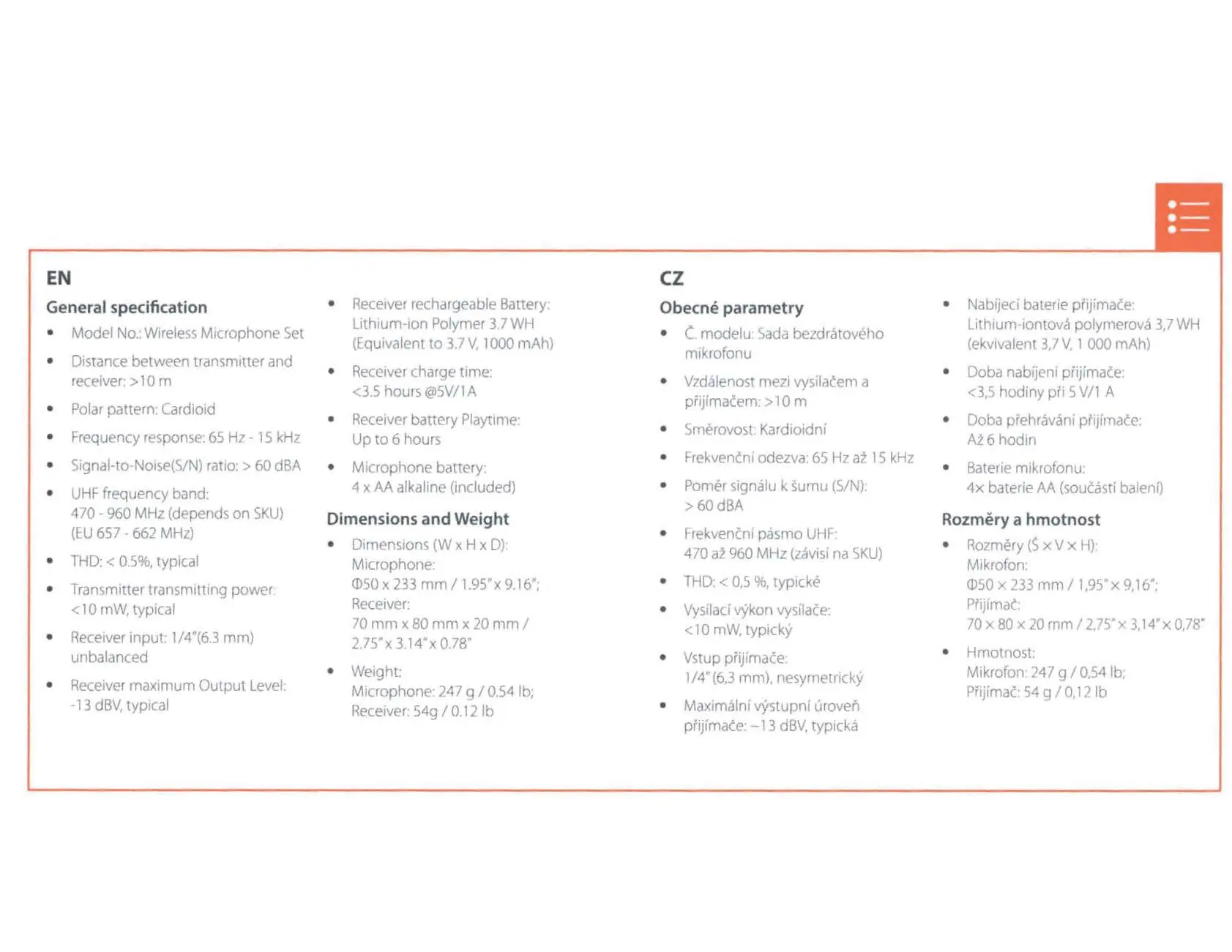
- Frequency Response: 65 Hz - 15 kHz
- Operating Range: > 10 meters
- Receiver Battery Life: Up to 6 hours
- Receiver Charge Time: Less than 3.5 hours at 5V/1A
- Microphone Power: 4 x AA alkaline batteries
- Polar Pattern: Cardioid
Safety and Maintenance
Do not expose the apparatus to rain or moisture. Do not use the headphones or microphones at high volume for extended periods to prevent hearing damage. If the receiver battery needs service, contact an authorized service center. Dispose of batteries according to local regulations.
Manufacturer information
JBL
Practical help
Common problems
Noise interference while singing
Do not charge the receiver while using the microphone. Disconnect the charging cable during performance.
Battery life degradation
Fully charge the receiver at least once every 3 months to maintain battery health.
Before use
- Insert 2 AA batteries into each microphone.
- Ensure the receiver is fully charged using the USB cable.
- Verify the audio device has a 6.3mm microphone input.
- Power on the receiver before turning on the microphones.
Specs in practice
- Frequency response
- 65 Hz - 15 kHz, indicating the range of audio frequencies the microphone can capture.
- Operating range
- Greater than 10 meters between the transmitter (microphone) and receiver.
- Receiver battery life
- Up to 6 hours of continuous playtime on a full charge.
Images and diagrams
- Page 3 illustrates the battery installation process for the microphones.
- Page 4 shows the connection sequence: Power on receiver, plug into 6.3mm input, power on microphone.
- Page 5 demonstrates the correct USB charging setup for the receiver.
Model compatibility
- Receiver input is 1/4 inch (6.3 mm) unbalanced.
- UHF frequency band depends on SKU (470 - 960 MHz).

Manual page author
David Miller
Documentation analyst
Organizes user manual content into clear summaries, with attention to model details, product context, and everyday usability.