Tools / Generators
User Manual for BougeRV 1100WH Portable Power Station
Quick guide for the BougeRV 1100WH Portable Power Station (SYZ-G1000). Includes operating instructions, charging methods, error code troubleshooting, and safety guidelines.
Table of contents
Manual images
Jump to the sectionQuick Guide
The BougeRV 1100WH Portable Power Station (SYZ-G1000) is designed to provide portable power for various devices. Before first use, ensure the unit is fully charged. The device supports AC, car, and solar charging. Always use BougeRV-approved charging cables to prevent damage. If the unit is not used for a long time, discharge to 30% and recharge to 85% every 6 months to maintain battery health.
Product Description
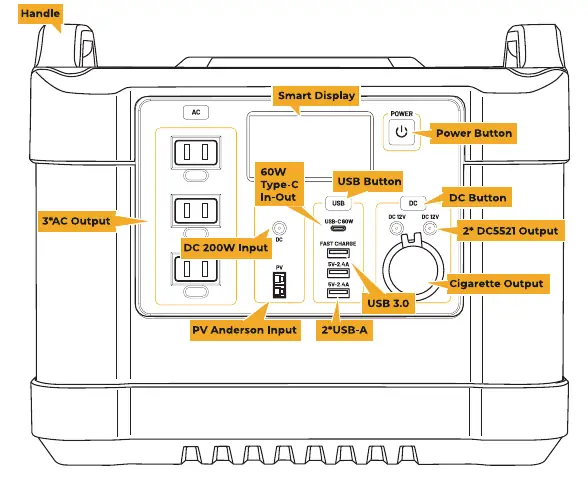
The front panel features the Smart Display, Power Button, AC output ports, USB ports (USB-C 60W, USB-A, Fast Charge), and DC output ports (DC5521, Cigarette port). Input ports include DC5521, PV Solar, and USB-C.
Operating Instructions
Power Control: Press the Power Button for 2 seconds to turn off all output. Press for 10 seconds to reset the unit if an error code persists.
AC/DC/USB Control: Press the AC button for 2 seconds to turn the inverter on/off. Press the USB/DC button for 1 second to turn the modules on/off. The unit features an auto-off function if output power is low for a set duration (3 hours for AC, 1 hour for USB/DC).
Frequency Change: Turn on the AC port, then press the USB and DC buttons simultaneously for 2 seconds. When the frequency flashes, press the DC button to switch between 50Hz and 60Hz. Press USB and DC buttons simultaneously again to confirm.
Smart Display
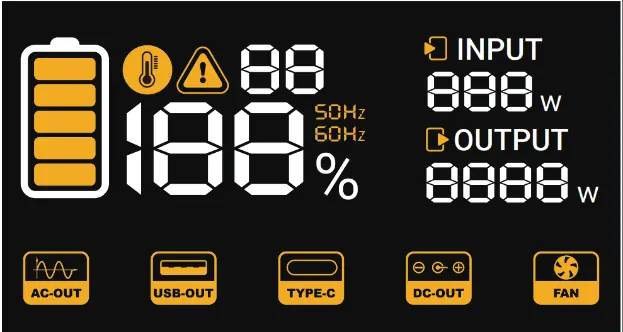
The display provides real-time status, including battery level, input/output wattage, and active ports (AC, USB, Type-C, DC, Fan). Icons indicate faults, high temperature, and frequency settings.
Charging Methods
- PV Solar Charging: Connect solar panels to the PV input. 200W input provides a full charge in approximately 5.5 hours.
- AC Charging: Use the provided AC adapter. 200W input provides a full charge in approximately 5.5 hours.
- Car Charging: Use the car charging cable. 120W input provides a full charge in approximately 9 hours.
- Faster Charging: Combine AC or PV input with USB-C input to shorten charging time.
Troubleshooting
If an error occurs, the display will show an error code. Common issues include:
- Short Circuit Protection (01-04): Unplug the device, then press the corresponding button (USB, DC, or AC) for 2 seconds to reset.
- Overload Protection (05): Rated power of appliances exceeds 1200W. Unplug the device and reset the AC button.
- Temperature Protection (06-10): If the unit is too hot or cold, allow it to return to the operating temperature range (32°F to 105°F).
- Voltage Issues (11-13): Check input voltage or charge the battery if capacity is below 10%.
Safety & Maintenance
- Do not immerse in water or expose to rain.
- Do not use in environments above 140°F (60°C) or below 32°F (0°C).
- Keep away from flammable materials during charging.
- Do not charge immediately after a heavy load; allow the unit to cool down.
- Do not bring this product on flights.
Specifications
- Capacity: 1100WH / 50AH
- AC Output: 1200W total (Pure Sine Wave)
- Weight: 13.5kg / 30Lbs
- Cycle Life: 1500+ cycles to 80% capacity
Manufacturer information
BougeRV
Practical help
Common problems
AC Inverter Overload (Error 05)
The connected appliances exceed 1200W. Unplug the devices and press the AC button for 2 seconds to reset.
Short Circuit Protection (Errors 01-04)
Unplug the device from the port, then press the corresponding button (USB, DC, or AC) for 2 seconds to clear the error.
High/Low Temperature Protection
Allow the unit to cool down or warm up to the operating temperature range (32°F to 105°F) before attempting to use or charge.
Battery Low-voltage (Error 13)
Charge the battery immediately. Avoid using low-power DC appliances for long periods when capacity is low.
Before use
- Verify all accessories are present (Power station, car charging cable, AC charger, solar charging cable).
- Ensure the ambient temperature is between 32°F and 105°F.
- Charge the unit fully before the first use.
- Ensure you are using only BougeRV-approved charging cables.
- Check that the storage environment is dry and away from direct sunlight.
Specs in practice
- 1200W AC Output
- Maximum combined power draw allowed for all AC devices connected.
Images and diagrams
- The front panel contains the main power button, AC outlets, USB-C/USB-A ports, and DC output ports.
- The Smart Display shows battery percentage, input/output power, and active port indicators.
- Input ports are located on the front panel for AC, PV Solar, and USB-C charging.
Model compatibility
- Supports pass-through charging, though it may decrease battery life.
- Not permitted for air travel.
- Compatible with solar panels (12-30V, 8A, 200W Max).

Manual page author
Michael Turner
Technical manual editor
Reviews PDF manuals for structure, safety notes, and practical product details so readers can find the right information quickly.