Electronics / Audio
User Manual for Digitech 10,000mAh Dual USB Portable Power Bank
Quick guide for the Digitech 10,000mAh Dual USB Portable Power Bank. Learn how to charge, check battery levels, and safely use your device.
Table of contents
Manual images
Jump to the sectionQuick guide from the manual
The Digitech 10,000mAh Power Bank is designed to charge mobile devices on the go. To check the remaining battery level, press the ON/OFF button; the LED indicators will light up, with each light representing 25% of the total capacity. Use the 2.4A output port for power-hungry devices and the 1A port for standard devices. Always use the provided Micro USB cable or a compatible cable to charge the power bank itself.
Safety Instructions
- Do not charge and discharge the power bank at the same time.
- Keep the device away from rain, moisture, and extreme temperatures.
- Do not disassemble the power bank, as this may result in a risk of fire or electric shock.
- Disconnect the device from the power bank when not in use.
- Do not use unauthorized extensions or attachments.
- If the unit has been subjected to shock or damage, do not operate it.
- This device contains a Lithium-ion polymer battery; dispose of it according to local council regulations.
Product Overview
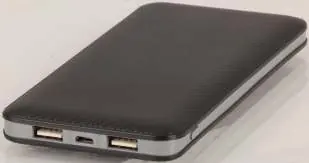
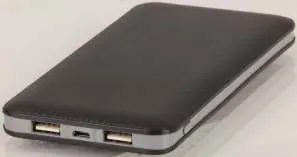
The power bank features an LED indicator, two USB output ports (Output 1 and Output 2), a Micro USB input port, and a power button. The LED indicator provides a visual representation of the remaining charge:
- 4 lights: 100%
- 3 lights: 75%
- 2 lights: 50%
- 1 light: 25%
Operating Instructions
Power On and Off
Press the ON/OFF button to power on the unit and check the battery level. The power bank will automatically enter low power standby mode if it is not used for 30 seconds.
Recharging the Power Bank
Connect a Micro USB cable to the input port on the power bank and a power source. The LED indicator will light up to signal that the device is charging.
Charging Other Devices
Connect your device to either Output 1 or Output 2 using a USB cable. Use the 2.4A output for devices that require more power (such as tablets) and the 1A output for standard devices.
Long Term Storage
The battery will automatically discharge over time when not in use. To maintain battery health, please charge the power bank at least once every 3 months. Store the device away from dust and humidity.
Specifications
- Battery Type: Lithium Polymer
- Capacity: 10,000mAh
- Input: 5V, 1.5A (USB 2.0 Micro B)
- Output 1: 5V, 1A (USB 2.0 Type A)
- Output 2: 5V, 2.4A (USB 2.0 Type A)
- Dimensions: 149(L) x 74(W) x 15(D) mm
- Weight: 236g
Practical help
Common problems
Power bank does not charge devices
Ensure the device is connected to the correct output port and the cable is functional. Try using the original cable provided with your device.
Power bank is not charging
Ensure the Micro USB cable is securely connected to the input port and the power source.
Device charging is slow
If using a tablet or power-hungry device, ensure it is connected to the 2.4A output port rather than the 1A port.
Before use
- Charge the power bank fully before first use.
- Verify the battery level by pressing the power button.
- Ensure you have the correct USB cable for your mobile device.
- Check that the power bank is stored in a dry, dust-free environment.
Specs in practice
- Output 2 (2.4A)
- High-speed charging, suitable for tablets and power-hungry devices.
- Input (5V 1.5A)
- The power requirement to recharge the power bank itself.
Images and diagrams
- LED Indicator: Displays remaining battery capacity in 25% increments.
- Output Ports: Two USB-A ports for charging external devices.
- Input Port: Micro USB port for recharging the power bank.
- Power Button: Activates the LED indicator and initiates power output.
Model compatibility
- Compatible with iPad, iPhone, iPod, Samsung, HTC, Android phones, tablets, and Kindle e-readers.

Manual page author
David Miller
Documentation analyst
Organizes user manual content into clear summaries, with attention to model details, product context, and everyday usability.