Automotive / Portable Coolers
User Manual for Brass Monkey 15L Portable Fridge / Freezer GH2068
Quick guide for the Brass Monkey 15L Portable Fridge / Freezer GH2068. Learn how to operate, power, maintain, and troubleshoot your portable fridge, including battery usage and app control.
Table of contents
Manual images
Click an image to enlargeQuick guide from the manual
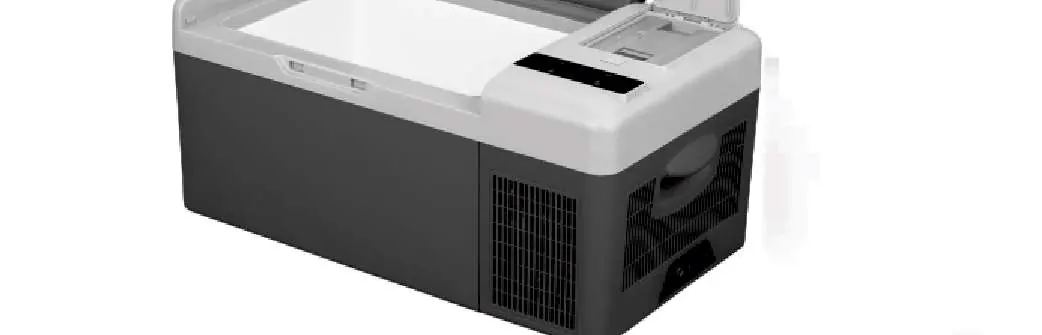
This document provides essential operating instructions for the Brass Monkey 15L Portable Fridge / Freezer (GH2068). The device is designed for cooling and freezing, with support for 12/24V DC power, optional AC power, and solar charging. It features Bluetooth app control and an optional removable battery.
Safety Instructions
- Ensure the fridge is placed on a flat surface for at least 6 hours before powering on for the first time.
- Maintain a minimum clearance of 200mm at the back and 100mm around the sides for proper ventilation.
- Do not use electrical devices inside the fridge.
- Do not soak the device in water or wash it directly.
- Keep the product away from wet or humid places.
- If using in a boat, DC power installation must be performed by a qualified electrician.
- Do not insert metal objects into air vents or gaps.
Power Supply and Charging
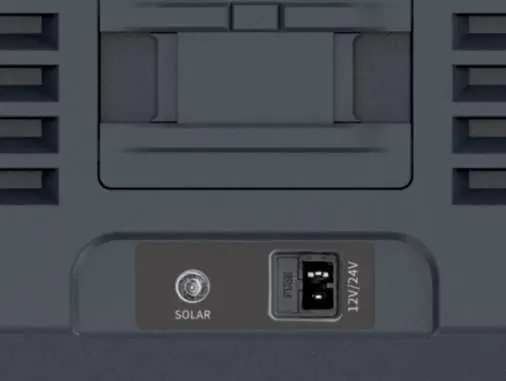
The fridge can be powered via 12/24V DC (car cigarette lighter) or 100-240V AC using an optional adapter. It also supports solar charging (12V-50V input). Do not charge the fridge with DC 12V and a solar panel simultaneously to avoid damage.
Operation
Power On/Off: Press the power button to switch the unit on or off.
Temperature Setting: Press the + or - buttons to adjust the temperature. The setting is saved automatically after 4 seconds. The range is -20°C to +20°C.
Cooling Modes: Press the settings button (gear icon) to switch between MAX (fast cooling) and ECO (energy saving) modes. Factory default is MAX.
Battery Protection: Long press the settings button for 3 seconds until the screen flashes, then press again to select protection mode: H (High), M (Middle), or L (Low). Factory default is H.
Temperature Unit: Switch off the fridge, long press the settings button for 3 seconds until E1 displays, keep pressing until E5 displays, then use + or - to select Celsius or Fahrenheit.
Battery Management
The optional removable battery allows for off-grid use. It can be charged via DC, AC, or solar. When not in use for a long time, turn off the battery output by holding the settings button for 3 seconds. Ensure the battery is fully charged before storage.
Smart Control App
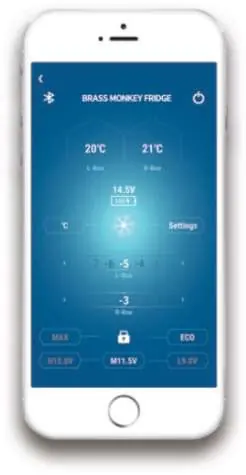
Download the "BRASS MONKEY FRIDGE" application from the Apple App Store or Google Play Store. Use the app to pair with the fridge via Bluetooth to control temperature, modes, and monitor battery status.
Cleaning and Maintenance
- Unplug the device before cleaning.
- Use a wet cloth to clean the device and dry it thoroughly.
- Do not use abrasive cleaning agents.
- For storage, turn off the power, remove the plug, empty the contents, and leave the door slightly open to prevent odors.
- Defrost the device if ice builds up on the evaporator; do not use hard or sharp tools to remove ice.
Manufacturer information
Brass Monkey
Practical help
Common problems
Code F1 displayed
Low voltage protection. Set the battery protection mode from H to M or M to L.
Code F2 displayed
Fan overload protection. Turn off the product, wait 30 minutes, and restart.
Code F3 displayed
Compressor frequent start protection. Turn off the product, wait 30 minutes, and restart.
Code F4 displayed
Compressor overload. Turn off the product, wait 30 minutes, and restart.
Code F5 displayed
High temperature compressor module protection. Move the product to a ventilated area, wait 30 minutes, and restart.
Before use
- Unpack the unit and place it on a flat surface for at least 6 hours before first use.
- Ensure at least 200mm clearance at the back and 100mm at the sides.
- Verify the power source is 12/24V DC or use the optional AC adapter.
- If using in a boat, ensure DC power installation is done by a qualified electrician.
- Check that the power switch on the control panel is turned on.
Specs in practice
- Temperature Range
- -20°C to +20°C
- Power Consumption
- 0.2kWh / 24hrs
- Input Voltage
- 12/24V DC (or 100-240V AC with optional adapter)
- Max Solar Input
- 50V / 10A
Images and diagrams
- Control Panel: Features power button, temperature adjustment (+/-), and settings button (gear icon).
- Solar Interface: Located on the side, used for connecting solar panels.
- Battery Level Indicator: Shows charge status on the optional battery pack.
Model compatibility
- Requires optional AC adapter for mains power.
- Optional removable battery available in 5.2Ah, 7.8Ah, or 15.6Ah capacities.
- Bluetooth app control requires a smartphone with the 'BRASS MONKEY FRIDGE' app.

Manual page author
Michael Turner
Technical manual editor
Reviews PDF manuals for structure, safety notes, and practical product details so readers can find the right information quickly.