Power / Solar Systems
User Manual for BougeRV CR PRO Series Portable Car Refrigerator
Quick guide for the BougeRV CR PRO series portable car refrigerator. Learn how to operate, set temperatures, configure battery protection, and troubleshoot error codes.
Table of contents
Manual images
Click an image to enlargeQuick Guide
Before using your BougeRV CR PRO refrigerator, ensure it has been placed on a level surface for at least 24 hours after unpacking. Clean the interior and exterior with a damp cloth before first use. The unit is compatible with 12/24V DC power (cars, trucks, power stations) and 110-240V AC power (home outlets).
Product Overview
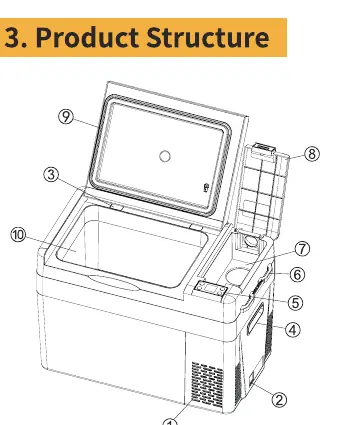
The BougeRV CR PRO series is designed for various vehicles and home use. It features a compressor-based cooling system with a temperature range of -22°C to 10°C (-8°F to 50°F). Key components include a ventilation port, 12/24V power outlet, damping door, control panel, and storage compartment.
Operation
Power On/Off: Press the power button once to turn on from standby. Press and hold for 3 seconds to turn off.
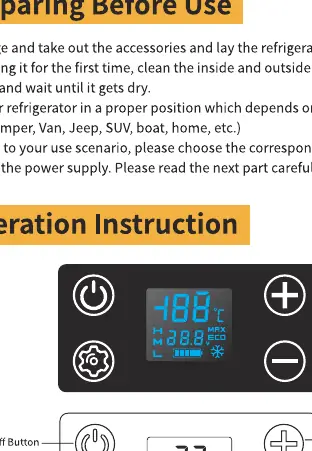
Temperature Setting: Press the + or - buttons to adjust the temperature. The setting saves automatically after 4 seconds. Press and hold the setting button and + button simultaneously for 3-5 seconds to switch between Celsius and Fahrenheit.
Modes: Press the setting button to switch between MAX (Fast Cooling, 45W) and ECO (Energy Saving, 36W) modes.
Battery Protection
The refrigerator includes a battery monitor to prevent deep discharge of your vehicle battery. Long press the setting button until 'H' flashes, then press the setting button again to cycle through High (H), Medium (M), and Low (L) levels. It is recommended to use 'High' when connected to a car battery.
Cleaning and Storage
Always unplug the device before cleaning. Use a damp cloth; do not soak the unit in water or use abrasive cleaners. For long-term storage, turn off the unit, remove all items, wipe dry, and leave the lid slightly open to prevent odors.
Troubleshooting
If the unit does not work, check the power connection, fuse, and power switch. If cooling is insufficient, check the door seal, ventilation, and temperature settings. For specific error codes on the display:
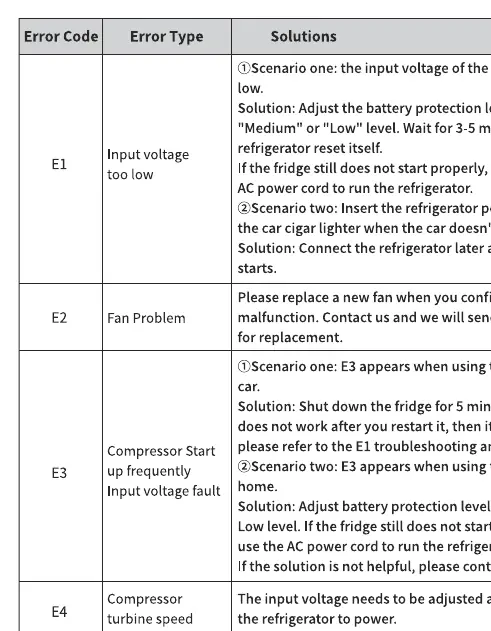
- E1: Input voltage too low. Adjust battery protection to Medium/Low or use AC power.
- E2: Fan malfunction. Contact customer service for a replacement fan.
- E3: Compressor start-up frequency/input voltage fault. Shut down for 5 minutes; if it persists, adjust battery protection settings.
- E4: Compressor turbine speed too low. Adjust input voltage.
- E5: Controller chip overheating. Shut down for 5 minutes and check for vent blockages.
- E6: NTC cable disconnection or short circuit. Contact customer service.
Specifications
The CR PRO series supports 12/24V DC and 110-240V AC. Power consumption is 36W in ECO mode and 45W in MAX mode. Noise level is ≤45dB. Climate class is T/ST/N/SN.
Manufacturer information
BougeRV
Practical help
Common problems
Fridge does not work
Check if the power is connected correctly, the power switch is on, and the fuse is not blown.
Not cooling sufficiently
Ensure the door is closed, the seal is intact, there is proper ventilation, and temperature settings are correct.
E1 Error Code
Input voltage is too low. Adjust battery protection to Medium or Low, or switch to AC power.
Abnormal noise
Ensure the refrigerator is placed on a stable surface and check for loose internal parts.
Before use
- Unpack and let the unit sit flat for 24 hours.
- Clean the interior and exterior with a damp cloth.
- Ensure the unit is on a level surface.
- Choose the correct power cord (AC or DC) based on your power source.
Specs in practice
- Battery Protection
- Prevents car battery discharge; adjustable to High, Medium, or Low.
Images and diagrams
- Control Panel: Features power button, temperature adjustment (+/-), setting button, and display showing voltage/mode.
- Structure: Includes ventilation port, power outlet, damping door, and storage compartment.
Model compatibility
- Compatible with 12/24V DC (cars, trucks, power stations).
- Compatible with 110-240V AC (home outlets).

Manual page author
David Miller
Documentation analyst
Organizes user manual content into clear summaries, with attention to model details, product context, and everyday usability.