Health / Laboratory Equipment
User Manual for Bresser Mobile Solar Panel 21W/40W/60W
Quick guide for Bresser Mobile Solar Panel (3810030, 3810040, 3810050). Learn how to set up, connect devices, clean, and maintain your solar panel for optimal performance.
Quick answers from the manual
Quick answer
- The Bresser Mobile Solar Panel is designed to charge mobile devices via USB or DC connections using solar energy. It requires direct sunlight for optimal performance. p. 6, 7
Key actions
- Unfold the panel and place it in direct sunlight. p. 6
- Connect your device via the USB or DC port. p. 7
First start
- Unfold the panel bag so the solar modules point upwards and secure with snap hooks if necessary. p. 6
Show 4 more answers Show less
Problems and fixes
Device not charging
Ensure direct sunlight, check cable connection, verify device compatibility (5V/12V-18V).
p. 10Maintenance and reset
- Wipe solar modules with a dry, soft, lint-free cloth. p. 7
Technical specifications
| Parameter | Value | Meaning | Pages |
|---|---|---|---|
| Peak power Voltage (Vmp) | 18V | Voltage at peak power | p. 9 |
| Open circuit voltage (Voc) | 21.6V | Maximum voltage without load | p. 9 |
Where to find it in the PDF
- Safety Instructions p. 5
- Technical Data p. 9
Table of contents
Manual images
Click an image to enlargeQuick guide from the manual
The Bresser Mobile Solar Panel is designed to charge mobile devices using solar energy. For consistent power generation, the panels must be placed in direct, continuous sunlight. The device is splash-proof but should not be immersed in water or left outdoors in extreme weather conditions like frost, snow, or heavy rain.
Scope of delivery
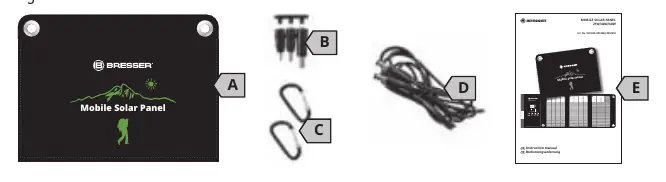
- Model 3810030: Panel bag with solar modules, 3 DC adapter plugs, 2 snap hooks, DC connection cable, instruction manual.
- Models 3810040 & 3810050: Panel bag with solar modules, 3 DC adapter plugs, 4 snap hooks, integrated DC connection cable, instruction manual.
Parts overview
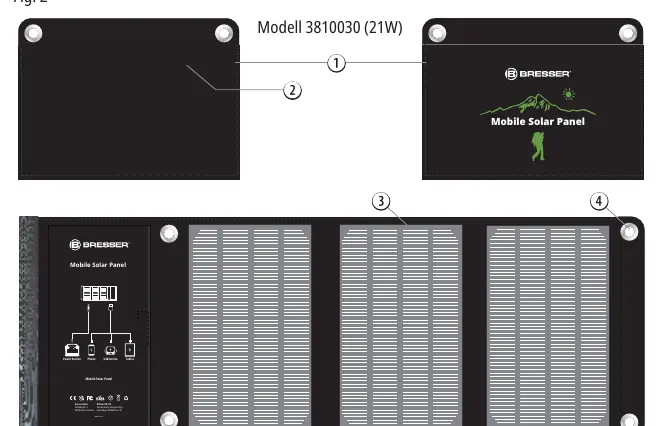
- Panel bag: The main housing for the solar modules.
- Compartment with connections: Contains the USB and DC ports.
- Solar modules: The light-absorbing panels.
- Eyelets: Used for securing the panel with snap hooks.
Site selection and assembly
A steady supply of sunlight is essential. To set up:
- Open the panel bag and unfold it so the solar modules point upwards.
- Select a location with direct and continuous sunlight.
- Use the eyelets and snap hooks to secure the panel in a suitable place if necessary.
Connecting devices
Caution: Ensure your end device (smartphone, tablet, powerbank) is suitable for connection. Protect the connected device from direct sunlight by placing it in the shade or under the solar panel.
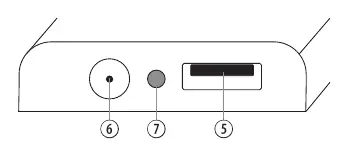
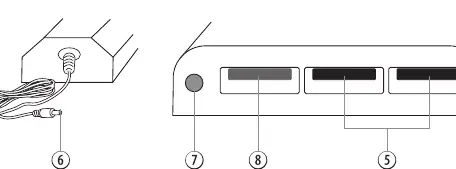
- USB-A (black): Connect a suitable USB cable to the port and then to your device.
- USB-A (orange) QC 3.0: Available on models 3810040/3810050 for fast charging.
- DC direct current: Connect the DC cable (separate for 3810030, integrated for others) and use the appropriate DC adapter plug for your device.
Cleaning and maintenance
- Allow the panel to cool in the shade before cleaning.
- Wipe solar modules only with a dry, soft, lint-free cloth (do not use microfiber).
- Do not use hard tools or cleaning fluids.
- Store in a dry, dust-free place at room temperature.
Troubleshooting
If your device is not charging:
- Check if the device supports the output voltage (5V USB or 12V-18V DC).
- Ensure the panel is in direct sunlight; clouds or shade will interrupt charging.
- Clean the solar modules if dirty.
- Ensure the cable is securely connected.
Manufacturer information
Bresser GmbH
Practical help
Common problems
Device not charging
Ensure the panel is in direct, unobstructed sunlight. Check that the device is compatible with the output voltage (5V USB or 12V-18V DC) and that the cable is securely connected.
Partial shade or cloudy sky
Efficiency and charging duration will be significantly affected. Move the panel to a location with direct sunlight.
Water exposure
The panel is only splash-proof. Do not immerse in water or leave outdoors in rain, snow, or frost.
Before use
- Ensure the panel is unfolded completely.
- Place the panel in direct, continuous sunlight.
- Verify the end device is compatible with the solar panel output.
- Protect the connected device from direct sunlight (e.g., place in shade).
Show more Show less
Specs in practice
- Vmp (Peak power Voltage)
- 18V for all models; the voltage at which the panel produces maximum power.
- Voc (Open circuit voltage)
- 21.6V for all models; the maximum voltage the panel can output without a load.
Images and diagrams
- Fig 1: Shows the contents of the package including the panel, cables, and adapters.
- Fig 2: Illustrates the parts of the solar panel, including the eyelets and connection compartment.
- Fig 3: Details the connection panel ports (USB-A, DC, and QC 3.0).
Model compatibility
- Compatible with smartphones, tablets, GPS trackers, power banks, and power stations.
- Requires devices that accept 5V USB or 12V-18V DC input.

Manual page author
Emily Carter
User documentation editor