Home / Security
User Manual for Brookstone 2-in-1 Music System
Comprehensive user guide for the Brookstone 2-in-1 Music System. Includes setup instructions, iPod docking, CD/MP3 playback, radio tuning, and troubleshooting tips.
Quick answers from the manual
Quick answer
- To use the Brookstone 2-in-1 Music System, connect it to an AC power outlet, select your desired mode (TUNER, CD, iPod, or AUX) using the FUNCTION button, and adjust the volume. Ensure the correct dock adapter is used for your iPod. p. 14, 17, 31
Key actions
- Resetting the unit p. 33
- Programming radio stations p. 22
First start
- Remove packing materials and pull the battery spacer tab from the remote. p. 13
Show 4 more answers Show less
Problems and fixes
CD player doesn't play
Ensure the unit is in CD mode, the CD is loaded correctly with the label facing front, and the disc format is compatible.
p. 36Maintenance and reset
- If the unit exhibits abnormal operation, press the RESET button on the back with a pointed non-metallic object. p. 33
Technical specifications
| Parameter | Value | Meaning | Pages |
|---|---|---|---|
| Power Source | AC 120V~60Hz | Standard power requirement | p. 36 |
| Power Output | 2 x 5W | Audio output power | p. 36 |
Where to find it in the PDF
- Controls Diagram p. 10, 11
- Troubleshooting p. 34, 35
Table of contents
Manual images
Click an image to enlargeQuick guide from the manual
The Brookstone 2-in-1 Music System is designed for playing audio from CDs, MP3 discs, iPods, and radio stations. To begin, ensure the unit is connected to an AC 120V~60Hz power supply. Remove all packing materials before use. The remote control requires a CR2025 3V lithium battery. Use the FUNCTION button to toggle between TUNER, CD, iPod, and AUX modes.
Safety instructions
- Do not expose the unit to rain, moisture, dripping, or splashing.
- Do not remove the cover; there are no user-serviceable parts inside.
- Keep the unit away from heat sources like radiators or stoves.
- Ensure ventilation openings are not blocked.
- Unplug the unit during lightning storms or when not in use for long periods.
- Use only manufacturer-specified attachments and accessories.
Location of parts and controls
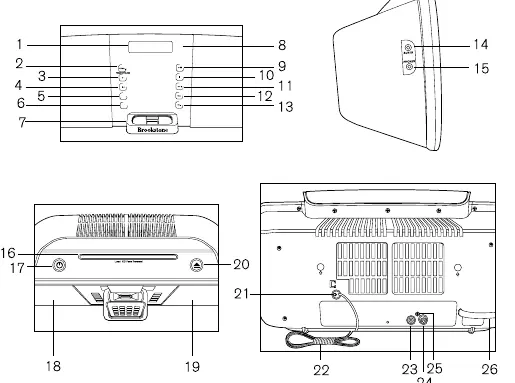
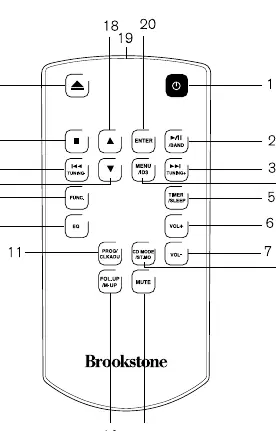
The main unit features an LCD display, CD slot, iPod connector, and various playback buttons (Play/Pause, Stop, Skip/Tuning, Volume). The rear panel contains the AC input, antenna sockets, video output, and subwoofer output. The remote control mirrors most of these functions, including specific iPod menu navigation and timer settings.
Setup and connections
- Power: Unwind the AC power cord completely and plug it into a standard AC outlet.
- Remote Battery: Pull the plastic spacer tab out. If replacement is needed, use a CR2025 3V lithium battery.
- Subwoofer: Connect an RCA cable (not included) to the SUBWOOFER output socket on the rear.
- AUX: Connect a 3.5mm stereo jack lead (not included) from your external device to the AUX-IN jack.
- Video Output: Connect an RCA cable to the VIDEO OUT jack to display iPod photos/videos on a TV.
Basic operation
Press the STANDBY button to turn the unit on or off. Use the FUNCTION button to select the desired mode. Adjust volume using the VOL+ and VOL- buttons (range 00-40). The MUTE button silences the output.
CD and MP3 operation
Insert a disc into the CD slot with the graphic side facing front. The unit will automatically load the disc. Use the PLAY/PAUSE button to start or pause playback, and the STOP button to end it. For MP3 discs, you can skip folders using the FOLD+ or FOLD- buttons. Programmed playback allows you to set a sequence of up to 20 tracks.
iPod operation
The unit includes a universal docking station. Select the appropriate dock adapter for your iPod model. The unit charges the iPod while docked in CD or AUX mode (charging is not available in Radio mode). Use the remote control's MENU, ENTER, and arrow buttons to navigate the iPod interface.
Tuner operation
The unit can store 20 FM and 10 AM stations. Use the TUNING buttons to search for stations. Press and hold for 2 seconds for automatic search. Save stations by pressing the PROG button and selecting a memory position.
Maintenance and troubleshooting
Clean the unit with a soft, dry cloth. Never use abrasive cleaners. If the unit behaves abnormally, use a pointed non-metallic object to press the RESET button on the back. If the radio has no signal, ensure it is in radio mode. If a CD skips, clean the disc or check for scratches.
Manufacturer information
Brookstone
Practical help
Common problems
No signal from the radio
Ensure the unit is in radio mode by pressing the FUNC button.
CD skips while playing
The disc may be dirty or scratched. Wipe it with a soft, dry cloth or try another disc.
AM or FM has no sound
Check if the volume is at the lowest level or if MUTE mode is active. Ensure the unit is in the correct tuner band.
iPod not charging
The unit will not charge the iPod in Radio mode. Ensure the unit is in CD or AUX mode.
Before use
- Unwind the AC power cord completely.
- Remove all packing materials from the unit.
- Pull the plastic spacer tab out of the remote control battery compartment.
- Select the correct dock adapter for your iPod model.
- Ensure the unit is placed on a stable surface away from heat sources.
Show more Show less
Specs in practice
- Power Source
- AC 120V~60Hz
- Power Consumption
- 32W
- Power Output
- 2 x 5W
- Speaker Impedance
- 4 ohms
Images and diagrams
- The main unit features a front-loading CD slot and iPod dock.
- The rear panel houses the AM/FM antenna sockets, video out, and subwoofer out.
- The remote control provides dedicated buttons for iPod menu navigation and timer settings.
Model compatibility
- Compatible with various iPod models (touch, classic, nano, mini).
- Requires specific dock adapters (included) for different iPod models.
- Video output feature requires TV configuration to accept input signals.

Manual page author
David Miller
Documentation analyst