Electronics / Audio
User Guide for Klark Teknik PRO DI 2 / DI 20P Passive DI Box
Quick start guide for the Klark Teknik PRO DI 2 and DI 20P passive stereo DI boxes. Learn about connections, controls, specifications, and safety instructions.
Quick answers from the manual
Quick answer
- The Klark Teknik PRO DI 2 / DI 20P is a passive stereo DI box with Midas transformers, designed to convert high-impedance signals to balanced XLR outputs. p. 1
Key actions
- Connect your audio source to the IN/THRU jacks. p. 4
- Connect the XLR outputs to your mixing console. p. 4
Problems and fixes
Unwanted hum
Use the EARTH LIFT switch.
p. 4Show 2 more answers Show less
Technical specifications
| Parameter | Value | Meaning | Pages |
|---|---|---|---|
| Frequency response | 20 Hz to 30 kHz (± 1 dB) | Audio frequency range | p. 5 |
| Signal-to-noise ratio | 108 dBu | Noise floor performance | p. 5 |
Where to find it in the PDF
- Front Panel Diagram p. 1
- Safety Instructions p. 2, 3
- Controls and Operation p. 4
- Specifications p. 5
Table of contents
Manual images
Click an image to enlargeQuick guide from the manual
The Klark Teknik PRO DI 2 and DI 20P are passive stereo DI boxes designed to convert high-impedance audio signals to balanced XLR outputs. They feature Midas transformers for extended dynamic range and are suitable for instrument, line, and speaker-level sources.
Controls and Connections
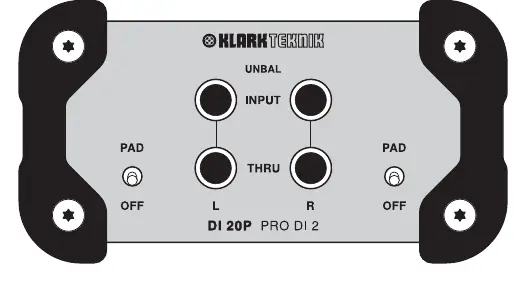
- IN/THRU: Connect your high-impedance source audio to the left and right 1/4" TS jacks. Each input has a corresponding loop-through output to send the signal to an amplifier.
- PAD: A -15 dB pad can be applied to each channel to handle very hot signals without affecting the level of the thru jacks.
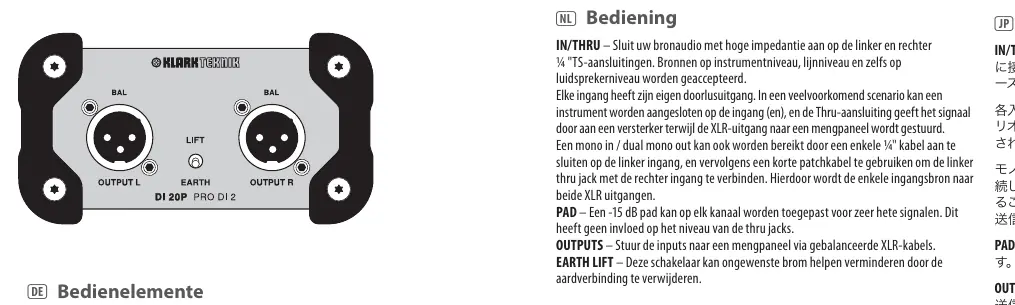
- OUTPUTS: Send the inputs to a mixing console using balanced XLR cables.
- EARTH LIFT: This switch helps reduce unwanted hum by removing the ground connection.
Mono/Dual Mono Operation: You can achieve a mono in/dual mono out configuration by connecting a single 1/4" cable to the left input and using a short patch cable to connect the left thru jack to the right input.
Specifications
- Frequency Response: 20 Hz to 30 kHz (± 1 dB)
- Signal-to-Noise Ratio: 108 dBu
- THD + N: 0.01% @ 1 kHz, 0 dBu
- Power Requirement: Passive (no external power required)
- Dimensions: 118 x 112 x 64 mm
- Weight: 0.54 kg
Safety Instructions
Always follow these safety guidelines to ensure proper operation:
- Do not use the apparatus near water.
- Clean only with a dry cloth.
- Do not block ventilation openings.
- Do not install near heat sources such as radiators or amplifiers.
- Use only attachments and accessories specified by the manufacturer.
- Do not place naked flame sources, such as lighted candles, on the apparatus.
Practical help
Common problems
Unwanted hum or noise
Engage the EARTH LIFT switch to remove the ground connection.
Input signal is too loud (distorted)
Apply the -15 dB PAD to the affected channel.
Before use
- Ensure your audio source is high-impedance.
- Use 1/4" TS cables for input connections.
- Use balanced XLR cables for output connections to a mixing console.
- Verify that the device is not placed near heat sources or water.
Show more Show less
Specs in practice
- Frequency Response
- The range of frequencies the device can accurately reproduce (20 Hz to 30 kHz).
- Signal-to-noise ratio
- 108 dBu, indicating low self-noise.
Images and diagrams
- The front panel features dual inputs and thru outputs for both Left and Right channels.
- Each channel has an independent PAD switch and EARTH LIFT switch.
Model compatibility
- Accepts instrument-level, line-level, and speaker-level sources.

Manual page author
David Miller
Documentation analyst