Home Appliances / Small Kitchen Appliances
User Manual for Sencor STT 212U Turntable
Quick guide for the Sencor STT 212U turntable. Learn how to operate the record player, record to USB/SD, tune the FM radio, use Bluetooth, and set up the device.
Quick answers from the manual
Quick answer
- The Sencor STT 212U is a belt-driven turntable with FM radio, USB/SD recording, and Bluetooth receiver. It supports 33/45/78 rpm speeds and includes built-in stereo speakers. p. 7, 17
Key actions
- Record from turntable to USB/SD p. 14
- Tune FM radio p. 12
First start
- Connect power adapter and press switch (4) to turn on. p. 11
Show 4 more answers Show less
Problems and fixes
Record stops before the end
Turn the automatic stop switch (22) to the 'off' position.
p. 14Maintenance and reset
- Clean the device using a wet cloth. Pull the plug out of the outlet before cleaning. p. 3
Technical specifications
| Parameter | Value | Meaning | Pages |
|---|---|---|---|
| Speed | 33/45/78 rev./min | Turntable rotation speeds | p. 17 |
| Speakers | 2x 5W | Integrated stereo speakers | p. 17 |
| Weight | 1.9 kg | Device weight | p. 17 |
Where to find it in the PDF
- Safety Instructions p. 2, 3, 4, 5
- Device Controls p. 8
- Technical Specifications p. 17
Table of contents
Quick guide from the manual
The Sencor STT 212U is a belt-driven turntable with integrated stereo speakers, FM radio, and recording capabilities. Before using the device, ensure the stylus cover is removed and the tone arm is disengaged from its support. The device features an automatic standby function that activates after 10 minutes of inactivity.
Device overview
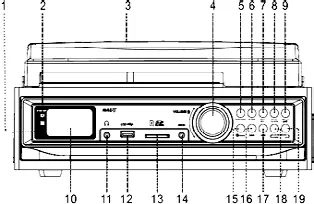
The device features a front control panel with an LCD display, volume control, and playback buttons. The top surface contains the turntable platter, tone arm, and speed selector. The rear panel houses the line output and power adapter jack.
Operation
Turntable playback
- Press the function button to select 'phon'.
- Set the speed selector (33/45/78 rpm) according to your record.
- Use the lifting lever to raise the tone arm, position it over the record, and lower it gently.
- The platter will start turning automatically.
- If the record stops before the end, turn the automatic stop switch to the 'off' position.
FM Radio
- Press function to select radio mode.
- Hold skip forward or skip back for 1-2 seconds to automatically search for stations.
- Use T-SCAN (play/pause button) to automatically save stations to presets.
Recording
You can record from the turntable, radio, or AUX IN to a USB drive or SD card.
- Insert the memory device.
- Select the source (phon, radio, or aux).
- Press rec. The 'rec' icon will appear on the display.
- Press stop to end the recording.
Bluetooth connection
Select the BT source using the Function key. Enable Bluetooth on your mobile phone and select 'STT 212U' to pair. A speaker sound confirms successful pairing.
Technical specifications
- Speeds: 33/45/78 rev./min
- Speakers: 2x 5W
- Power consumption: 8W
- Dimensions: 305 x 288 x 124 mm
- Weight: 1.9 kg
- Recording format: MP3 (128 kbps)
Manufacturer information
Sencor
Practical help
Common problems
Record stops before the end of the song
Turn the automatic stop switch (22) to the 'off' position.
No sound from USB/SD card
Ensure the device is compatible (supports up to 8GB SD cards) and the file format is MP3/WMA.
Remote control not working
Check the CR2025 battery and ensure the sensor is not exposed to intense light.
Before use
- Remove the stylus cover.
- Ensure the tone arm is disengaged from the support.
- Check that the power supply matches the nameplate specifications.
- Ensure there is sufficient ventilation space around the unit.
Show more Show less
Specs in practice
- Speed selection
- Adjusts platter speed to 33, 45, or 78 rpm for different record types.
- Automatic standby
- The device turns off after 10 minutes of no sound signal to save energy.
- Recording format
- Records audio to MP3 format at 128 kbps.
Images and diagrams
- Lifting lever (21) is used to safely raise and lower the tone arm.
- Speed selector (23) allows switching between 33, 45, and 78 rpm.
- Automatic stop switch (22) toggles the auto-stop feature for the turntable.
Model compatibility
- Supports SD cards up to 8 GB.
- Not all USB/SD devices are guaranteed to be compatible due to market variety.

Manual page author
David Miller
Documentation analyst