Electronics / Speakers & Soundbars
User Manual for BUSH CBAR7W 4.1 CH 200W Sound Bar
Comprehensive user guide for the BUSH CBAR7W 4.1 CH 200W Sound Bar. Includes setup, wall mounting, Bluetooth pairing, connection instructions, and troubleshooting.
Quick answers from the manual
Quick answer
- The BUSH CBAR7W is a 4.1 channel sound bar with 200W output. It supports Bluetooth, optical, coaxial, and RCA/AUX connections. It includes a subwoofer and can be wall-mounted. p. 1, 4, 11
Key actions
- Pairing Bluetooth p. 8
- Wall mounting p. 10
First start
- Connect subwoofer to sound bar, connect audio source, plug into mains, and power on. p. 4, 6, 7
Show 4 more answers Show less
Problems and fixes
No Power
Ensure mains plug is connected and switched ON.
p. 11
No Sound
Check volume, source playback, and ensure digital output is set to PCM.
p. 11Maintenance and reset
- Unplug the power cable for 1 minute then plug back in again. p. 11
Technical specifications
| Parameter | Value | Meaning | Pages |
|---|---|---|---|
| Power Output | 200W MAX | Maximum power output | p. 11 |
| Bluetooth Version | 2.1 | Bluetooth version | p. 11 |
Where to find it in the PDF
- Controls and Accessories p. 4
- Remote and Subwoofer p. 5
- TV Connections p. 6
- Wall Mounting p. 10
- Troubleshooting and Specs p. 11
Table of contents
Manual images
Click an image to enlargeQuick guide from the manual
The BUSH CBAR7W is a 4.1 channel sound bar system with 200W output. To get started, connect the subwoofer to the sound bar using the provided cable, connect your audio source (TV, DVD, or MP3 player) via the appropriate input (Optical, Coaxial, RCA, or 3.5mm AUX), and plug the unit into a mains outlet. Use the remote control or the touch buttons on the unit to select the source, adjust volume, and pair Bluetooth devices.
Safety information
- Do not remove any covers; no user-serviceable parts inside.
- Use indoors only; keep away from water, moisture, and heat sources.
- Unplug during lightning storms or long periods of disuse.
- Ensure the mains plug remains accessible.
- Do not use cleaning fluids containing alcohol, ammonia, or abrasives.
Overview of controls
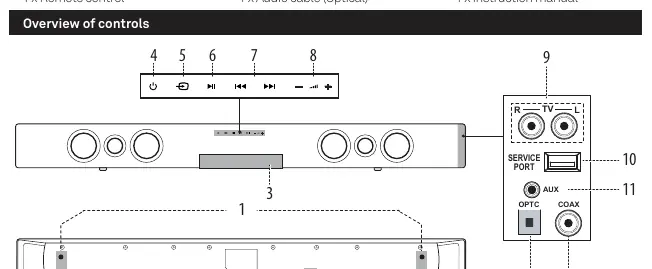
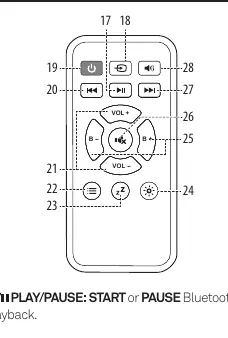
The sound bar features touch buttons for Standby, Source selection, Play/Pause, Skip tracks, and Volume control. The remote control provides additional functionality, including Bass adjustment, Mute, Sleep timer, Display brightness (DIM), and Sound EQ modes (Standard, Movie, Music, News).
Connections
The system supports multiple connection types:
- Subwoofer: Connect the speaker cable from the subwoofer to the terminals on the back of the sound bar, matching the red/white lines to the corresponding sockets.
- TV/Audio Source: Use the provided cables for RCA-RCA, Coaxial, Optical, or RCA-3.5mm connections.
- Note: For digital connections (Coaxial/Optical), you may need to set your source device (TV/DVD) audio output to PCM (Downmix).
Bluetooth operation
To pair a device:
- Press the SOURCE button until 'BT' appears on the display.
- Wait for 'BT' to flash, indicating pairing mode.
- Enable Bluetooth on your device and search for 'BUSH CBAR7W'.
- If prompted for a password, enter '0000'.
- Once connected, 'BT' will stop flashing.
To unpair, press and hold the OPTION button on the remote for 5 seconds.
Wall mounting
The sound bar can be wall-mounted:
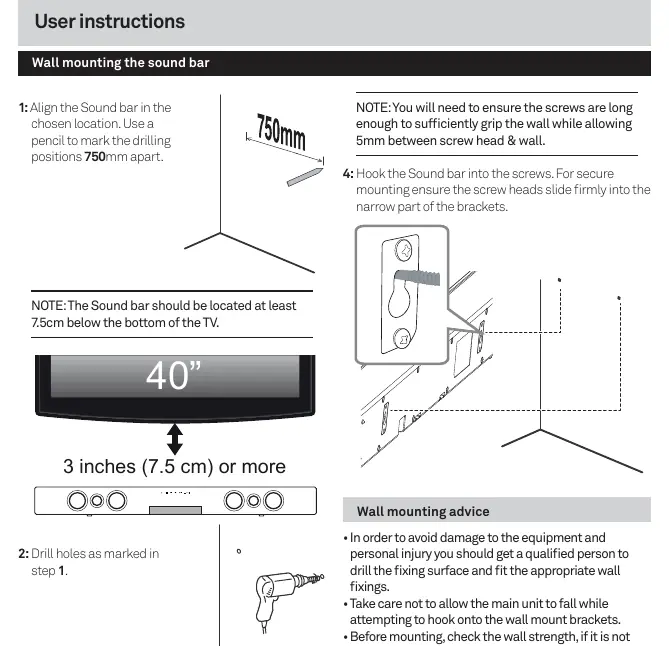
- Mark drilling positions 750mm apart.
- Ensure the sound bar is at least 7.5cm below the TV.
- Use appropriate screws (not supplied) and leave 5mm between the screw head and the wall to hook the brackets securely.
Troubleshooting
If you encounter issues:
- No Power: Check mains connection and power outlet.
- No Sound: Check volume levels, ensure source is playing, and verify digital output settings (PCM).
- Remote not working: Check battery installation, distance, and line of sight.
- Unit powers off: The unit enters standby automatically after 20 minutes of inactivity.
Technical specifications
- Power Output: 200W MAX
- Frequency Response: 20Hz - 20KHz
- Power Supply: 100-240V ~ 50-60Hz
- Bluetooth Version: 2.1
- Dimensions: Soundbar 930 x 90 x 60mm; Subwoofer 264 x 251 x 274mm
Practical help
Common problems
No sound from the sound bar
Check if the volume is turned up, ensure the external source is playing, and if using digital connections, set the source device audio output to PCM.
Remote control not working
Check that the CR2025 battery is installed correctly, reduce distance to the unit, and ensure you are aiming directly at the sound bar.
Unit turns off automatically
The unit is designed to enter standby mode after 20 minutes of inactivity. Press the STANDBY button to wake it.
Before use
- Unpack the sound bar, subwoofer, and accessories.
- Install the CR2025 battery into the remote control.
- Connect the subwoofer to the sound bar using the provided cable.
- Connect your TV or audio source using the appropriate cable (Optical, Coaxial, RCA, or 3.5mm).
- Connect the mains power cable to a UK outlet.
Show more Show less
Specs in practice
- Power Output
- 200W MAX total power output.
- Standby Power
- Consumes less than or equal to 0.5W in standby mode.
- Bluetooth Compatibility
- Supports EDR, A2DP, and AVRCP profiles.
Images and diagrams
- The control panel shows buttons for Standby, Source, Play/Pause, Skip, and Volume.
- The rear panel shows inputs for Optical, Coaxial, AUX, and Subwoofer terminals.
- Wall mounting diagram illustrates the 750mm spacing and 7.5cm clearance requirement.
Model compatibility
- Digital audio sources (TV/DVD) may require setting audio output to PCM/Downmix.
- Only one Bluetooth device can be paired at a time.
- Not all Bluetooth devices are compatible.

Manual page author
Michael Turner
Technical manual editor