General / Accessories
Instruction Manual for Somogyi PAR 2200BT Portable Party Speaker
Quick guide for the Somogyi PAR 2200BT portable party speaker. Learn how to set up, charge, use Bluetooth, record to USB, and troubleshoot common issues.
Quick answers from the manual
Quick answer
- The Somogyi PAR 2200BT is a portable party speaker with Bluetooth, USB/SD playback, and karaoke features. Charge it using the provided cable and use the 3-way switch on the back to select between battery or AC power. p. 23, 37
Key actions
- Pairing Bluetooth p. 24, 38
First start
- Charge the battery before first use. p. 23, 37
Show 4 more answers Show less
Problems and fixes
No sound
Check volume levels and cable connections.
p. 26, 40Maintenance and reset
- Reset factory settings by holding the MENU button for 3 seconds. p. 25, 39
Technical specifications
| Parameter | Value | Meaning | Pages |
|---|---|---|---|
| Battery | Lead-acid / 12 V / 3,2 Ah | Built-in rechargeable battery | p. 47 |
Where to find it in the PDF
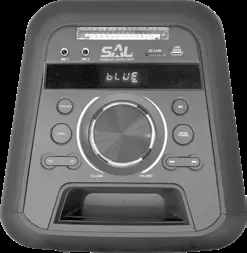
- Control Panel Layout p. 2
- Back Panel Layout p. 3
Table of contents
Manual images
Click an image to enlargeQuick guide from the manual
The Somogyi PAR 2200BT is a portable party speaker featuring Bluetooth connectivity, USB/SD MP3 playback, FM radio, and karaoke inputs. Before first use, ensure the built-in battery is fully charged. The device can operate on battery power or AC mains power, controlled by the 3-way switch on the back panel.
Device Description
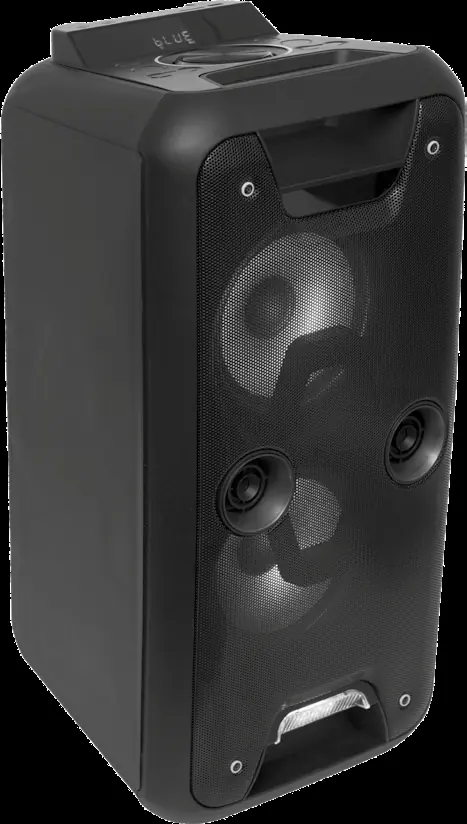
The speaker includes two subwoofers and two tweeters, LED light effects, and multiple input options including Bluetooth, USB, SD card, and two 6.3mm microphone inputs. It also features RCA AUX inputs for external devices like mobile phones or CD players.
Power Supply and Charging
The device has a built-in battery. To charge, connect the supplied power cable to the POWER IN socket on the back and plug it into the mains. The red LED on the display indicates charging. Charging takes approximately 2 hours for a fully depleted battery, providing up to 14 hours of operation at medium volume. The 3-way switch on the back allows you to select: Battery Power (operating from battery), OFF/Recharge (switch off/charging), or AC (operating from mains).
Operation
- Bluetooth: Press the MODE/POWER button until 'BLUE' appears on the display. Pair with your device in the Bluetooth settings.
- MP3 Playback: Insert a USB or SD memory device (FAT32 format recommended). The device will automatically switch to MP3 mode. Use the playback buttons to control tracks.
- Karaoke: Connect a microphone to the MIC1 or MIC2 socket. Use the MENU button and the rotary knob to adjust microphone volume and echo settings.
- Recording: Insert a USB device and press the REC button to start recording from sources like BT, FM, or LINE IN. Press REC again to stop.
Maintenance and Safety
Keep the device away from water and moisture. Do not cover the speaker and ensure at least 20 cm of clearance for cooling. Clean with a soft, dry cloth. Do not use aggressive cleaners. If the device malfunctions, turn it off and contact a specialist.
Troubleshooting
If the device does not turn on, check the power switch position and ensure the battery is charged. If there is no sound, verify volume levels on both the speaker and the source device, and check cable connections. If MP3 playback fails, ensure the memory device is formatted as FAT32 and files are compatible.
Manufacturer information
Somogyi Elektronic Kft.
Practical help
Common problems
Device does not turn on
Check if the power switch is in the correct position and press the MODE/POWER button.
No sound
Check volume levels on both the speaker and the external source. Ensure audio cables are connected correctly.
MP3 playback not working
Ensure the USB/SD card is formatted as FAT32 and the MP3 files are compatible.
Microphone not heard
Check that the microphone is switched on and the MIC VOLUME is not set to minimum.
Before use
- Charge the battery fully before first use.
- Ensure the power switch is set to the correct mode (Battery/AC).
- Check that the volume is not set to maximum before turning on.
- Keep microphone cables away from power cables.
Show more Show less
Images and diagrams
- The top panel contains controls for volume, mode selection, playback, and microphone settings.
- The back panel contains the 3-way power switch, power input, RCA inputs, and FM antenna.
Model compatibility
- Recommended file system for USB/SD is FAT32.
- Do not use NTFS formatted memory cards.
- Maximum USB memory size recommended is 32 GB.

Manual page author
Michael Turner
Technical manual editor