Automotive / Car Audio
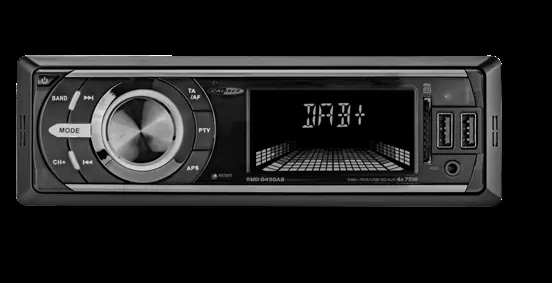
User Manual for Caliber RMD 049DAB Car Radio
Quick guide for the Caliber RMD 049DAB car radio. Includes installation instructions, wiring diagrams, DAB antenna setup, and button operation.
Table of contents
Manual images
Jump to the sectionQuick guide from the manual
The Caliber RMD 049DAB is a car radio supporting DAB+, RDS, USB, SD, and AUX inputs. This guide provides essential information for installation, wiring, and operation. Always ensure the vehicle is turned off before installation and verify that your vehicle uses a 12V negative ground system.
DAB Antenna Installation
The active DAB+ antenna is powered through the core of the antenna wire (+5V), so no separate power source is required. Follow these steps for installation:
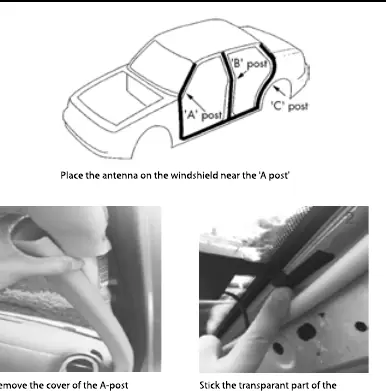
- Remove the cover of the A-post.
- Place the antenna on the windshield near the A-post.
- Stick the transparent part of the antenna on the windshield and the black part on the metal frame.
- Connect the antenna to the radio unit.
Wiring Diagram
The unit uses two main connectors, A and B. Ensure all connections are secure before powering the unit.
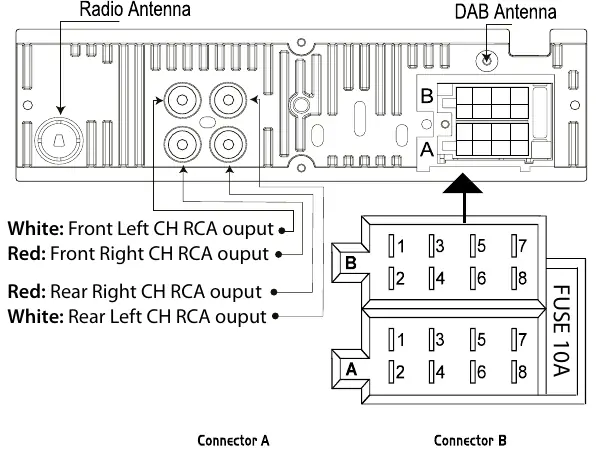
Connector A:
- Pin 4: Memory +12V (yellow wire)
- Pin 5: Remote +12V output (blue wire)
- Pin 7: +12V ignition (red wire)
- Pin 8: Ground (black wire)
Connector B:
- Pins 1-2: Right rear speaker (+/-)
- Pins 3-4: Right front speaker (+/-)
- Pins 5-6: Left front speaker (+/-)
- Pins 7-8: Left rear speaker (+/-)
DAB Settings
To use DAB mode:
- Press the [MODE] button to switch to DAB mode.
- Upon first energizing, the system will automatically search and store stations.
- If you need to re-scan, press the [APS] button.
- After a full search, the 18 strongest stations are stored in three DAB bands (DAB1, DAB2, DAB3).
- Use the [BND] button to switch between bands.
Controls and Functions
The unit features a rotary volume knob and various buttons for system, tuner, and media control:
- Power: Short press to turn on, long press to turn off.
- Mode: Switch between sources (Tuner, USB, SD, AUX).
- Reset: Use a non-metallic pointed object to press and hold the reset button for 5 seconds to restore factory defaults.
- USB/SD: Inserting a USB stick or SD card (max 32GB) automatically switches the unit to that mode.
- Audio Menu: Adjust Bass, Treble, Balance, Fader, Loudness, EQ, and DX/LOCAL settings.
Safety Precautions
- Do not operate the unit in a way that distracts from safe driving.
- Keep volume at a level where outside noises can still be heard.
- Use only in vehicles with a 12V negative ground.
- Do not disassemble or alter the unit.
- Keep small objects like screws out of the reach of children.
- Ensure the temperature inside the vehicle is between 0°C and +45°C before turning the unit on.
Manufacturer information
Caliber Europe
Practical help
Common problems
Unit is unresponsive or behaving erratically
Use a non-metallic pointed object to press and hold the reset button for 5 seconds to restore factory settings.
DAB antenna not receiving signal
Ensure the antenna is correctly placed on the windshield and the black part is attached to the metal frame. The antenna is powered via the antenna wire (+5V), so no external power is needed.
High volume distortion
Reduce the volume level. High sound levels can cause damage to your ears and the audio system.
Before use
- Verify the vehicle has a 12V negative ground electrical system.
- Ensure the 10A fuse is intact.
- Check that the antenna is mounted correctly on the windshield.
- Ensure all wiring connections (Connector A and B) are secure.
- Verify that USB/SD cards are formatted correctly and do not exceed 32GB.
Specs in practice
- Power supply
- 12V DC, negative ground.
- Max power output
- 75W x 4 channels.
- DAB Frequency range
- 174 ~ 240MHz.
- USB/SD capacity
- Maximum 32GB supported.
Images and diagrams
- Connector A handles power (Memory, Remote, Ignition, Ground).
- Connector B handles all four speaker outputs (Front/Rear, Left/Right).
- RCA outputs are provided for external amplifiers (Front Left/Right, Rear Left/Right).
- The DAB antenna connects to the specific DAB antenna input port on the rear.
Model compatibility
- Designed for 12V mobile applications only.
- USB and SD cards must not exceed 32GB.
- Operating temperature range: 0°C to +45°C.

Manual page author
David Miller
Documentation analyst
Organizes user manual content into clear summaries, with attention to model details, product context, and everyday usability.