Automotive / Car Audio
User Manual for Caliber RMD 056DAB-BT Car Radio
Quick guide for the Caliber RMD 056DAB-BT car radio. Includes wiring diagrams, DAB antenna installation, Bluetooth pairing, and remote control operation instructions.
Table of contents
Manual images
Jump to the sectionQuick guide from the manual
The Caliber RMD 056DAB-BT is a car radio designed for 12V mobile applications. Before operating, ensure the vehicle temperature is between 0°C and +45°C. Always prioritize safe driving; do not operate the unit or watch the screen while driving. If you encounter issues, use the reset button with a non-metallic pointed object for 5 seconds to restore factory settings.
Installation and Wiring
The unit requires a 12V negative ground connection. Refer to the wiring diagram for specific pin assignments:
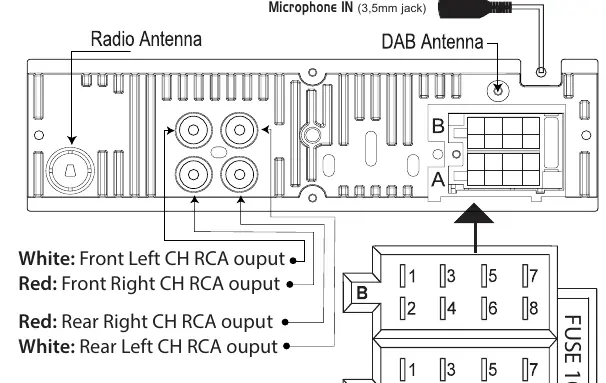
- Connector A: Includes Memory +12V (yellow), Remote +12V output (blue), +12V ignition (red), and Ground (black).
- Connector B: Dedicated to speaker outputs (Front Left/Right, Rear Left/Right).
- RCA Outputs: White and Red RCA outputs are provided for Front and Rear channels.
DAB Antenna Installation
To install the active DAB+ antenna:
- Remove the cover of the A-post.
- Place the antenna on the windshield near the 'A post'.
- Stick the transparent part of the antenna on the windshield and attach the black part to the metal frame.
- The antenna is powered through the core of the antenna wire (+5V); no separate power source is required.
Remote Control and Operation
The remote control allows for full operation of the unit, including:
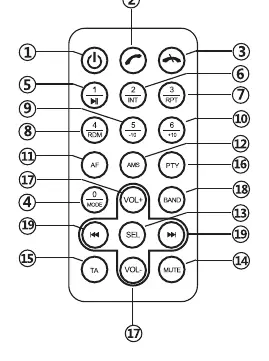
- Power Button: Short press to turn on.
- Mode: Switch between sources (Radio, USB, SD, Bluetooth).
- Volume: Adjust volume levels.
- Radio Controls: Band selection, station scanning, and manual tuning.
- Playback Controls: Pause/Play, Intro (INT), Repeat (RPT), Shuffle (RMD), and track navigation.
Bluetooth Pairing
To connect your mobile phone:
- Open Bluetooth mode by pressing the 'MODE' button.
- Activate Bluetooth on your phone and search for available devices.
- Select 'RMD056DAB-BT_CALIBER'.
- Enter the password '0000' if prompted.
- If successful, 'BT ON' will be displayed. If it fails, 'NO CON' will appear.
Specifications
- Power Supply: 12V DC, negative ground.
- Output: 75W x 4 channels (Max), 20W x 4 channels (RMS).
- Radio: FM (87.5-108.0 MHz), DAB (174-240 MHz).
- USB/SD: Supports up to 32GB.
- Bluetooth: 2402-2480 MHz.
Safety and Maintenance
Clean the product periodically using a soft, dry cloth. For stubborn stains, dampen the cloth with water only; other cleaning agents may damage the plastic or paint. Do not block ventilation openings or radiator panels.
Manufacturer information
Caliber Europe
Practical help
Common problems
Bluetooth connection fails
Ensure the device is in Bluetooth mode, search for 'RMD056DAB-BT_CALIBER', and use password '0000'. If 'NO CON' appears, try the pairing process again.
Unit is unresponsive or behaving incorrectly
Use a non-metallic pointed object to press and hold the reset button for 5 seconds to restore factory settings.
Radio stations not saving
Ensure the memory wire (yellow) is correctly connected to a constant +12V power source.
Before use
- Verify the vehicle has a 12V negative ground electrical system.
- Ensure the ambient temperature is between 0°C and +45°C.
- Check that the fuse (10A) is intact.
- Ensure the DAB antenna is correctly mounted on the A-post.
- Confirm the USB/SD card is formatted correctly and does not exceed 32GB.
Images and diagrams
- The wiring diagram illustrates the pinout for Connector A (power/ignition) and Connector B (speakers).
- The DAB antenna installation diagram shows the correct placement on the vehicle's A-post.
Model compatibility
- Designed for 12V mobile applications only.
- Not compatible with 24V systems.
- Requires negative ground connection.

Manual page author
David Miller
Documentation analyst
Organizes user manual content into clear summaries, with attention to model details, product context, and everyday usability.