Electronics / Audio
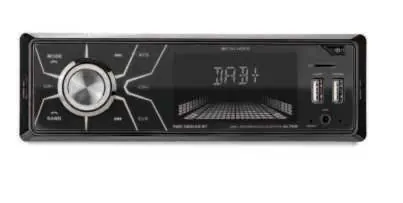
User Manual for Caliber RMD 061DAB-BT Car Radio
Quick guide for the Caliber RMD 061DAB-BT car radio. Includes installation instructions, wiring diagrams, Bluetooth pairing, and technical specifications.
Table of contents
Manual images
Jump to the sectionQuick guide from the manual
The Caliber RMD 061DAB-BT is a car radio system supporting DAB+, FM, USB, SD, AUX, and Bluetooth connectivity. This document provides essential installation and operation instructions. Always ensure the vehicle's ignition is off before starting installation. The device is designed for 12V DC negative ground systems.
DAB Antenna Installation
The active DAB+ antenna is powered through the core of the antenna wire (+5V), so no separate power source is required.
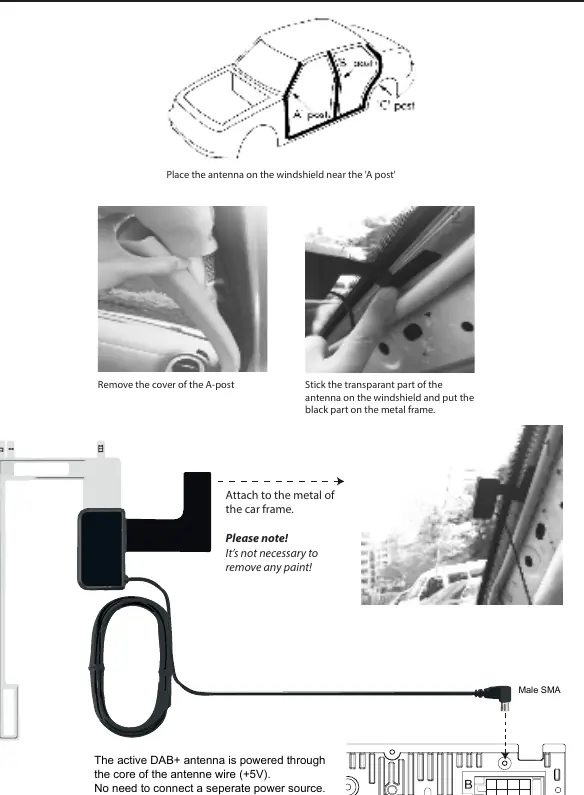
- Remove the cover of the A-post.
- Place the antenna on the windshield near the 'A post'.
- Stick the transparent part of the antenna on the windshield.
- Attach the black part to the metal frame of the car. It is not necessary to remove any paint.
Wiring Diagram
Ensure all connections are secure before powering the unit. The wiring harness includes two main connectors:
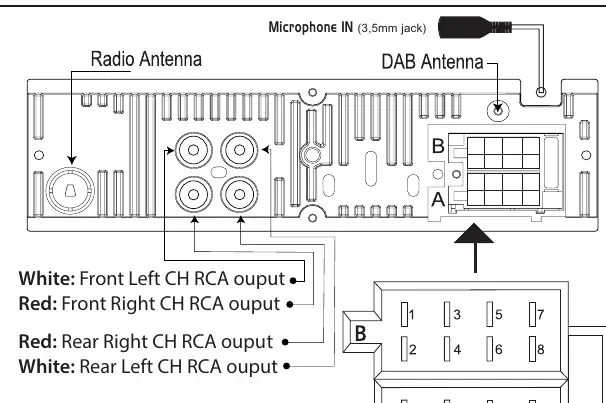
- Connector A (Power): Includes Memory +12V (yellow), Remote +12V output (blue), +12V ignition (red), and Ground (black).
- Connector B (Speakers): Includes connections for Right Rear, Right Front, Left Front, and Left Rear speakers.
- RCA Outputs: White/Red outputs for Front and Rear channels.
Controls and Operation
The device is operated via the front panel buttons and the rotary volume knob. Key functions include:
- Mode: Switch between sources (Radio, USB, SD, Bluetooth).
- Band: Select reception bands (FM0-FM9, DAB1-DAB3).
- Audio Menu: Adjust Bass, Treble, Balance, Fader, Loudness, EQ, DX/LOCAL, and Stereo/Mono.
- Reset: If the unit becomes unresponsive, use a non-metallic pointed object to press and hold the reset button for 5 seconds to restore factory settings.
Bluetooth Pairing
- Press the MODE button to open Bluetooth mode.
- Activate Bluetooth on your mobile phone and search for available devices.
- Select RMD061DAB-BT_CALIBER from the list.
- Enter the password 0000 if prompted.
- Upon successful connection, the display will show BT ON.
Specifications
- Power Supply: 12V DC, negative ground.
- Max Power Output: 75W x 4 channels.
- Fuse: 10A.
- DAB Frequency Range: 174-240 MHz.
- FM Frequency Range: 87.5-108.0 MHz.
- USB/SD Capacity: Max 32GB.
Safety and Maintenance
For safe usage, observe the following:
- Do not operate the unit while driving.
- Keep volume at a level where outside noises can still be heard.
- Operating temperature must be between 0°C and +45°C.
- Clean the unit with a soft, dry cloth. Do not use harsh chemicals.
Manufacturer information
Caliber Europe
Practical help
Common problems
Device does not turn on
Check the wiring connections, specifically the yellow (memory) and red (ignition) wires, and verify the 10A fuse.
Bluetooth pairing fails
Ensure the device is in Bluetooth mode, search for 'RMD061DAB-BT_CALIBER', and use PIN '0000'.
Poor DAB reception
Verify the DAB antenna is correctly installed on the windshield and the black part is attached to the car's metal frame.
Device is frozen or unresponsive
Perform a factory reset by pressing the reset button with a non-metallic pointed object for 5 seconds.
Before use
- Verify vehicle has a 12V negative ground electrical system.
- Check that the fuse rating is 10A.
- Ensure speaker impedance is between 4-8 ohms.
- Confirm DAB antenna is placed near the A-post.
- Ensure all wiring connections match the provided diagram.
Specs in practice
- Power supply
- Requires 12V DC with negative ground.
- Max power output
- 75W per channel across 4 channels.
- DAB Frequency
- 174-240 MHz range for digital radio.
Images and diagrams
- Connector A: Power and ground wiring harness.
- Connector B: Speaker wiring harness for 4 speakers.
- DAB Antenna: Active antenna installation steps.
Model compatibility
- USB and Micro SD card capacity: Maximum 32GB.
- Operating temperature: 0°C to +45°C.

Manual page author
Emily Carter
User documentation editor
Prepares concise manual descriptions and highlights the most useful setup, operation, and maintenance information for readers.