Automotive / Car Audio
User Manual for Caliber RMD 053DAB Car Stereo
Quick start guide and user manual for the Caliber RMD 053DAB car stereo. Learn about installation, wiring, antenna setup, and operation.
Table of contents
Quick guide from the manual
This document provides essential instructions for the safe and effective use of the Caliber RMD 053DAB car stereo. Key safety points include ensuring the vehicle has a 12V negative ground electrical system, maintaining a safe volume level while driving, and operating the unit within a temperature range of 0°C to +45°C. Do not attempt to disassemble or modify the unit.
Installation
Proper installation is critical for the performance of the RMD 053DAB.
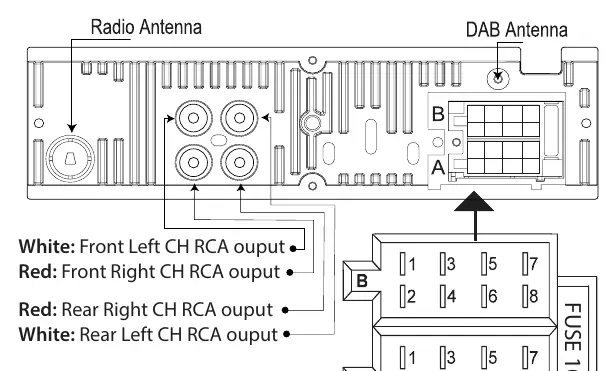
Wiring Diagram
The unit uses two main connectors:
- Connector A (Power): Includes connections for Memory +12V (yellow), Remote +12V output (blue), +12V ignition (red), and Ground (black).
- Connector B (Speakers): Includes connections for Right rear, Right front, Left front, and Left rear speakers.
The unit is protected by a 10A fuse.
DAB Antenna Installation
To install the active DAB+ antenna:
- Remove the cover of the A-post.
- Place the antenna on the windshield near the 'A post'.
- Stick the transparent part of the antenna on the windshield and attach the black part to the metal frame of the car.
- The active DAB+ antenna is powered through the core of the antenna wire (+5V), so no separate power source is required.
Operation
The unit features a front panel with 16 buttons for controlling various functions:
- Power: Turn the unit on or off.
- Band: Select between different reception bands (FM0-FM9, DAB1-DAB3).
- Mode: Switch between sources (Tuner, USB, SD, AUX).
- Volume: Rotary knob to adjust volume. Press to access audio settings like Bass, Treble, Balance, Fader, Loudness, EQ, and Stereo/Mono.
- Playback Controls: Buttons for Play/Pause, Intro, Repeat, Shuffle, and track navigation in USB/SD modes.
Maintenance and Reset
To clean the unit, use a soft, dry cloth. For stubborn stains, dampen the cloth with water only; other cleaners may damage the plastic or paint. If the unit malfunctions, use a non-metallic pointed object to press and hold the Reset button for 5 seconds to restore factory settings.
Specifications
- Power Supply: 12V DC, negative ground.
- Power Output: 75W x 4 channels (Max), 20W x 4 channels (RMS).
- Speaker Impedance: 4-8 ohm.
- Fuse: 10A.
- USB Charge Output: 5V, max 1.1A.
- Radio Frequency: FM 87.5-108.0 MHz; DAB 174-240 MHz.
Manufacturer information
Caliber Europe
Practical help
Common problems
Unit is not working or behaving unexpectedly
Use a non-metallic pointed object to press and hold the Reset button for 5 seconds to restore factory settings.
DAB reception issues
Ensure the active DAB+ antenna is correctly installed on the A-post and the transparent part is stuck to the windshield.
Volume is too loud
Adjust the rotary volume knob. High volume levels can cause hearing damage and distract from driving.
Before use
- Verify the vehicle has a 12V negative ground electrical system.
- Ensure the fuse is 10A.
- Check that speaker impedance is between 4-8 ohm.
- Ensure the ambient temperature is between 0°C and +45°C.
- Do not block ventilation openings.
Images and diagrams
- The wiring diagram shows Connector A for power and Connector B for speakers.
- The DAB antenna installation guide illustrates placing the antenna on the A-post of the vehicle.
Model compatibility
- Designed for mobile 12V applications only.
- USB and SD card slots support up to 32GB storage.

Manual page author
Michael Turner
Technical manual editor
Reviews PDF manuals for structure, safety notes, and practical product details so readers can find the right information quickly.