Electronics / PA Systems
User Manual for Califone 2395IR Infrared Music Maker Plus
Comprehensive user guide for the Califone 2395IR Infrared Music Maker Plus. Includes setup, radio, CD, cassette, and wireless infrared headphone operation instructions.
Quick answers from the manual
Quick answer
- The Califone 2395IR is a multimedia player featuring a CD player, dual cassette decks, AM/FM radio, and infrared wireless headphone transmission. It can be powered by AC or 8 D-cell batteries. p. 1, 2
Key actions
- Programming Radio Stations p. 6
- Recording to Cassette p. 10
First start
- Powering the unit p. 2
Show 4 more answers Show less
Problems and fixes
CD play does not begin
Check if AC cord is loose, CD is upside down, lens is dirty, or if in PAUSE mode.
p. 14Maintenance and reset
- Cleaning Tape Heads p. 13
Technical specifications
| Parameter | Value | Meaning | Pages |
|---|---|---|---|
| Transmission Frequency | 2.3 MHz | Infrared signal frequency | p. 13 |
| Power Supply | AC 110V – 60Hz, 8”D” (UM-1) Cells | Power requirements | p. 13 |
Where to find it in the PDF
- Initial Setup p. 2
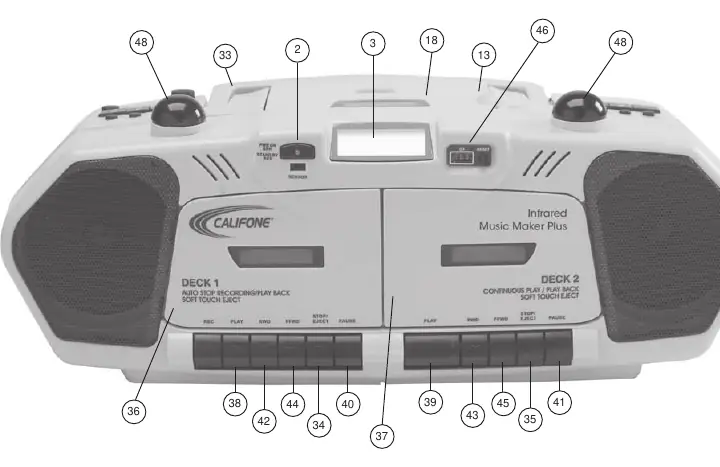
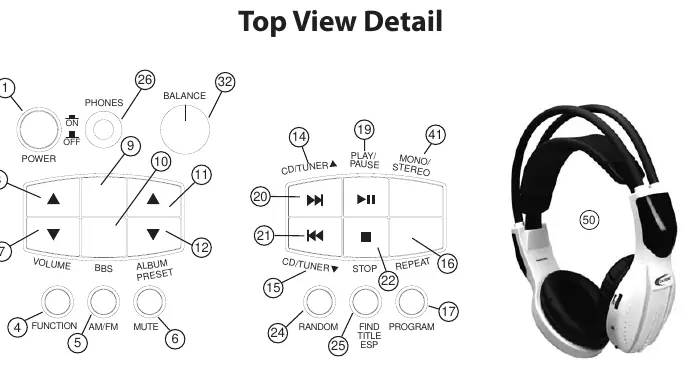
- Controls Reference p. 3, 4
- Troubleshooting p. 14
Table of contents
Manual images
Click an image to enlargeQuick Guide
The Califone 2395IR Infrared Music Maker Plus is a versatile multimedia player designed for educational and group settings. It features a CD player, dual cassette decks, AM/FM radio, and an infrared wireless transmission system for headphones. The unit can be powered via AC outlet or eight D-cell batteries.
Initial Setup
AC Power: Locate the power cord at the rear, release the retainer tab, and plug into a standard 120V 50-60 Hz outlet.
Battery Power: Requires eight D (UM-1) size batteries. Open the compartment at the rear, insert batteries according to the diagram, and ensure the nylon ribbon is placed underneath to assist with removal.
Radio Operation
To use the radio, set the function selector to Radio. Extend the telescoping antenna for FM reception. Use the tuner buttons to select stations. You can save up to 20 FM and 12 AM stations using the 'PRESET' and 'PROGRAM' functions.
CD Function
The player supports 12cm and 8cm discs (CD, CD-R, CD-RW). Load a disc by opening the CD door and placing it label-side up. Use the 'PLAY/PAUSE' button to start playback. You can program up to 20 tracks by using the 'PROGRAM' button and selecting tracks with the skip buttons.
Cassette Function
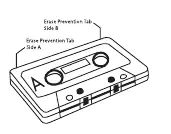
The unit features dual cassette decks for playback and recording. Deck A is used for recording from radio, CD, or microphone. Deck B is for playback. To record, insert a blank tape into Deck A, press 'PAUSE' then 'RECORD', and start the source audio.
Headphone Listening
Wired: Use the 3.5mm jack on top or the 1/4" jack on the rear.
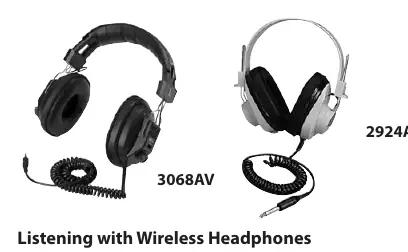
Wireless: The unit transmits infrared audio to Califone 34B-IR headphones within a 15-foot range. Ensure the red IR domes on the unit are unobstructed. The system requires line-of-sight and will not function in bright sunlight.
Care and Maintenance
Clean the cassette heads, capstan, and pinch roller periodically with a cotton swab and methyl alcohol. Handle CDs by their edges and clean with a soft, moistened cloth if necessary. Never use solvents or abrasive materials on the tape heads or discs.
Practical help
Common problems
Unit does not operate
Check if the AC power cord is plugged in or if batteries are fully charged.
CD sound jumps or stops
Check if the CD is dirty, scratched, or loaded upside down. Ensure the unit is not subject to excessive vibration.
Tape speed is slow or unstable
Check for excessive slack in the tape or if the tape quality is poor.
No infrared transmission
Check the IR switch on the rear of the unit and ensure batteries in the 34B-IR headphones are fresh.
Before use
- Ensure the unit is placed on a stable surface away from heat sources.
- Check that the power source (AC or batteries) is correctly connected.
- Extend the telescoping antenna for FM radio reception.
- Ensure the IR domes are uncovered for wireless headphone use.
- Verify that the tape or CD is clean and free of damage.
Show more Show less
Specs in practice
- Transmission Frequency
- 2.3 MHz (used for infrared audio transmission).
- IR Transmission Range
- 15 feet at 360 degrees (line-of-sight required).
- Output Power
- 6W total power output.
Images and diagrams
- Front View: Shows location of CD door, cassette decks, and primary control buttons.
- Rear View: Shows headphone jacks, external speaker jacks, microphone input, and IR switch.
- Top View: Details the layout of volume, tone, tuner, and playback control buttons.
Model compatibility
- Wireless headphones: Only Califone 34B-IR infrared headphones are compatible.
- Cassette tapes: Designed for use with 60-minute Type 1 Normal Bias recording tape.
- Microphone: Supports dynamic microphones via 3.5mm jack.

Manual page author
Emily Carter
User documentation editor