Electronics / Audio Interfaces
User Manual for Califone 1216BKBT Bluetooth Jackbox
Quick guide for the Califone 1216BKBT Bluetooth Jackbox. Learn how to pair your device, use the volume controls, daisy-chain units, and understand LED status indicators.
Table of contents
Manual images
Click an image to enlargeQuick Start Guide
To begin using your Califone 1216BKBT Bluetooth Jackbox, follow these steps:

- Power On: Touch the ON/OFF icon for 3 seconds. The Bluetooth and Power/Charge LEDs will light up briefly.
- Pairing: Ensure your Bluetooth device (iPhone, Android, laptop) has Bluetooth enabled. Scan for devices and select Califone1216BT to pair.
- Charging: Before first use, charge the unit using the provided Power Adaptor or by connecting it to a computer's USB port using the charging cord.
Part Names and Functions
The device features several controls and ports:
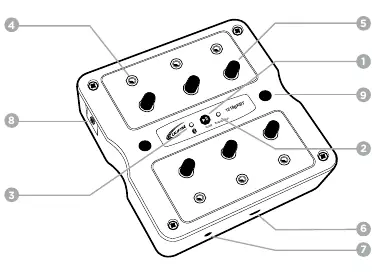
- On/Off/Play/Pause touchbutton: Used for power control and media playback.
- LED Indicators: Power/Charge and Bluetooth status lights.
- Headphone jack: For connecting headphones.
- Individual volume control: Adjusts audio levels.
- USB Charging port (5VDC): For charging the unit.
- 3.5mm Line in: For connecting non-Bluetooth audio devices.
- 3.5mm jack to daisy-chain: Allows connecting another jackbox for additional listeners.
- Predrilled mounting holes: For secure installation.
Operation
Once synced, the Bluetooth LED will flash 3 times continuously. When audio streaming begins, the Power/Charge LED will turn green.
- Volume Control: Adjust volume using the individual knobs on the unit.
- Pause/Play: Touch the Pause/Play icon for 2 seconds to activate.
- Auto Shut-Off: The unit automatically turns off after 6 minutes if left ON idling without pairing.
- Line-In: Connect non-Bluetooth devices (boomboxes, CD players) using the provided 6' patch cord. This connection is prioritized over Bluetooth.
- Daisy Chain: Use the side 3.5mm jack to connect another Bluetooth or non-Bluetooth jackbox.
LED Status Indicators
Understand the device status by observing the LEDs:
- Power ON: Bluetooth LED (blue), Power/Charge LED (green).
- Pairing: Bluetooth LED flashes red/blue.
- Connected/Pause: Bluetooth LED flashes blue (3 times).
- Streaming: Bluetooth LED flashes blue (2 times), Power/Charge LED (green).
- Power OFF: All LEDs off.
- Low Battery: Bluetooth LED flashes red.
Safety and Maintenance
- Cleaning: Use a soft, dry cloth. Never use benzene, paint thinner, or other chemicals.
- Location: Place in a stable location to prevent falls.
- Moisture and Heat: Do not use near water (sinks, pools) or expose to rain, high humidity, or direct sunlight.
- Servicing: Do not attempt to repair the device yourself. Refer all servicing to qualified personnel.
Practical help
Common problems
Unit will not pair with device
Ensure Bluetooth is enabled on your device, scan for 'Califone1216BT', and if in a classroom setting, pair one unit at a time to avoid connecting to nearby jackboxes.
Audio not playing via Bluetooth
Check if a device is connected to the Line-In jack, as this connection is prioritized over Bluetooth.
Unit turns off unexpectedly
The unit has an auto shut-off feature that activates after 6 minutes if left ON idling without pairing.
Before use
- Charge the unit using the provided Power Adaptor or USB charging cord.
- Inspect the shipping carton and unit for any signs of damage.
- Ensure the device is placed in a stable location.
- Read the safety instructions regarding moisture and heat sources.
Specs in practice
- Bluetooth Range
- 30 Feet
- Auto Shut-Off
- 6 minutes of idling without pairing
- Charging Port
- 5VDC USB
Images and diagrams
- The top panel contains the touch-sensitive On/Off/Play/Pause button and LED status indicators.
- The side panel houses the Line-In jack and the daisy-chain jack for connecting multiple units.
Model compatibility
- Compatible with Bluetooth-enabled devices (iPhone, Android, laptops).
- Line-In jack supports non-Bluetooth audio devices like boomboxes and CD players.

Manual page author
Michael Turner
Technical manual editor
Reviews PDF manuals for structure, safety notes, and practical product details so readers can find the right information quickly.