Home Appliances / Small Kitchen Appliances
User Manual for Camry CR 1259 20L Boiler
Quick guide for the Camry CR 1259 20L boiler. Includes setup, usage instructions, safety warnings, descaling procedures, and technical specifications.
Quick answers from the manual
Quick answer
- The Camry CR 1259 is a 20L hot water boiler. Before first use, boil and discard water three times. Always fill between 2.5L and 20L. If it stops heating, check the thermal reset switch on the bottom. p. 4
Key actions
- Resetting the thermal switch p. 4
- Descaling the boiler p. 4
First start
- Fill the boiler with water, boil and pour. Repeat three times to remove factory scent. p. 4
Show 4 more answers Show less
Problems and fixes
Device does not heat
Reset the thermal switch lever on the bottom after the device has cooled down.
p. 4Maintenance and reset
- Reset the thermal switch lever on the bottom. p. 4
Technical specifications
| Parameter | Value | Meaning | Pages |
|---|---|---|---|
| Capacity | 20L | Maximum capacity | p. 4 |
| Power | 1650W | Power consumption | p. 4 |
Where to find it in the PDF
- Safety instructions p. 3
- Usage and Technical Data p. 4
Table of contents
Quick guide from the manual
The Camry CR 1259 is a 20L hot water boiler designed for domestic and similar use. Before using the device for the first time, it is essential to boil and discard water three times to remove any factory scent. Always ensure the water level is between the minimum (2.5L) and maximum (20L) markings. If the device stops heating, it may have triggered the thermal switch; ensure it has cooled down and reset the lever on the bottom.
Device description
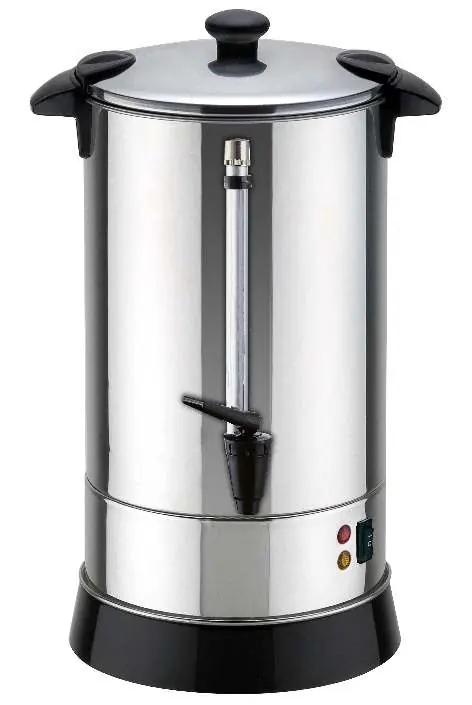
- 1. Housing
- 2. ON/OFF switch
- 3. Indicator lamp
- 4. Lid
- 5. Handle
- 6. Lid lock
- 7. Tap
First use
Before using the boiler for the first time, fill it with water up to the MAX level, boil it, and discard the water. Repeat this process three times to remove any potential factory odors.
Operation
- Place the boiler on a flat, stable, and heat-resistant surface.
- Fill the boiler with water between the minimum (2.5L) and maximum (20L) levels.
- Connect the power cable to a 220-240V ~50/60Hz outlet and press the ON/OFF switch. The indicator lamp will light up.
- After a few minutes, the water will reach approximately 97 degrees, and the automatic thermostat will maintain this temperature.
- When finished, switch off the device and unplug it.
Cleaning and maintenance
Regular descaling is required to maintain the device and ensure warranty validity. Use specific descaling agents according to the manufacturer's instructions. After descaling, rinse the boiler thoroughly three times. Do not use aggressive detergents on the housing as they may damage the surface or remove markings.
Safety instructions
- Never operate the boiler without water.
- Do not open the lid while the water is boiling or immediately after to avoid steam burns.
- Always hold the boiler by the handle.
- Do not leave the device unattended while connected to the power source.
- Keep away from children and people unfamiliar with the device.
- If the power cable is damaged, it must be replaced by a professional service center.
Technical specifications
- Capacity: 20L max, 2.5L min
- Voltage: 220-240V ~50/60Hz
- Power: 1650W
Manufacturer information
Camry
Practical help
Common problems
Device is switched on but does not heat
The thermal switch may have triggered. Ensure the device is unplugged and has cooled down, then reset the lever located on the bottom.
Device switches off automatically
This may happen if the boiler is empty or has insufficient water. Wait a few minutes for it to cool, add the appropriate amount of water, and switch it on again.
Before use
- Remove all packaging components
- Check the power cable for damage
- Place on a flat, heat-resistant surface
- Fill with water between 2.5L and 20L
- Boil and discard water 3 times to remove factory scent
Show more Show less
Images and diagrams
- 2: ON/OFF switch
- 3: Indicator lamp
Model compatibility
- Intended for domestic and similar use (staff kitchens, offices, hotels, motels, etc.)
- Not designed for use with external timers or remote control systems

Manual page author
Emily Carter
User documentation editor