Home Appliances / Small Kitchen Appliances
User Manual for Camry CR 3046 Waffle Maker
Quick guide and user manual for the Camry CR 3046 waffle maker. Includes setup, operation, cleaning instructions, and safety warnings.
Table of contents
Quick guide from the manual
The Camry CR 3046 is a waffle maker designed for domestic use. Before first use, ensure all packaging is removed, clean the plates, and perform an initial heat-up cycle to remove manufacturing odors. During operation, use the temperature control knob to adjust baking levels. Always use wooden or plastic utensils to avoid damaging the non-stick coating.
Description of the device
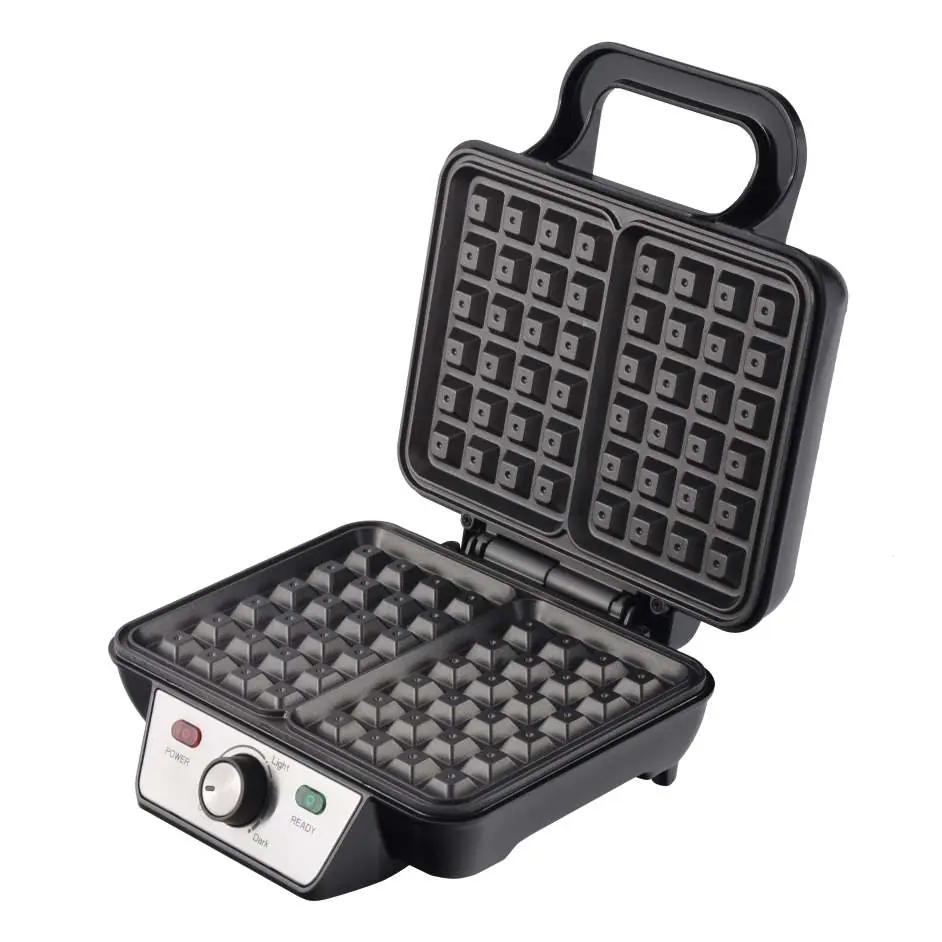
- 1. Handle
- 2. Power indicator (red)
- 3. Ready indicator (green)
- 4. Temperature control knob
- 5. Upper housing
- 6. Bottom housing
- 7. Heating plates
Before first use
- Remove all cartons and labels from the housing and from inside the device.
- Wipe the heating plates first with a wet cloth and then with a dry cloth.
- Apply a small amount of edible oil or vegetable fat to the heating plates.
- Close the device and plug it into a grounded socket. Set the temperature control knob to the 'DARK' position.
- Keep the device running for a few minutes to eliminate manufacturing odors. It is normal for the device to emit some smoke during this time.
- Clean the unit according to the cleaning instructions.
Using the device
- Prepare your batter according to your favorite recipe.
- Connect the closed device to a grounded socket. Set the temperature control knob to your desired setting: 'LIGHT' for lighter waffles and 'DARK' for darker waffles. The power and ready indicator lamps will light up.
- Wait approximately 10 minutes for the device to reach the required temperature. The ready indicator lamp will turn off.
- Open the device fully and place the prepared batter on the bottom heating plate.
- Close the device. Do not force the upper housing closed.
- During operation, the ready indicator lamp will turn on and off, indicating that the thermostat is maintaining the appropriate temperature.
- The baking time is approximately 5 to 15 minutes, depending on the ingredients and taste preference.
- Open the upper housing and remove the finished waffles using only a wooden or plastic spatula.
- Close the upper housing to allow the heating plate to reheat for the next batch.
Cleaning and maintenance
- Unplug the device after use and wait for it to cool down before cleaning.
- Wipe the heating plates first with a damp cloth and then with a dry cloth (you can also use a paper towel).
- If batter is difficult to remove, apply a little oil and wait a few minutes before gently removing it with a wooden paddle.
- Do not use metal or hard abrasive tools to clean the interior or exterior of the machine to avoid scratching the surface.
- Do not immerse the device in water.
Technical data
Power supply: 220-240V ~ 50/60HzNominal power: 1000WMaximum power: 1600W
Safety instructions
This device is intended for indoor use only. Do not use it for purposes incompatible with its application. Ensure the device is connected to a grounded power outlet. Keep the device away from children and do not leave it unattended while connected to power. Do not use the device if the power cord is damaged; it must be replaced by a professional service. Do not place the device on or near hot surfaces. Always unplug the device after use and allow it to cool down before storage.
Manufacturer information
Camry
Practical help
Common problems
Device emits smoke during first use
This is normal during the first few minutes of operation as manufacturing residues burn off.
Waffles are not cooking evenly
Ensure the device has reached the required temperature (ready indicator light goes off) before adding batter.
Batter is sticking to plates
Ensure plates are cleaned and lightly greased with edible oil before use. Do not use metal utensils.
Before use
- Remove all cartons and labels from the housing and inside.
- Wipe heating plates with a damp cloth, then dry.
- Apply a small amount of edible oil to the heating plates.
- Plug into a grounded socket.
- Set temperature control to 'DARK' for the initial burn-in.
Show more Show less
Specs in practice
- Power supply
- 220-240V ~ 50/60Hz
- Nominal power
- 1000W
- Maximum power
- 1600W
Images and diagrams
- 1. Handle: Used to open and close the device.
- 2. Power indicator (red): Shows the device is connected to power.
- 3. Ready indicator (green): Indicates the device has reached the set temperature.
- 4. Temperature control knob: Adjusts the baking temperature.
- 5. Upper housing: Top part of the waffle maker.
Model compatibility
- Use only with 220-240V ~ 50/60Hz power sources.
- Not designed for use with external schedulers or remote control systems.

Manual page author
Emily Carter
User documentation editor