Home Appliances / Microwaves
User Manual for Candy CMW 2070DW Microwave Oven
Comprehensive user guide for the Candy CMW 2070DW microwave oven. Includes installation instructions, cooking modes, safety warnings, cleaning tips, and troubleshooting.
PDF source: polski · summary: English
Quick answers from the manual
Quick answer
- To operate the Candy CMW 2070DW, place food inside, close the door, select the power level using the POWER button, set the time using the TIME/WEIGHT dial, and press START/QUICK START. p. 18
Key actions
- Set Clock p. 18
- Set Child Lock p. 18
First start
- Remove all packing materials from inside the door. p. 15
Show 4 more answers Show less
Problems and fixes
Oven fails to operate
Check power connection, fuse/circuit breaker, and ensure door is securely closed.
p. 16Maintenance and reset
- Clean regularly, including roller ring and oven floor. Use mild detergent. p. 19
Technical specifications
| Parameter | Value | Meaning | Pages |
|---|---|---|---|
| Power Output | 700W | Microwave power | p. 15 |
Where to find it in the PDF
- Specifications p. 15
- Installation p. 15
- Control Panel p. 17
Table of contents
Manual images
Click an image to enlargeQuick Guide
The Candy CMW 2070DW is a 20-liter microwave oven. To start cooking, place food inside, close the door, select the power level using the POWER button, set the time using the TIME/WEIGHT dial, and press START/QUICK START. For instant cooking, press START/QUICK START repeatedly to add time in 30-second increments.
Safety Instructions
- Do not operate the oven with the door open.
- Do not place objects between the oven front and the door.
- Do not use the oven if it is damaged (door, hinges, latches, or seals).
- Do not heat sealed containers as they may explode.
- Do not fry food in the oven.
- Pierce foods with heavy skins (potatoes, apples, etc.) before cooking.
- Keep the oven clean to prevent surface deterioration.
Installation
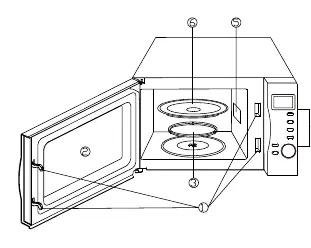
- Ensure all packing materials are removed from inside the door.
- Place on a flat, stable surface capable of supporting the oven's weight.
- Maintain proper ventilation: 20cm above, 10cm at the back, and 5cm on both sides.
- Ensure the power cord is not damaged and the socket is easily accessible.
Control Panel
The control panel features the following buttons:
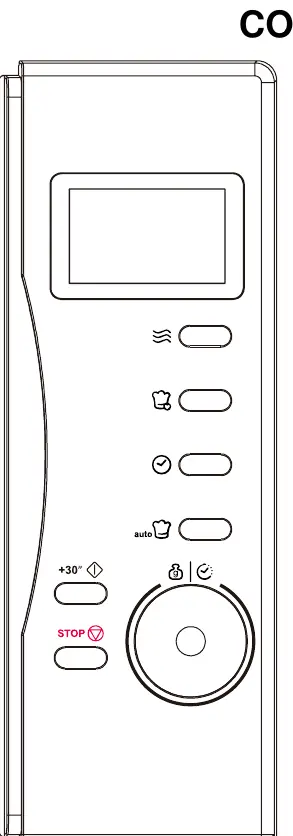
- POWER: Sets the microwave power level.
- MULTI STAGE COOKING: Allows setting multiple cooking programs.
- CLOCK: Used to set the digital clock.
- AUTO COOK: Provides instant settings for popular foods.
- START/QUICK START: Starts cooking or adds time.
- TIME/WEIGHT: Dial to set time, weight, or servings.
- STOP/CANCEL: Stops or cancels cooking; also used for child lock.
Operation
Setting the Clock
- Press the CLOCK button once or twice (12 or 24-hour cycle).
- Turn TIME/WEIGHT to set the hour.
- Press CLOCK.
- Turn TIME/WEIGHT to set the minutes.
- Press CLOCK to confirm.
Microwave Cooking
- Press POWER repeatedly to select the power level.
- Turn TIME/WEIGHT to set the desired time (max 95 minutes).
- Press START/QUICK START.
Child Lock
To set: Press and hold STOP/CANCEL for 3 seconds. A beep sounds and the lock indicator lights up. To cancel: Press and hold STOP/CANCEL for 3 seconds until the indicator turns off.
Auto Cook Menu
The oven includes pre-programmed settings for foods like coffee/soup, rice, spaghetti, potatoes, auto reheat, fish, pizza, and popcorn. Press AUTO COOK, select the food type, set the weight/serving using the TIME/WEIGHT dial, and press START/QUICK START.
Cleaning and Maintenance
- Always unplug the oven before cleaning.
- Clean the interior with a damp cloth; use mild detergent if necessary.
- Clean the exterior with a damp cloth, ensuring no water enters ventilation openings.
- Clean the door, window, and seals frequently.
- Remove the glass tray and roller ring for cleaning in warm soapy water or a dishwasher.
- To remove odors, heat a bowl of water with lemon juice and zest for 5 minutes.
Troubleshooting
If the oven fails to operate, check the following:
- Ensure the oven is plugged in securely.
- Check the fuse or circuit breaker.
- Ensure the door is securely closed.
- If the issue persists, contact a qualified technician.
Manufacturer information
Candy
Practical help
Common problems
Oven does not start
Check if the power plug is inserted securely, check the circuit fuse or breaker, and ensure the door is closed properly.
Radio or TV interference
Clean the door and sealing surfaces, reorient the antenna, or move the microwave away from the receiver.
Before use
- Remove all packing materials from inside the door.
- Place the oven on a flat, stable surface.
- Ensure sufficient airflow (20cm above, 10cm back, 5cm sides).
- Check for damage to the door, seals, hinges, and latches.
- Ensure the glass tray and roller ring are correctly positioned.
Show more Show less
Specs in practice
- Power Consumption
- 1200W (Microwave)
- Microwave Power Output
- 700W
Images and diagrams
- The control panel includes buttons for Power, Multi Stage Cooking, Clock, Auto Cook, Start/Quick Start, Time/Weight, and Stop/Cancel.
Model compatibility
- Use microwave-safe utensils only.
- Avoid metal trays, racks, or foil.
- Use round or oval dishes for even cooking.

Manual page author
Michael Turner
Technical manual editor