Home Appliances / Washing Machines
User Manual for Candy Washing Machine 148TBBE-80
Comprehensive user guide for the Candy 148TBBE-80 washing machine. Includes installation instructions, operating procedures, Smart Touch NFC setup, maintenance tips, and troubleshooting for common error codes.
Table of contents
Manual images
Click an image to enlargeQuick guide from the manual
To operate your washing machine, follow these steps: turn on the machine and select the required program. Adjust the washing temperature if necessary and press the required option buttons. Press the START/PAUSE button to begin the cycle. Wait for the DOOR LOCKED light to turn off before opening the door after the cycle finishes.
Installation
Proper installation is critical for the machine's performance and warranty coverage.
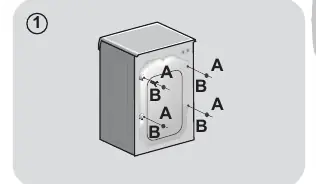
- Transport screws: Remove the 2 or 4 transportation screws (A) on the back and remove the flat washers, rubber bungs, and plastic spacer tubes (B) as illustrated in figure 1. Cover the holes with the provided plastic caps.
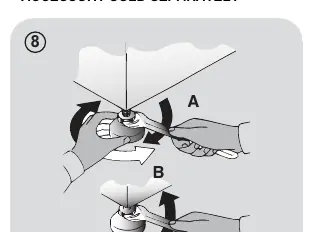
- Leveling: Level the appliance using the feet. Turn the nut clockwise to release the screw, rotate the foot to raise or lower it until it touches the floor, and lock the foot by tightening the nut against the bottom of the machine.
- Water connection: Connect the water hose to the water supply tap using only the hose supplied with the appliance. Do not reuse old hose-sets.
Detergent drawer
The detergent drawer is split into 3 compartments:
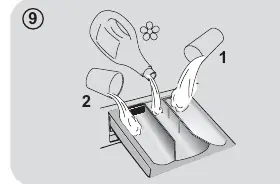
- Compartment 1: For prewash detergent.
- Compartment (symbol): For special additives, softeners, starch, fragrances, etc.
- Compartment 2: For washing detergent.
Only use liquid products if the machine is set to automatically dose additives. Some models include a liquid detergent cup for compartment 2.
Smart Touch
This appliance features Smart Touch technology, allowing interaction via the Candy simply-Fi App on Android smartphones equipped with NFC. To use it, enable NFC on your phone, turn the machine knob to the Smart Touch position, and follow the app instructions to register and manage the machine.
Cleaning and maintenance
- Exterior: Clean with a damp cloth; avoid abrasives, alcohol, or diluents.
- Drawer: Regularly clean the detergent drawer under running water to avoid residue accumulation.
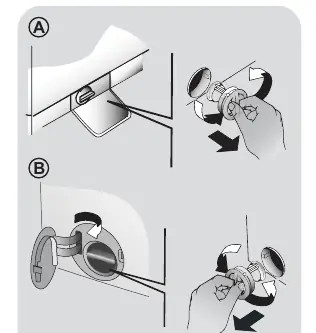
- Filter: Check and clean the pump filter 5 or 6 times a year. Ensure the machine is disconnected from power and empty of water before unscrewing the filter counter-clockwise.
Troubleshooting
If the machine displays an error, consult the following:
- E2: Machine cannot load water. Check if the tap is open, the hose is not kinked, and the filter is clean.
- E3: Machine does not drain. Check the filter and drain hose for blockages.
- E4: Too much foam/water. Ensure correct detergent usage.
- E7: Door problem. Ensure the door is closed correctly.
Manufacturer information
Candy
Practical help
Common problems
Machine does not load water (E2)
Check that the water supply tap is open, the hose is not bent or trapped, and the anti-sand filter is clean.
Machine does not drain (E3)
Check that the filter is not clogged, the drain hose is not kinked, and the home drainage system is not blocked.
Too much foam (E4)
Ensure you are using the correct amount of detergent and that it is suitable for machine washing.
Door will not open/close (E7)
Ensure the door is fully closed. If locked, unplug the machine, wait 2-3 minutes, and try again.
Before use
- Remove all transportation screws and spacers from the back of the machine.
- Level the machine using the adjustable feet.
- Connect the water supply hose to the tap.
- Ensure the drain hose is positioned correctly (50-85 cm height).
- Check that the detergent drawer is clean.
- Ensure the power plug is accessible.
Specs in practice
- Water pressure
- Must be between 0.05 MPa and 0.8 MPa.
Images and diagrams
- Figure 1: Removal of transportation screws and spacers.
- Figure 8: Leveling the machine using the feet and locking nut.
- Figure 9: Detergent drawer compartments layout.
Model compatibility
- Smart Touch features require an Android smartphone with NFC technology.
- Some models include specific features like Hot&Cold connection, Aquastop, or Aquaprotect.

Manual page author
David Miller
Documentation analyst
Organizes user manual content into clear summaries, with attention to model details, product context, and everyday usability.