Electronics / Camera Lenses
Canon EF 100mm f/2.8L Macro IS USM Lens User Manual
Quick guide for the Canon EF 100mm f/2.8L Macro IS USM lens. Learn about mounting, focus modes, image stabilizer settings, macro photography techniques, and specifications.
Table of contents
Manual images
Click an image to enlargeQuick Guide from the Manual
This manual provides essential instructions for operating the Canon EF 100mm f/2.8L Macro IS USM lens. Key features include an Image Stabilizer (IS) for steady shots, an Ultrasonic Motor (USM) for quiet autofocus, and 1:1 macro magnification capabilities. Always handle the lens with care, avoid looking at the sun through the lens, and protect it from condensation when moving between temperature extremes.
Nomenclature
The lens features several key controls:
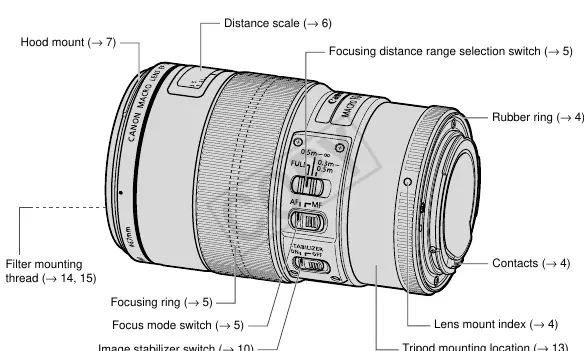
- Focusing ring: Used for manual focus.
- Focus mode switch: Toggles between AF (Autofocus) and MF (Manual Focus).
- Focusing distance range selection switch: Limits the focus range to speed up autofocusing.
- Image stabilizer switch: Turns the IS function ON or OFF.
- Tripod mounting location: For attaching a tripod mount ring.
Mounting and Detaching
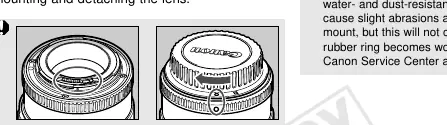
To mount the lens, align the lens mount index with the camera's mount index and rotate clockwise. When detaching, ensure the lens is placed with the rear end up to protect the electrical contacts. If contacts become soiled or scratched, clean them with a soft cloth to prevent operational errors.
Focusing
The lens supports both Autofocus (AF) and Manual Focus (MF). You can use the focus mode switch to select your preference. The focusing distance range switch allows you to limit the range (FULL, 0.3m-0.5m, or 0.5m-infinity) to improve autofocus speed. For infinity focus compensation, align the vertical line of the L mark with the distance indicator on the distance scale.
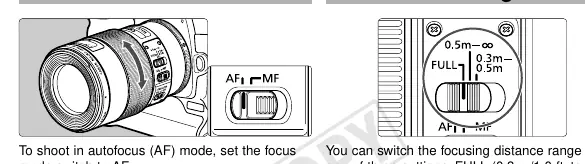
Image Stabilizer
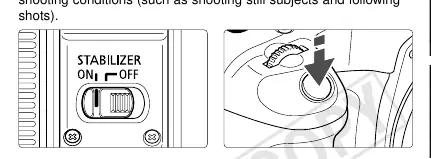
The Image Stabilizer helps reduce camera shake. Set the switch to ON to activate. It is particularly effective for close-up shooting, low-light conditions, and when using a monopod. Note that the stabilizer consumes more power and should be turned OFF when using a tripod or during long exposures (Bulb setting).
Macro Photography Techniques
For close-up shots, the depth of field is very shallow. Use the following techniques to minimize blur:
- Hold the camera firmly, using a steady surface like a table or wall for support.
- Use AI Servo AF mode on your camera.
- Use a faster shutter speed than normal to compensate for magnification.
Accessories and Compatibility
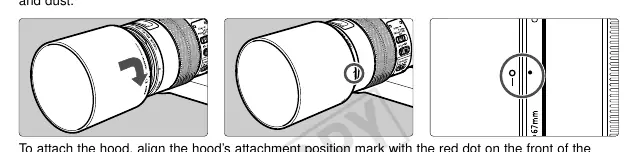
- Hood: Use the ET-73 hood to block unwanted light and protect the lens. Align the attachment mark with the red dot on the lens and turn until it clicks.
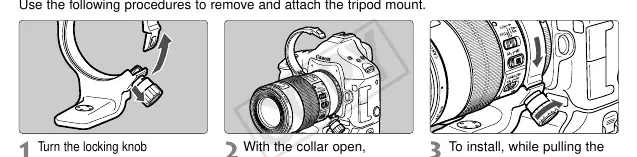
- Tripod Mount: The D (B) tripod mount ring (sold separately) allows for rotation between vertical and horizontal positions.
- Filters: 67mm filters can be attached to the front thread. Do not use filters and a macro flash simultaneously.
- Extension Tubes: Compatible with EF12 II and EF25 II for increased magnification.
- Macro Flash: Compatible with Canon Macro Ring Lite MR-14EX or Macro Twin Lite MT-24EX using the Macro Lite Adapter 67.
Specifications
The lens features a focal length of 100mm, f/2.8 aperture, and a minimum focusing distance of 0.3m. It is constructed of 12 groups and 15 elements. The filter diameter is 67mm, and the weight is approximately 625g.
Manufacturer information
Canon Inc.
Practical help
Common problems
Condensation on lens surface
Place the lens in an airtight plastic bag before moving it from a cold to a warm environment to allow it to warm gradually.
Blurred macro shots
Use a faster shutter speed, ensure the camera is held firmly, or use a tripod. Ensure the Image Stabilizer is ON for handheld shots.
Tripod mount interference
If a battery pack or vertical grip is attached to the camera, it may bump into the tripod mount. Remove the battery pack/grip or the tripod mount.
Before use
- Ensure electrical contacts are clean and free of fingerprints.
- Check that the focus mode switch is set to the desired mode (AF or MF).
- Set the focusing distance range switch to the appropriate range for your subject.
- Attach the lens hood correctly by aligning the red dots.
- Verify the Image Stabilizer switch is set to ON for handheld shooting.
Images and diagrams
- The nomenclature diagram identifies the focusing ring, distance scale, focus mode switch, and image stabilizer switch.
- The mounting diagram illustrates aligning the lens mount index with the camera.
- The tripod mount section shows how to loosen the locking knob to remove or adjust the collar.
Model compatibility
- Compatible with Canon EOS cameras.
- Compatible with Extension Tube EF12 II and EF25 II.
- Not compatible with EF1.4X II or EF2X II extenders.
- Filters and macro flash cannot be used simultaneously.

Manual page author
David Miller
Documentation analyst
Organizes user manual content into clear summaries, with attention to model details, product context, and everyday usability.