Electronics / Camera Lenses
User Manual for Canon 15x50 IS ALL WEATHER and 18x50 IS ALL WEATHER Binoculars
Quick guide for Canon 15x50 IS ALL WEATHER and 18x50 IS ALL WEATHER binoculars. Learn how to adjust focus, use the Image Stabilizer, replace batteries, and troubleshoot common issues.
Table of contents
Manual images
Click an image to enlargeImportant Information
The Canon 15x50 IS ALL WEATHER and 18x50 IS ALL WEATHER are high-magnification binoculars featuring an optical Image Stabilizer. These binoculars are water-resistant and suitable for use in the rain, but they are not designed for underwater use. Always handle them as precision instruments and avoid dropping or subjecting them to shock.
Device Overview
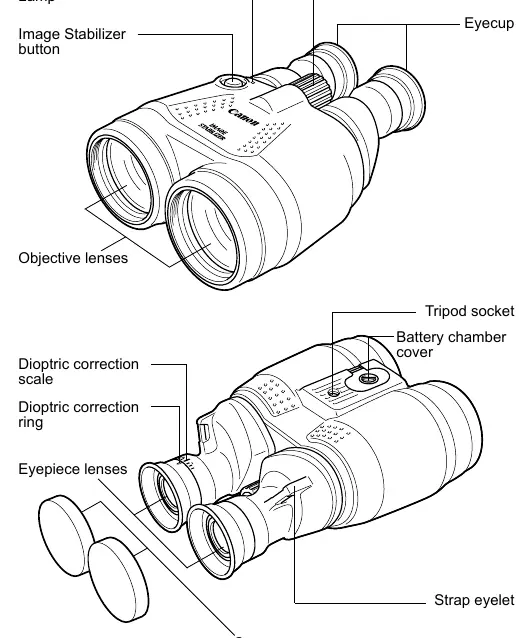
The binoculars feature a focusing knob, dioptric correction ring, and an Image Stabilizer button. The objective lenses are 50mm in diameter. A tripod socket is located on the bottom for stable mounting.
Setup and Installation
Attaching the Strap: Ensure the strap is securely fastened to the eyelets and does not loosen when pulled.
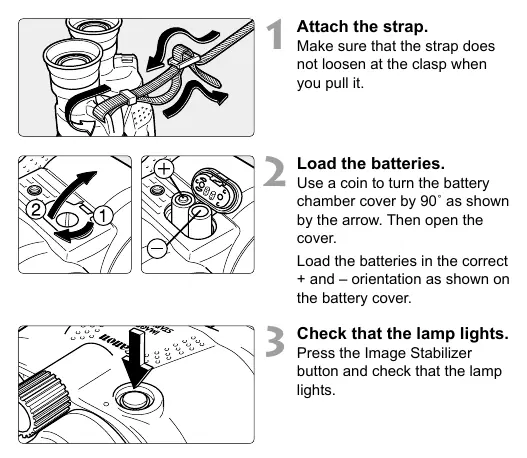
Loading Batteries: Use a coin to turn the battery chamber cover 90 degrees. Insert two AA batteries according to the polarity (+/-) markings shown on the cover. Do not replace batteries while the binoculars are wet; wipe them dry first.
Adjusting the Binoculars
Width Adjustment: Look through the binoculars and adjust the width until the left and right images converge into a single circle. This minimizes eye fatigue.
Diopter Adjustment: First, look through the left eyepiece and adjust the focusing knob until the object is sharp. Then, look through the right eyepiece and turn the dioptric correction ring until the object is sharp.
Focusing: Turn the focusing knob while looking through the eyepiece until the image is sharp.
Using the Image Stabilizer
The Image Stabilizer helps steady the image when holding the binoculars by hand. There are two modes of operation:
- Holding down the button: The stabilizer operates continuously as long as you hold the button.
- Five-minute operation: Press the button once and release. The stabilizer will operate for five minutes. Press again to stop.
The lamp lights up while the Image Stabilizer is active. If the battery power is low, the stabilizer may generate noise or vibration.
Maintenance and Battery Care
Lens Cleaning: Use a blower brush to remove dust, then use a soft, dry cloth to wipe the lens gently. Do not use organic solvents.
Storage: Store in a well-ventilated, dry place. Avoid humid locations to prevent fungus. Remove batteries if the binoculars will not be used for a prolonged period to prevent leakage and corrosion.
Battery Tips: In cold temperatures, lithium batteries are recommended as they perform better than alkaline batteries.
Troubleshooting
Image is not clear: Clean the lens, adjust the width between your eyes, check the diopter setting, or refocus using the focusing knob.
Image Stabilizer does not operate: Ensure batteries are loaded and have sufficient power. If the lamp does not light, replace the batteries.
Strange noise during stabilization: This usually indicates exhausted batteries; replace them with new ones.
Air bubbles in lens: This can occur due to atmospheric pressure changes (e.g., on airplanes or mountains) and is not a defect. They typically disappear within a week.
Technical Specifications
- Magnification: 15x (15x50 model) or 18x (18x50 model)
- Objective Lens Diameter: 50 mm
- Image Stabilizer System: Optical correction with vari-angle prism
- Operating Temperature: -10°C to 45°C (14°F to 113°F)
- Humidity: 90%
- Dimensions: 152 x 193 x 81 mm
- Weight: Approx. 1200 g (excluding batteries)
Manufacturer information
Canon Inc.
Practical help
Common problems
Image is not clear
Clean the lens with a blower brush and soft cloth, adjust the width between eyepieces, check diopter settings, or refocus.
Image Stabilizer does not operate
Check if batteries are installed and have sufficient power. Replace batteries if the lamp does not light.
Strange noise during stabilization
This indicates low battery power. Replace both batteries with new ones.
Air bubbles in the lens
Caused by atmospheric pressure changes. This is normal and will disappear on its own after about a week.
Before use
- Attach the strap securely to the eyelets.
- Insert two fresh AA batteries (alkaline or lithium recommended).
- Ensure the battery cover is locked by turning it 90 degrees.
- Press the Image Stabilizer button to verify the lamp lights up.
- Adjust the width of the binoculars until images converge.
- Adjust the diopter for your eyesight.
Specs in practice
- Magnification
- 15x or 18x zoom capability depending on the specific model.
- Objective lens
- 50mm diameter allows for high light intake, resulting in a bright image.
- Image Stabilizer
- Uses a vari-angle prism to compensate for hand shake.
- Operating environment
- Designed to function between -10°C and 45°C.
Images and diagrams
- The nomenclature diagram identifies the focusing knob, dioptric correction ring, and Image Stabilizer button.
- Battery installation requires a coin to turn the battery chamber cover 90 degrees.
Model compatibility
- Water-resistant for use in rain, but not for underwater use.
- Battery Pack BP-B1 (sold separately) can be used as an external power source.
- Size-AA manganese batteries are not recommended due to low energy.

Manual page author
Emily Carter
User documentation editor
Prepares concise manual descriptions and highlights the most useful setup, operation, and maintenance information for readers.