Electronics / Cameras
Repair Guide for Canon EOS 20D CF Card Slot
A detailed repair guide for the Canon EOS 20D, focusing on fixing a damaged Compact Flash (CF) card slot. Includes step-by-step instructions for disassembly, pin replacement, and soldering techniques to resolve 'Err CF' errors.
Quick answers from the manual
Quick answer
- This guide provides instructions on how to repair a damaged Compact Flash (CF) card slot on a Canon EOS 20D by replacing broken pins and rerouting damaged traces. p. 1
Key actions
- Disassemble the camera to access the CF card slot. p. 3, 4, 5, 6
- Replace broken pins using thin wire. p. 8, 9, 10
Problems and fixes
Err CF message
Inspect the CF card slot for bent or broken pins and repair as described.
p. 10Show 1 more answers Show less
Where to find it in the PDF
- Disassembly p. 3, 4, 5, 6
Table of contents
Manual images
Click an image to enlargeQuick guide from the manual
This guide is intended for advanced users comfortable with electronics repair. It details the process of accessing and repairing the Compact Flash (CF) card slot on a Canon EOS 20D. Required tools: Phillips #0 screwdriver, soldering workstation, spudger, and thin multi-stranded wire or solid-core ethernet cable.
Disassembly
Follow these steps to access the CF card slot:
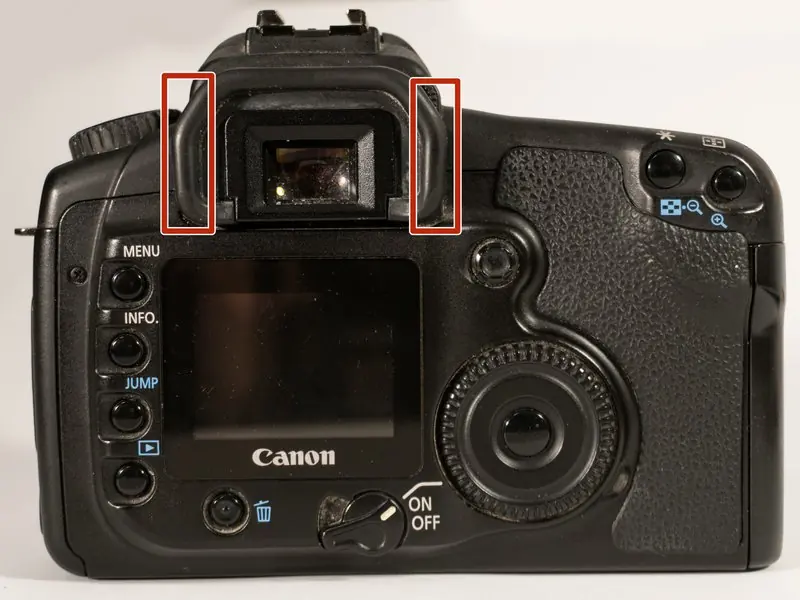
- Eyepiece: Pull up on both sides of the eyepiece cap to remove it. Remove the two screws hidden underneath.
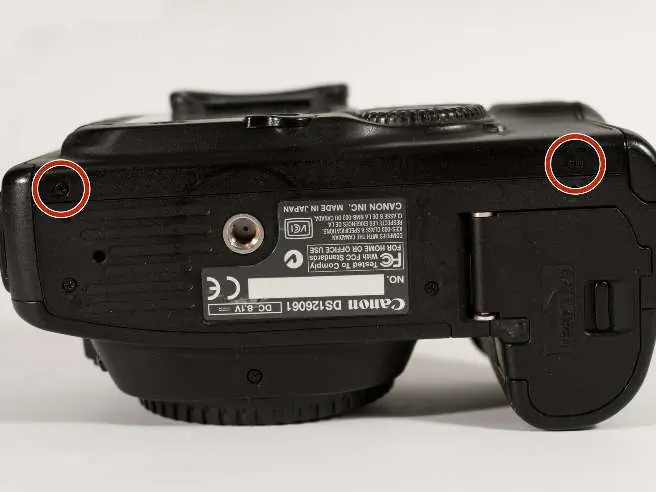
- Rear Panel: Peel off the rubber grip on the back to reveal a hidden screw. Remove both screws from the rear. Remove the two screws from the bottom of the camera.
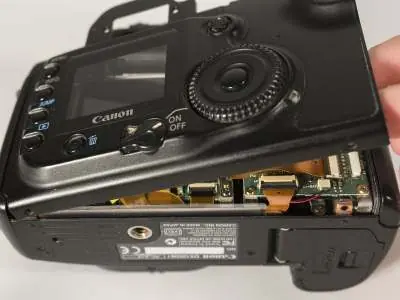
- Panel Removal: Carefully lift the rear panel. Warning: Do not lift too high to avoid tearing the flex cable or damaging the connector. Use a spudger to flip the lock on the flex cable connector up.
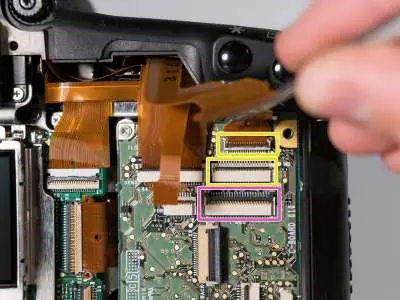
- Cables: Disconnect all labeled connectors by opening their latches. Be careful with the small green connector to avoid tearing the tiny wires.
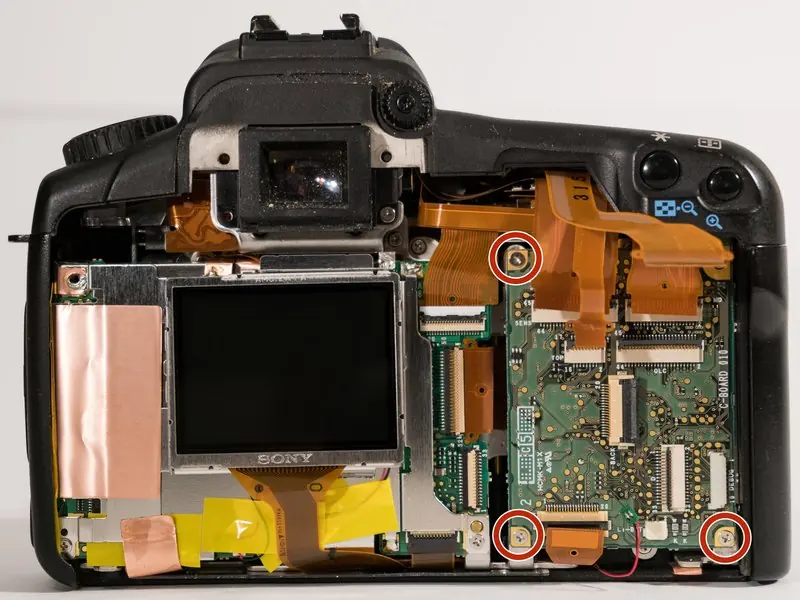
- Secondary Board: Remove the three screws from the edges of the secondary control board. Flip the board up and out to unscrew the ground connection.
- CF Slot: Open the connector for the CF slot, remove the screw at the bottom, and the two screws at the top to remove the CF slot unit.
Repairing the CF Card Slot
If the CF card slot pins are damaged:
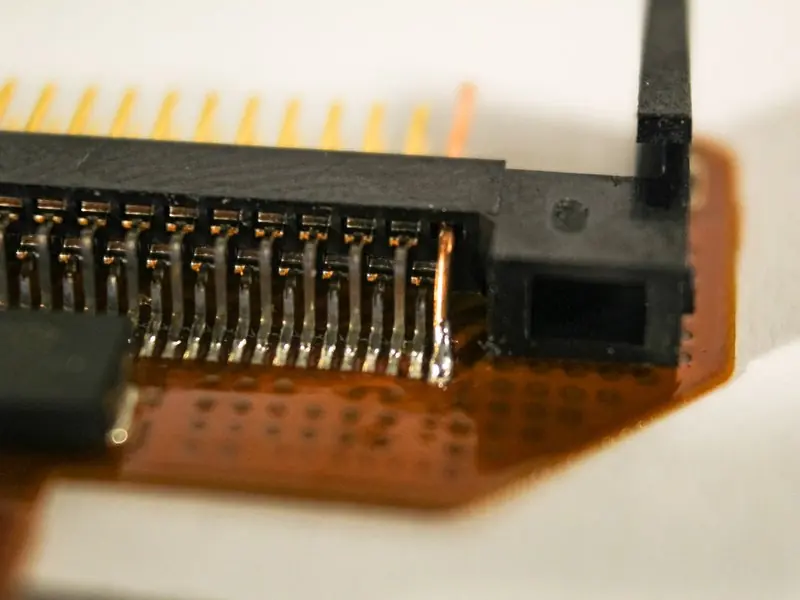
- Bent Pins: Attempt to carefully bend pins back into place. Note that severely bent pins may snap.
- Replacing Pins: If a pin snaps, it can be replaced using a section of solid-core wire from an ethernet cable. The replacement pin should be longer than its neighbors if it is an extended pin.
- Rerouting Traces: If pins are pushed in and rip up traces, you must reroute connections from the bottom vias. Use a sharp tool like an Xacto knife to scratch the solder mask off the vias before soldering.
- Soldering Tips: Taping the connector to your work surface helps with small joints. Ensure no large lumps of solder remain, as they may touch the metal housing.
Reassembly
To reassemble your device, follow the disassembly instructions in reverse order. When reattaching the front panel, insert the left side first to ensure the small lip fits under the camera case.
Manufacturer information
Canon Inc.
Practical help
Common problems
Err CF message
This is often caused by bent or broken pins in the CF card slot. Inspect the pins and repair or replace them as needed.
Torn flex cable
Ensure you do not lift the rear panel too high during disassembly to avoid damaging the flex cable or its connector.
Solder touching housing
Ensure solder joints are slim and do not protrude, as they may touch the metal housing of the connector upon reassembly.
Before use
- Phillips #0 screwdriver
- Soldering workstation
- Thin multi-stranded wire or solid-core ethernet cable
- Sharp tool (e.g., Xacto knife) for scratching solder mask
Show more Show less
Images and diagrams
- The guide uses photos to highlight screw locations and cable connectors.
- Specific diagrams show which pins are bent and how to solder wire to vias.
Model compatibility
- This guide is specific to the Canon EOS 20D.

Manual page author
Emily Carter
User documentation editor