Electronics / Cameras
User Manual for Canon RF 24-240mm F4-6.3 IS USM Lens
Quick guide for the Canon RF 24-240mm F4-6.3 IS USM lens. Learn about lens attachment, focusing and control ring settings, image stabilizer usage, zoom locking, and technical specifications.
Quick answers from the manual
Quick answer
- The Canon RF 24-240mm F4-6.3 IS USM is a high-magnification zoom lens for EOS R series cameras. It features a dual-purpose focusing/control ring, image stabilization, and a zoom lock mechanism. p. 1, 2
Key actions
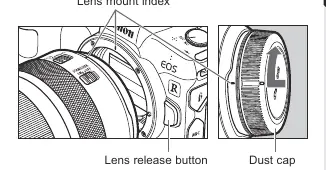
- Attach the lens by aligning the mount indexes and turning clockwise. p. 6
- Lock the zoom ring at 24mm for carrying. p. 9
First start
- Ensure camera firmware is updated. p. 1
Show 3 more answers Show less
Problems and fixes
Condensation on lens
Use an airtight plastic bag when moving between temperature extremes.
p. 3Technical specifications
| Parameter | Value | Meaning | Pages |
|---|---|---|---|
| Focal Length | 24-240mm | Zoom range | p. 14 |
| Filter Diameter | 72mm | Size of compatible filters | p. 14 |
| Weight | Approx. 750g | Lens weight | p. 14 |
Where to find it in the PDF
- Safety Precautions p. 2, 3
- Nomenclature p. 5
- Attaching/Detaching p. 6
- Focusing/Control Ring p. 7
- Fixing Zoom Ring p. 9
- Image Stabilizer p. 10, 11
- Specifications p. 14, 15
Table of contents
Manual images
Click an image to enlargeQuick Guide
This guide provides essential information for operating the Canon RF 24-240mm F4-6.3 IS USM lens. Ensure your camera firmware is updated to the latest version for full compatibility, especially with EOS R and EOS RP models.
Safety Precautions
- Do not look directly at the sun or strong light sources through the lens to avoid loss of sight.
- Do not leave the lens in the sun without the lens cap attached to prevent fire or malfunction.
- Avoid extreme temperatures.
- Prevent condensation when moving between cold and warm environments by placing the lens in an airtight plastic bag until it warms up gradually.
Nomenclature
Key components include the focusing/control ring, zoom ring, zoom ring lock lever, image stabilizer switch, and focusing/control selector switch.
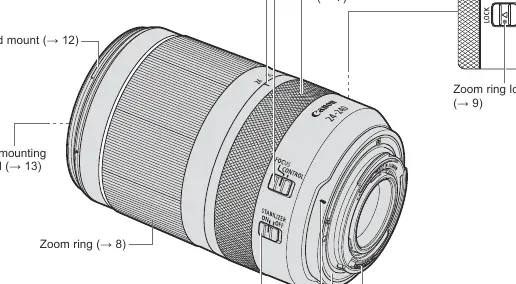
Attaching and Detaching the Lens
To attach, align the lens mount indexes on the lens and camera, then turn the lens clockwise until it clicks. To detach, press the camera's lens release button and turn the lens counterclockwise.
Focusing and Control Ring
The ring serves a dual purpose based on the selector switch position:
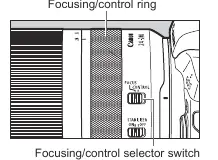
- FOCUS: Used for manual focusing.
- CONTROL: Used for camera settings like shutter speed or aperture (configured via camera menu).
Zooming and Locking
Turn the zoom ring to adjust focal length. The zoom ring can be locked at the 24mm position using the lock lever to prevent the lens from extending while carrying.
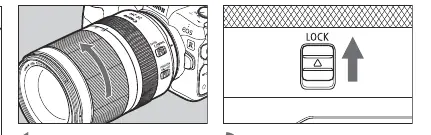
Image Stabilizer
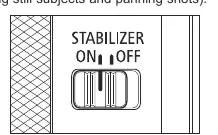
Use the switch to turn the Image Stabilizer ON or OFF. It is recommended to turn it OFF when using a tripod. Dynamic IS is available for movie shooting and activates automatically when the camera is set to movie mode.
Hood and Filters
- Hood: Attach by aligning the red mark on the hood with the red dot on the lens and turning until it clicks. Can be reverse-mounted for storage.
- Filters: Only one filter can be attached at a time. Use the Canon Circular Polarizing Filter PL-C B if needed.
Technical Specifications
- Focal Length/Aperture: 24-240mm f/4-6.3
- Lens Construction: 15 groups, 21 elements
- Filter Diameter: 72mm
- Weight: Approx. 750g
Manufacturer information
Canon Inc.
Practical help
Common problems
Lens condensation
Place the lens in an airtight plastic bag before moving it from a cold to a warm environment to allow it to warm up gradually.
Blurred shots
Ensure the Image Stabilizer is ON for handheld shooting. Turn it OFF when using a tripod.
Zoom ring will not lock
The zoom ring can only be locked at the widest position (24mm).
Before use
- Check camera firmware compatibility
- Ensure lens contacts are clean
- Remove lens cap
- Align lens mount index
- Set focus/control selector switch
Show more Show less
Images and diagrams
- Lens mount index: Alignment point for attaching the lens.
- Focusing/control selector switch: Toggles between focus and control ring functions.
- Zoom ring lock lever: Secures the lens at 24mm.
- Image stabilizer switch: Toggles stabilization on or off.
Model compatibility
- Compatible with EOS R series cameras.
- Requires latest firmware for EOS R and EOS RP to avoid limitations like unavailable magnified view.

Manual page author
Emily Carter
User documentation editor