Smart Home / Sensors Buttons
Casambi 15W 1CH NFC LED Driver User Manual
Quick guide for the Casambi 15W 1CH NFC LED Driver. Learn how to install, configure via NFC, wire for dimming, and understand technical specifications.
Table of contents
Manual images
Click an image to enlargeQuick guide from the manual
The Casambi 15W 1CH NFC LED Driver is a constant current driver designed for indoor LED lighting. Key features include NFC-based configuration, Casambi network compatibility, and support for Push Dim functionality. Important: Do not install the device while power is applied. Ensure the device is not exposed to moisture.
Installation and Wiring
The driver supports two primary wiring configurations:
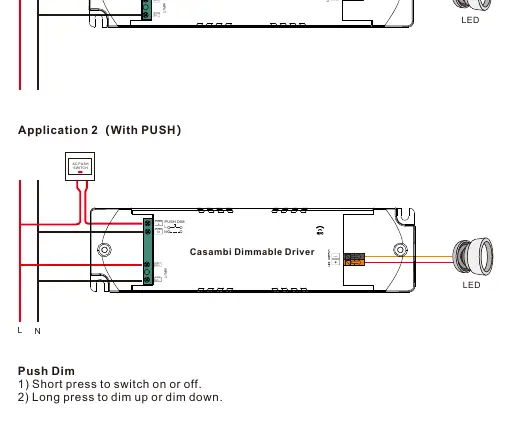
- Application 1 (Without PUSH): Standard connection for power input (L, N) and LED output.
- Application 2 (With PUSH): Connection including a push switch for manual dimming control.
Ensure all connections are secure before applying power. The device is a Class II power supply with a fully isolated plastic case.
NFC Configuration
Parameters such as output current (100-700mA) are set via the SR NFC Tool app:
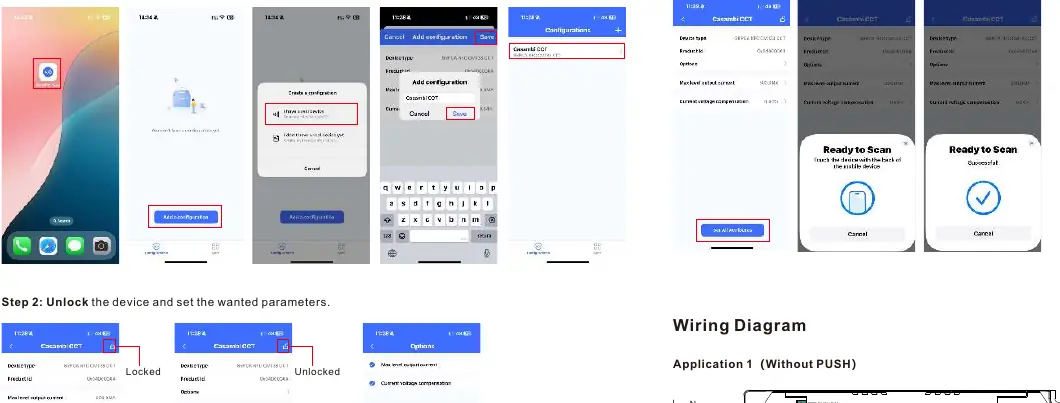
- Install the SR NFC Tool app from the Apple Store or Google Play.
- Ensure your phone's NFC function is enabled.
- Open the app and follow the instructions to add the device.
- Unlock the device in the app to set desired parameters (e.g., target current, current compensation).
- Write the configuration to the device. Note: Do not power on the device during the programming process.
Push Dim Operation
If a push switch is connected:
- Short press: Switch the light on or off.
- Long press: Dim the light up or down.
Technical Specifications
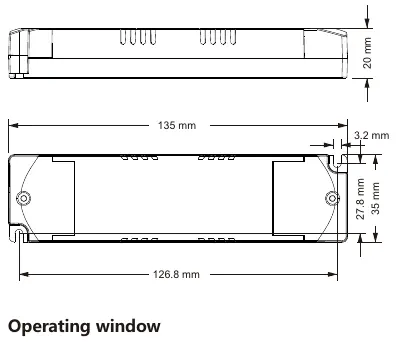
- Input Voltage: 220-240VAC / 220-240VDC
- Output Power: Max. 15W
- Output Current: 100-700mA (adjustable via NFC)
- Dimming Method: Amplitude/CCR dimming
- Protection: Short circuit, over current, and over temperature protection (requires re-powering to reset).
- Operating Temperature: -25°C to +45°C
- IP Rating: IP20
Practical help
Common problems
Device not responding after programming
Ensure the device was not powered on during the programming process. Re-power the device after ensuring fault conditions are removed.
NFC configuration fails
Verify that your smartphone's NFC function is enabled and positioned correctly. If the app cannot be downloaded, contact support.
Overheating or Overcurrent protection triggered
Remove the fault conditions (e.g., check load) and re-power the device to reset.
Before use
- Ensure power is disconnected before starting installation.
- Verify the LED load is compatible (6-42V, 15W max).
- Download the SR NFC Tool app on your smartphone.
- Enable NFC on your smartphone.
- Check that the installation environment is dry (IP20 rating).
Specs in practice
- Output Current
- Adjustable from 100-700mA via NFC; default is 350mA.
- Dimming Method
- Amplitude/CCR dimming provides smooth and deep dimming.
Images and diagrams
- Application 1: Standard wiring diagram for power input and LED output.
- Application 2: Wiring diagram including a push switch for manual dimming control.
Model compatibility
- Works with Casambi network.
- Compatible with Type C MCBs (Miniature Circuit Breakers).

Manual page author
Emily Carter
User documentation editor
Prepares concise manual descriptions and highlights the most useful setup, operation, and maintenance information for readers.