Home Appliances / Personal Care
Cecotec RitualCare Air&Straight 2in1 Hair Straightener
Quick guide for the Cecotec RitualCare Air&Straight 2in1 hair straightener. Learn how to use temperature and speed settings, maintain the device, and troubleshoot common issues.
Table of contents
Quick guide from the manual
The Cecotec RitualCare Air&Straight 2in1 is a versatile hair styling tool that combines drying and straightening functions. Before use, ensure the mains voltage matches the device rating label and that your hands are dry. The device features multiple speed and temperature settings, a cold air mode, and a standby function for safety.
Description of the device
The device consists of the following main components:
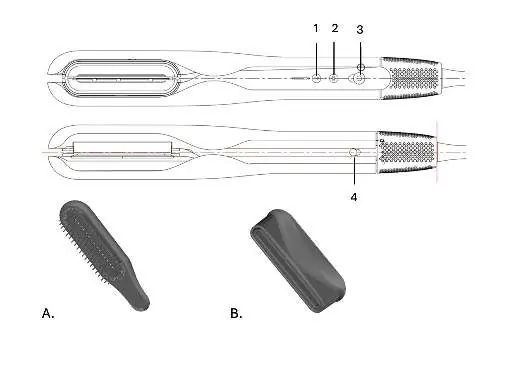
- Temperature setting button
- Cool air button
- Power/Speed setting switch
- Plates lock switch
- Accessories: Brush head and Concentrator nozzle
Operation
To operate the device, use the power/speed switch to select the desired speed (Low or High). Use the temperature button to cycle through settings: Low, Medium, High, and Boost. Note that the Boost setting is only available when the speed is set to High.
Drying and straightening
For best results, towel dry your hair to remove excess moisture before use. Hold the device with the plates closed and direct the airflow towards the roots. You can attach the concentrator nozzle for faster drying. Place 3 cm strands of hair between the plates and glide the device from root to tip.
Standby mode
If the device is left on a surface and no movement is detected, it will automatically reduce airflow and enter standby mode after approximately 8 seconds. It will resume operation when you pick it up again.
Cleaning and maintenance
Always unplug the device and let it cool down completely before cleaning. Never immerse the device in water. Clean the exterior with a damp (not wet) cloth. Regularly remove the air inlet filter cover and use a soft toothbrush to clean dust and dirt from the rear filter.
Troubleshooting
If the device does not turn on, check that it is correctly connected to a live power socket and the switch is in the 'on' position. If the device does not blow air, it may be in standby mode; use it again to reactivate. If the air is cold, ensure the cold air mode is not activated.
Safety instructions
Do not use the device near bathtubs, showers, or other water-filled containers. Keep the device away from flammable materials and heat sources. Do not use on pets, wigs, or artificial hair. Ensure air inlets and outlets are not blocked to prevent overheating.
Manufacturer information
Cecotec Innovaciones S.L.
Practical help
Common problems
Device does not turn on
Check that the plug is correctly connected to a live power socket and the power/speed switch is in the 'on' position.
Device does not blow air
The device may be in standby mode. Use the device again to reactivate it.
Air comes out cold
Cold air mode is activated. Press the cold air button again or press the temperature setting button to exit this mode.
Before use
- Remove all packaging materials.
- Check that all parts are included and in good condition.
- Ensure the mains voltage matches the device rating label.
- Ensure your hands are dry before touching the plug.
Images and diagrams
- 1: Temperature setting button
- 2: Cool air button
- 3: Power/Speed setting switch
- 4: Plates lock switch
- A: Brush head
Model compatibility
- Do not use on pets or animals.
- Do not use on wigs or fake hair.
- Boost temperature setting is only available at High speed.

Manual page author
David Miller
Documentation analyst
Organizes user manual content into clear summaries, with attention to model details, product context, and everyday usability.