Home Appliances / Air Fryers
User Manual for Cecotec BAKE&TOAST 570 / 610 4PIZZA Toaster Oven
Comprehensive user guide for the Cecotec BAKE&TOAST 570 / 610 4PIZZA toaster oven. Includes setup, operating instructions, cooking tips, cleaning, and technical specifications.
Quick answers from the manual
Quick answer
- The Cecotec BAKE&TOAST 570/610 is a 26L toaster oven. Before first use, heat it empty for 10 minutes at 230°C. Use the function knob to select heating modes (Upper, Lower, Convection) and the temperature knob to set heat between 90-230°C. p. 15
Key actions
- Adjusting rack level p. 15
- Cleaning p. 16
First start
- Heat empty oven for 10 minutes at 230°C p. 15
Problems and fixes
Strange odor or smoke
Normal during first use due to manufacturing wastes.
p. 15Technical specifications
| Parameter | Value | Meaning | Pages |
|---|---|---|---|
| Power | 1500 W | Power consumption | p. 16 |
| Capacity | 26 L | Internal volume | p. 16 |
Where to find it in the PDF
- Safety Instructions p. 13, 14
- Parts and Components p. 15
- Operation p. 15, 16
- Technical Specifications p. 16
Table of contents
Quick guide from the manual
The Cecotec BAKE&TOAST 570 / 610 4PIZZA is a 26-liter toaster oven designed for home use. Before using it for the first time, it is essential to heat the empty oven for 10 minutes at 230°C to remove manufacturing residues, which may cause a slight odor or smoke. Always use the provided tray handle and oven gloves when handling hot accessories.
Parts and components
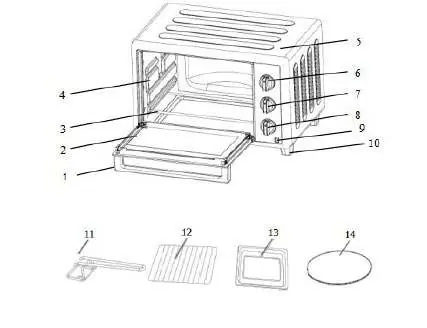
- Door handle
- Glass window
- Heating elements
- Temperature-selection knob
- Function knob
- Timer
- Light indicator
- Accessories: Wire rack, baking tray, tray handle, pizza stone
Before first use
Remove all packaging materials and check the appliance for damage. Place the oven on a flat, stable, heat-resistant surface. Perform the initial heating cycle as described in the quick guide section to prepare the oven for cooking.
Operation
Temperature control
Turn the temperature knob clockwise to set the desired temperature between 90°C and 230°C. You can select 'Upper' or 'Upper and lower' heating levels depending on the dish.
Function selector
Choose the heating mode based on the food type:
- Upper heating
- Lower heating / Upper heating
- Upper & Lower heating
- Upper heating + Convection
- Lower heating + Convection
- Upper & Lower heating + Convection
Timer
Turn the timer knob to the desired cooking time. The oven will turn off automatically when the time elapses, and an alarm will sound. You can turn it off manually by turning the knob to 'OFF'.
Cooking tips
The oven is suitable for various foods. Use the wire rack for potatoes and dry foods, and the baking tray for roasting chicken, steak, or gratin. For oil-splashing foods, place aluminum foil on the tray. Always adjust the rack position (3 levels available) according to the dish.
Cleaning and maintenance
Always unplug the oven and let it cool before cleaning. Do not immerse the appliance in water. Use a damp, soft cloth with a neutral cleaner to wipe the interior, exterior, and door. Do not use abrasive cleaners, metal brushes, or strong detergents.
Safety
- Do not use outdoors or in high humidity.
- Do not cover the appliance during use.
- Keep the cord away from hot surfaces and edges.
- Do not leave the oven unattended while in use.
- Not intended for use by children under 8 years old without supervision.
Manufacturer information
Cecotec Innovaciones S.L.
Practical help
Common problems
Strange odor or smoke during first use
This is normal due to manufacturing residues. Heat the empty oven for 10 minutes at 230°C before first use.
Oil splashing during cooking
Place 2 sheets of aluminum foil on the tray to reduce splashing.
Glass window damage
Do not apply water to the glass window while the oven is hot.
Before use
- Remove all packaging materials
- Check for visible damage
- Ensure the outlet is grounded
- Heat empty oven for 10 minutes at 230°C
Images and diagrams
- Fig 1: Oven parts overview
- Fig 2: Tray handle usage
- Fig 3: Rack level adjustment
- Fig 4: Temperature control
- Fig 5: Function selector
Model compatibility
- Not for outdoor use
- Not for commercial or industrial use
- Do not use with external timers or remote control systems

Manual page author
David Miller
Documentation analyst
Organizes user manual content into clear summaries, with attention to model details, product context, and everyday usability.