Home Appliances / Small Kitchen Appliances
User Manual for Cecotec Power Black Titanium 1800MAX Wizard Jug Blender
Quick guide for the Cecotec Power Black Titanium 1800MAX Wizard jug blender. Includes setup, operation, cleaning, and technical specifications.
Quick answers from the manual
Quick answer
- This manual provides instructions for operating, cleaning, and maintaining the Cecotec Power Black Titanium 1800MAX Wizard jug blender. p. 17
Key actions
- To operate: Add ingredients, cover the jug, place on the main body, and turn the speed knob. p. 17
- To clean blades: Rinse jug, add 400ml lukewarm water and soap, run in PULSE mode for 2 seconds, repeat as needed. p. 17
First start
- Unpack the device, remove all packaging, and ensure all parts are present and undamaged. p. 16
Problems and fixes
Unusual noises or excessive vibration
Stop using the product and contact Technical Support.
p. 17Technical specifications
| Parameter | Value | Meaning | Pages |
|---|---|---|---|
| Power | 1250 W | Rated power | p. 17 |
| Max Motor Power | 1800 W | Maximum locked motor power | p. 17 |
Where to find it in the PDF
- Safety Instructions p. 6, 7
- Operation p. 17
- Cleaning p. 17
Table of contents
Manual images
Click an image to enlargeQuick guide from the manual
This document provides essential instructions for the safe and efficient use of the Cecotec Power Black Titanium 1800MAX Wizard jug blender. Always ensure the device is placed on a stable, heat-resistant surface and never operate it for more than 2 minutes continuously to prevent motor overheating. Allow a 20-minute cooling period between uses if the motor becomes hot.
Parts and Components
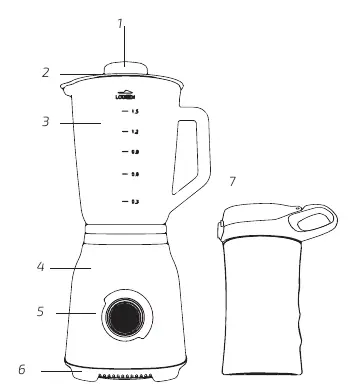
- Measuring cup
- Lid
- Glass jug
- Main body
- Speed knob
- Rubber feet
- Transportable cup (included only with the Wizard Go reference 03906)
Before Use
Remove all packaging materials from the device. Check that all parts and components are included and in good condition. If any parts are missing or damaged, contact the official Cecotec Technical Support Service immediately.
Operation
- Add ingredients to the jug and secure the lid.
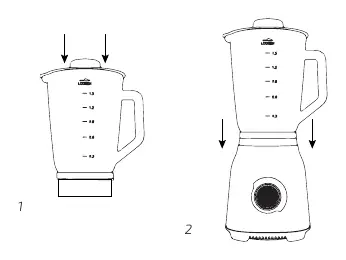
- Place the jug onto the main body.
- Plug the appliance into a power supply.
- Turn the speed knob to the desired setting:
- Turn left (counterclockwise) to select PULSE mode.
- Turn right (clockwise) to select speed settings 1-4.
- After processing, turn the speed knob to position 0, switch off the appliance, and wait for the blades to stop completely before removing the jug.
Ice crushing: It is recommended to use the Pulse function at maximum power and add a small amount of water with the ice.
Cleaning and Maintenance
Always switch off and unplug the appliance before cleaning. Handle the blades with care as they are sharp.
- Dishwasher safe parts: Jug, jug lid, and measuring cup.
- Blade cleaning: Rinse the jug, fill with 400 ml of lukewarm water and a little detergent. Close the lid and run the blender in PULSE mode for 2 seconds. Repeat as necessary.
- Motor base: Never submerge the motor base in water. Clean it using a soft, dry cloth.
Safety
- Do not use the blender with hard foods like bones, shelled nuts, or frozen meats.
- Do not process hot or boiling liquids; allow them to cool first.
- Do not use accessories not provided by Cecotec.
- Keep the device and power cord out of the reach of children.
Manufacturer information
Cecotec Innovaciones S.L.
Practical help
Common problems
Device does not operate, makes unusual noises, or vibrates excessively
Stop using the product immediately and contact Cecotec Technical Support.
Motor overheating
Do not use the blender for more than 2 minutes continuously. Let it cool down for 20 minutes before the next operation.
Before use
- Remove all packaging materials.
- Check that all parts and components are included and in good condition.
- Place the appliance on a dry, stable, flat, and heat-resistant surface.
Images and diagrams
- Fig 1: Shows the blender parts (Measuring cup, Lid, Glass jug, Main body, Speed knob, Rubber feet, Transportable cup).
- Fig 2: Shows the assembly of the jug onto the main body.
Model compatibility
- Transportable cup is only included with the 'Wizard Go' reference (03906).

Manual page author
Michael Turner
Technical manual editor
Reviews PDF manuals for structure, safety notes, and practical product details so readers can find the right information quickly.