Home Appliances / Small Kitchen Appliances
User Manual for Chefman 2-Slice Digital Toaster
Quick guide for the Chefman 2-Slice Digital Toaster. Learn how to use the shade selector, reheat, defrost, and bagel modes, clean the crumb tray, and troubleshoot common issues.
Quick answers from the manual
Quick answer
- The Chefman 2-Slice Digital Toaster features 7 shade settings, a digital timer, and specific modes for reheating, defrosting, and toasting bagels. It includes an anti-jam function and a removable crumb tray for easy maintenance. p. 5, 7
Key actions
- Toasting p. 6
- Cleaning the crumb tray p. 11
First start
- Remove all packaging, wipe exterior with a damp cloth, and ensure the crumb tray is inserted. p. 6
Problems and fixes
Food stuck
Unplug, cool, use wooden/plastic tongs.
p. 12
Burning smell
Clean crumb tray.
p. 12Maintenance and reset
- Clean crumb tray periodically to avoid buildup. p. 11
Technical specifications
| Parameter | Value | Meaning | Pages |
|---|---|---|---|
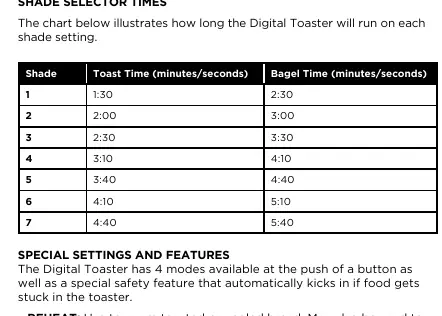
| Shade 1 | 1:30 (Toast) / 2:30 (Bagel) | Shortest toasting time. | p. 8 |
| Shade 7 | 4:40 (Toast) / 5:40 (Bagel) | Longest toasting time. | p. 8 |
Where to find it in the PDF
- Features p. 5
- Operating Instructions p. 6, 7
- Troubleshooting p. 12
Table of contents
Manual images
Click an image to enlargeQuick guide from the manual
The Chefman 2-Slice Digital Toaster is designed for toasting bread, bagels, waffles, and pastries. Key features include seven shade settings, a digital timer, and specialized modes for reheating, defrosting, and bagel toasting. Always ensure the crumb tray is inserted before use and never use metal utensils to remove food.
Features
The toaster includes the following controls and components:
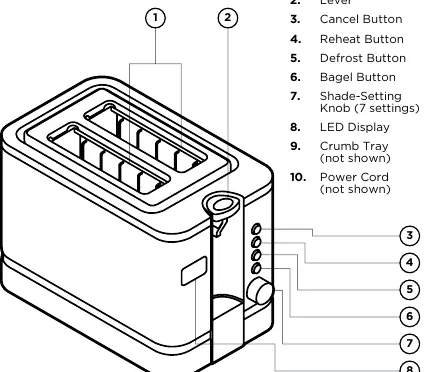
- Toasting Slots: For bread products.
- Lever: Lowers food into the toaster.
- Cancel Button: Stops the toasting cycle at any time.
- Reheat Button: Warms toasted or cooled bread/pastries for 30 seconds.
- Defrost Button: Increases toasting time by 10% for frozen items.
- Bagel Button: Toasts only the outward-facing side of the bread.
- Shade-Setting Knob: Adjusts browning levels (7 settings).
- LED Display: Shows the countdown timer.
Operating Instructions
Follow these steps to toast your food:
- Ensure the crumb tray is pushed all the way in.
- Plug in the toaster to enter standby mode.
- Turn the shade-setting knob to the desired level.
- Insert food into the slots.
- Press the lever down to start. If using a special mode (Reheat, Defrost, Bagel), press the corresponding button after lowering the lever.
- The unit will automatically pop up the food when finished.
Toasting Tips
- Bagels: Insert with cut sides facing out to toast only the inner side.
- Single Slice: Lower the shade setting to avoid overbrowning.
- Fresh Bread: Increase the shade setting as moisture slows down toasting.
- Gluten-Free Bread: Use thicker slices to prevent crumbling.
Cleaning and Maintenance
Regular maintenance involves cleaning the crumb tray:
- Unplug the toaster and allow it to cool completely.
- Press the crumb tray at the bottom back of the unit to release it.
- Wash the tray with warm, soapy water. Note: The crumb tray is not dishwasher-safe.
- Dry completely and reinsert before the next use.
Troubleshooting
If the toaster does not work as expected:
- Won't turn on: Check that it is plugged in and the outlet is working. Inspect the power cord for damage.
- Burning smell: Clean the crumb tray to remove accumulated crumbs.
- Food stuck: Unplug the unit, let it cool, and use wooden or plastic tongs to remove the food. Never use metal utensils.
- Anti-Jam Function: If food gets stuck, the unit will power off, the screen will display Err, and the Cancel button will flash.
Manufacturer information
Chefman
Practical help
Common problems
Toaster will not turn on
Ensure the unit is plugged in, the outlet is functional, and the power cord is not damaged.
Burning smell
Clean the crumb tray to remove excess crumbs that may be burning.
Food stuck in toaster
Unplug the unit, let it cool, and use wooden or plastic tongs to remove the item. Never use metal utensils.
Before use
- Remove all packing materials and stickers.
- Wipe the exterior with a damp cloth.
- Ensure the crumb tray is pushed all the way in.
- Read all safety instructions.
Specs in practice
- Shade Settings (1-7)
- Controls the toasting duration. Higher numbers result in darker, crisper toast.
- Defrost Mode
- Increases toasting time by 10% to accommodate frozen items.
Images and diagrams
- The lever lowers the bread and starts the cycle.
- The shade knob allows selection of 7 different browning levels.
- Function buttons (Reheat, Defrost, Bagel) illuminate when active.
Model compatibility
- Use only bread products and items designed for toasters.
- Do not use buttered bread or pastries with frosting.
- Not dishwasher-safe.

Manual page author
Michael Turner
Technical manual editor
Reviews PDF manuals for structure, safety notes, and practical product details so readers can find the right information quickly.