Home Appliances / Small Kitchen Appliances
User Manual for Chefman Programmable 12-Cup Coffee Maker
Quick guide for the Chefman Programmable 12-Cup Coffee Maker. Learn how to set the clock, program brewing times, operate the machine, and perform maintenance.
Table of contents
Manual images
Click an image to enlargeQuick guide from the manual
This guide provides essential information for operating your Chefman Programmable 12-Cup Coffee Maker. Always read the full safety instructions before use. The unit features a programmable timer, a pause-and-serve function, and an automatic shut-off after 2 hours.
Safety Instructions
- Household use only: Do not use for commercial purposes.
- Hot surfaces: The unit becomes hot during operation. Use caution and oven mitts when opening the lid.
- Water safety: Never immerse the base, power cord, or plug in water.
- Supervision: Keep out of reach of children and pets.
- Damage: Do not operate if the cord is damaged or if the unit malfunctions.
- Burn hazard: Never open the lid while brewing. Wait at least 5 minutes after brewing before opening.
Product Features
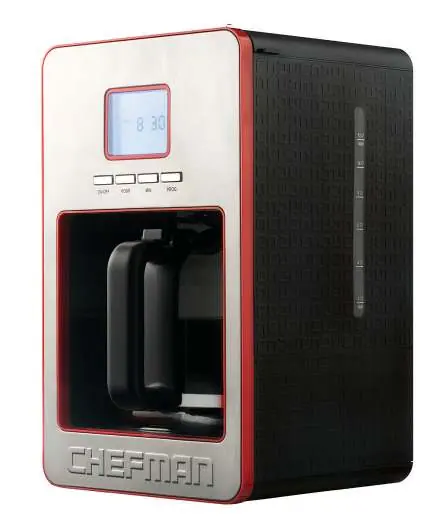
The coffee maker includes a lid, water level indicator, warming plate, LCD display, and control buttons (ON/OFF, HOUR, MIN, PROG). The brewing system uses a filter basket, a permanent filter (or #2 cone paper filter), and a drip stop valve.
First Time Use
- Remove all packaging, labels, and stickers.
- Clean the coffee maker thoroughly.
- Fill the water tank to the maximum level with fresh water.
- Run a full brewing cycle without coffee to clear any residue. Repeat this process at least once.
Operating Instructions
Brewing Coffee:
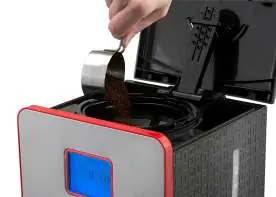
- Open the lid and place the filter basket in the unit.
- Insert the permanent filter or a #2 cone paper filter. Do not use both simultaneously.
- Add 45g-60g of ground coffee for 12 cups.
- Fill the carafe with water and pour it into the water tank.
- Close the lid, place the carafe on the warming plate, and plug in the unit.
- Press the ON/OFF button to start brewing.
Pause & Serve: You can remove the carafe during brewing; the drip valve will prevent leaking. Ensure the carafe is returned to the warming plate within 30 seconds to prevent overflow.
Setting the Clock and Programming
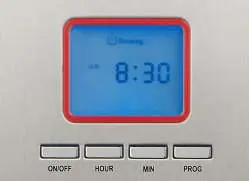
Setting the Clock: When plugged in, the display flashes "12:00". Use the HOUR and MIN buttons to set the current time. The time is set when the display stops flashing.
Programming a Brew Time:
- Hold the PROG button for 3 seconds until the display blinks.
- Use the HOUR and MIN buttons to set the desired brew time.
- Release the PROG button to save.
- To check the programmed time, press the PROG button once.
- To cancel, press the ON/OFF button.
Cleaning and Maintenance
- After every use: Unplug the unit and let it cool completely.
- Cleaning: Wipe the housing and warming plate with a damp cloth.
- Carafe: Wash the carafe, filter basket, and permanent filter in hot, soapy water. The carafe is not dishwasher-safe.
- Stains: Use baking soda or a mild cleaning agent for stubborn stains on the carafe.
Troubleshooting
- Coffee leaks around filter basket: Ensure the basket is seated correctly or check if coffee is ground too finely.
- Coffee maker does not brew: Ensure the power cord is firmly plugged in.
- Water does not run through: Fill the water tank; check if the filter is blocked or grounds are too fine/packed.
- "ERR" message: The time must be set before using the program function.
Manufacturer information
Chefman
Practical help
Common problems
Coffee leaks around filter basket
Ensure filter basket is seated correctly; check if coffee is ground too finely, which may clog the filter.
Coffee maker does not brew or heat
Ensure the power cord is firmly plugged into a power outlet.
Water does not run through
Fill the water tank; check if the filter is blocked or if coffee grounds are too fine or packed down too hard.
"ERR" message appears on display
The time must be set prior to using the program function. Set the current time.
Before use
- Remove all packaging materials, labels, and stickers.
- Clean the coffee maker thoroughly.
- Run a full brewing cycle with fresh water to clear residue.
- Ensure the filter basket is properly seated.
- Check that the carafe is properly positioned on the warming plate.
Specs in practice
- 12-Cup Capacity
- Maximum brewing capacity of the coffee maker.
- Keep Warm Function
- Automatically activates for 2 hours after brewing is complete.
Images and diagrams
- 1-16: Parts identification including lid, water level indicator, filter basket, and control panel.
- Control Panel: Includes ON/OFF, HOUR, MIN, and PROG buttons for operation and programming.
Model compatibility
- Use either the permanent filter or a number 2 cone paper filter.
- Do not use the permanent filter and a paper filter at the same time.

Manual page author
Emily Carter
User documentation editor
Prepares concise manual descriptions and highlights the most useful setup, operation, and maintenance information for readers.