Home Appliances / Small Kitchen Appliances
User Manual for Chefman 2-Slice Toaster
Quick guide for the Chefman 2-Slice Toaster. Learn how to use the bagel and defrost settings, adjust shade levels, clean the crumb tray, and follow safety guidelines.
Quick answers from the manual
Quick answer
- To use the toaster, ensure the crumb tray is inserted, plug in the unit, set the shade knob, insert bread, and press the lever down. Use the Bagel or Defrost buttons if needed. p. 7
Key actions
- Clean the crumb tray p. 10
First start
- Remove all packing materials and stickers, then wipe the exterior with a damp cloth. p. 6
Problems and fixes
Food gets stuck
The unit will power off automatically. Do not attempt to dislodge food while plugged in.
p. 8Where to find it in the PDF
- Parts Diagram p. 2
- Safety Instructions p. 3, 4, 5
- Operating Instructions p. 7, 8
Table of contents
Quick Guide
To start using your toaster, ensure the crumb tray is fully inserted, plug the unit into an outlet, and set your desired shade level using the knob. Insert your bread, press the lever down to begin, and select additional functions like Bagel or Defrost if needed. Always unplug the unit and allow it to cool before cleaning.
Product Overview
The toaster consists of the following main components:
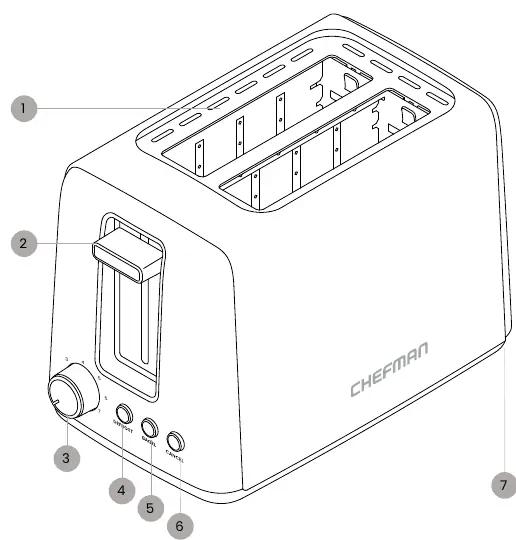
- Toasting slots
- Lever
- Shade-setting knob (7 settings)
- DEFROST button
- BAGEL button
- CANCEL button
- Crumb tray (located at the bottom back)
Before First Use
Before using the toaster for the first time, follow these steps:
- Remove all packing materials and stickers from inside and outside the unit.
- Gently wipe the exterior with a damp cloth or paper towel.
- Warning: Never immerse the toaster or its plug in water or any other liquid. The unit is not dishwasher safe.
Operating Instructions
Follow these steps for daily operation:
- Ensure the crumb tray is pushed all the way in.
- Plug the toaster into a power outlet.
- Turn the shade-setting knob to the desired level. Higher numbers result in darker and crisper toast.
- Place food into the toasting slots. Use only bread products or items designed for toasters.
- Press the lever all the way down to start.
- If using special settings (Bagel or Defrost), press the lever down first, then press the corresponding button. The button will illuminate when active.
Special Settings
- BAGEL: Heats only the outer heating elements. For best results, insert bagels or English muffins with the cut side facing out.
- DEFROST: Use for frozen foods like bread and waffles. This function defrosts and toasts simultaneously by increasing the time by 10%.
- CANCEL: Stops the toasting process at any time. The food will automatically pop up.
- Anti-Jam Function: If food gets stuck, the unit will automatically power off.
Toasting Tips
- Do not put buttered bread or pastries with frostings in the toaster, as this creates a fire hazard.
- Never force food into the slots; it should lower smoothly.
- Lower the shade setting when toasting a single slice to avoid overbrowning.
- Adjust the shade setting higher for fresh or moist bread, and lower for drier bread.
- Choose thicker slices for gluten-free bread to prevent crumbling.
Cleaning and Maintenance
The toaster requires minimal maintenance, primarily the regular removal of crumbs:
- Unplug the toaster and allow it to cool completely.
- Wipe the exterior with a damp cloth or paper towel to remove fingerprints.
- Clean the crumb tray at least once a week if used frequently:
- Pull out the crumb tray from the bottom back of the toaster.
- Wash with a sponge and warm, soapy water. The tray is not dishwasher safe.
- Dry the tray completely before sliding it back into the unit.
Safety Precautions
- Do not touch hot surfaces; use handles or knobs.
- Do not immerse the cord or plug in water.
- Close supervision is required when used by or near children.
- Do not operate with a damaged cord or plug.
- Do not use outdoors.
- Do not place on or near hot gas or electric burners, or in a heated oven.
- Always attach the plug to the toaster first, then plug into the wall outlet.
- Do not insert oversized foods, metal foil packages, or utensils.
- Do not attempt to dislodge food while the toaster is plugged in.
Manufacturer information
Chefman
Practical help
Common problems
Food stuck in toaster
The unit has an anti-jam function and will power off. Do not attempt to dislodge food while the unit is plugged in.
Uneven toasting
Adjust the shade-setting knob. For fresh bread, use a higher setting; for single slices, use a lower setting.
Before use
- Remove all packing materials and stickers
- Wipe exterior with a damp cloth
- Ensure crumb tray is pushed all the way in
Specs in practice
- Shade-setting knob
- 7 settings to control darkness and crispiness
Images and diagrams
- The toaster features a lever, shade knob, and buttons for Defrost, Bagel, and Cancel functions.
- The crumb tray is located at the bottom back of the unit.
Model compatibility
- Use only bread products and items designed for toasters.
- Do not insert buttered bread or pastries with frostings.

Manual page author
David Miller
Documentation analyst
Organizes user manual content into clear summaries, with attention to model details, product context, and everyday usability.