Home Appliances / Small Kitchen Appliances
User Guide for Chefman ExacTemp 12-Qt Digital Air Fryer+
Quick guide for the Chefman ExacTemp 12-Qt Digital Air Fryer+. Learn how to use the control panel, probe thermometer, rotisserie function, and cleaning instructions.
Table of contents
Manual images
Click an image to enlargeQuick guide from the manual
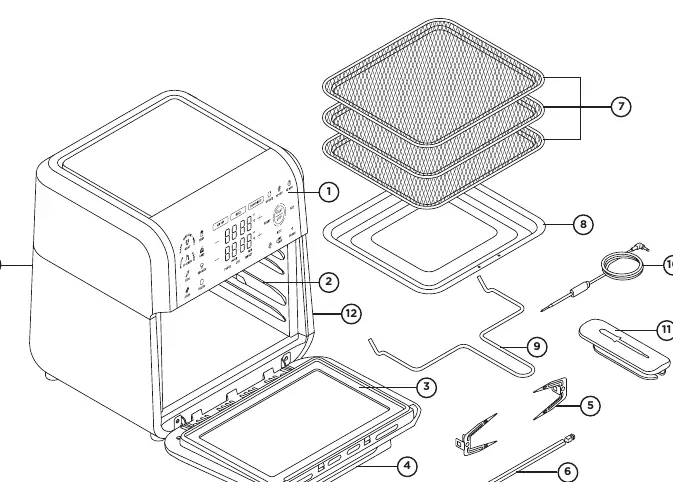
The Chefman ExacTemp 12-Qt Digital Air Fryer+ is a versatile appliance designed for air frying, baking, dehydrating, and rotisserie cooking. Before first use, remove all packaging, wash accessories in warm soapy water, and wipe the unit interior and exterior with a damp cloth. Always place the unit on a flat, heat-resistant surface with at least 2 inches of clearance on all sides.
Features and Control Panel
The unit features a capacitive touch control panel. Key buttons include:
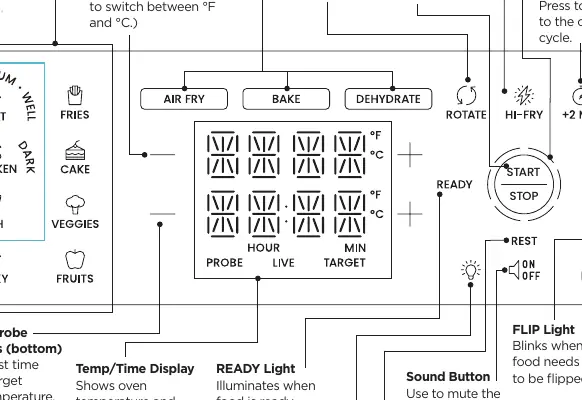
- Cook Function Buttons: Select Air Fry, Bake, or Dehydrate.
- Oven +/- Buttons: Adjust temperature.
- Time and Probe +/- Buttons: Adjust time or target internal temperature.
- ROTATE: Turns the rotisserie spit.
- HI-FRY: Temporarily raises temperature to 450°F (235°C) for 2 minutes.
- +2 MIN: Adds 2 minutes to the cooking cycle.
Operating Instructions
Time Cook Mode: Place food on racks, baking pan, or rotisserie spit. Select a function, set temperature and time, and press START/STOP. The unit will pause if the door is opened.
Probe Cook Mode: Insert the probe horizontally into the thickest part of the food, ensuring it does not touch bone. Plug the probe into the port. Select Air Fry or Bake, set the oven temperature, and set the target internal temperature using the probe buttons or presets. The unit will stop cooking when the target is reached and enter a rest phase.
Using the Rotisserie Spit
The rotisserie function is ideal for whole chickens or roasts. Run the spit through the center of the food, secure with forks and screws, and place into the rotisserie rack position. Ensure the ROTATE button is selected. Use the included fetch tool and oven mitts to safely remove the hot spit.
Cleaning and Maintenance
Always unplug the unit and let it cool completely before cleaning. Wipe the exterior and interior with a damp cloth. Accessories (except the probe) are top-rack dishwasher safe. The door can be removed by opening it, sliding it to the right, and detaching it from the hinges.
Troubleshooting
- White smoke: Usually caused by excess fat. Ensure the unit and accessories are clean.
- Uneven cooking: Ensure food is not overcrowded and switch rack positions halfway through cooking.
- Food not crisp: Lightly coat food with oil and ensure the unit is preheated.
- Probe undercooked: Ensure the probe is inserted correctly into the thickest part of the meat, avoiding bone.
Manufacturer information
Chefman
Practical help
Common problems
White smoke coming from the unit
This is often a sign of too much fat in the fryer. Avoid cooking very fatty foods and ensure the interior and accessories are clean.
Food cooked unevenly
Avoid overcrowding the racks. Switch rack positions halfway through the cooking cycle and flip food if necessary.
Food is not crisp
Lightly coat food with oil (about 1 teaspoon per batch) and ensure the air fryer is preheated.
Meat undercooked after probe cooking
Ensure the probe is inserted into the center of the thickest part of the meat and is not touching any bone.
Before use
- Remove all packaging materials.
- Check that all parts and accessories are accounted for.
- Wash accessories with warm, soapy water.
- Wipe the interior and exterior of the unit with a damp cloth.
- Place the unit on a flat, heat-resistant surface with at least 2 inches of clearance.
Specs in practice
- Probe Cook Mode
- Uses the integrated thermometer to cook food to a specific internal temperature rather than a set time.
Images and diagrams
- Probe Placement: Insert the probe horizontally into the thickest part of the food, ensuring the tip is not touching bone.
Model compatibility
- The ROTATE function is not available for Dehydrate or Probe Cooking.
- Probe Cook Mode is only available for Air Fry and Bake functions.

Manual page author
Michael Turner
Technical manual editor
Reviews PDF manuals for structure, safety notes, and practical product details so readers can find the right information quickly.