Home Appliances / Small Kitchen Appliances
Chefman 2-Slice Waffle Maker User Guide
Quick guide for the Chefman 2-Slice Waffle Maker (RJ01-B-W). Learn how to operate, clean, and maintain your waffle maker safely.
Table of contents
Quick guide from the manual
The Chefman 2-Slice Waffle Maker (RJ01-B-W) is designed for household use. Before first use, wipe the cooking plates with a damp cloth and towel dry. During the first few minutes of initial use, you may notice smoke or a slight odor; this is normal and will disappear after a few uses. Always use plastic or non-metallic utensils to avoid scratching the non-stick surface.
Important Safeguards
- Do not touch hot surfaces; use handles.
- Do not immerse the cord, plug, or appliance in water or other liquids.
- Close supervision is required when used by or near children.
- Unplug from the outlet when not in use and before cleaning.
- Do not use outdoors or place on/near hot gas or electric burners.
- Connect to properly grounded outlets only.
- Do not operate if the cord is damaged or if the appliance malfunctions.
Features
The appliance consists of the following main components:
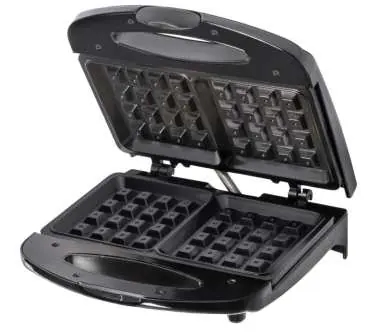
- Non-stick cooking surface: For easy waffle removal and cleaning.
- Cool-touch handle: Allows safe opening and closing of the lid.
- Non-skid feet: Keeps the unit stable during operation.
- Power/ready to cook lights: Red light indicates power; green light indicates the unit is at the appropriate temperature.
Operating Instructions
- Insert the plug into a wall outlet; the red POWER light will turn on.
- Lightly glaze both cooking plates with vegetable oil or non-stick spray.
- Close the lid and allow the unit to heat up for 3-5 minutes.
- When the green READY light turns on, the unit is ready for cooking.
- Pour waffle mix into the bottom plate. Do not overfill.
- Close the lid. Normal cooking time is 3-6 minutes. The READY light will cycle on and off as the thermostat maintains temperature.
- Remove waffles using a plastic (non-metallic) utensil.
- Unplug the unit after cooking and allow it to cool completely before storing.
User Maintenance
The appliance requires minimal maintenance and contains no user-serviceable parts. To clean:
- Always unplug and allow the unit to cool down completely.
- Brush crumbs from the grooves and wipe with a damp cloth and mild soap.
- Never immerse the unit in water.
- Do not use sharp utensils, cleansers, or oven cleaners on the cooking plates.
- Store the cord loosely coiled; do not wrap it tightly around the unit to prevent fraying.
Warranty Information
This product includes a 1-year limited warranty covering mechanical defects. Proof of purchase is required for warranty claims. For technical support or service, contact the helpline at 888-315-8407 or email [email protected].
Manufacturer information
Chefman
Practical help
Common problems
Smoke or slight odor during first use
This is normal and should disappear after the appliance has been used a few times.
Waffles sticking to the surface
Ensure you lightly glaze both cooking plates with a small amount of vegetable oil or non-stick spray before adding batter.
Before use
- Unpack the waffle maker.
- Wipe the top and bottom cooking plates with a damp cloth.
- Towel dry the cooking plates.
- Ensure the power outlet is properly grounded.
Specs in practice
- Power Light (Red)
- Indicates the appliance is plugged in and receiving power.
- Ready Light (Green)
- Indicates the unit has reached the appropriate cooking temperature.
Images and diagrams
- 1: Non-stick cooking surface
- 2: Cool-touch handle
- 3: Non-skid feet
- 4: Power/ready to cook lights
Model compatibility
- For household use only.
- Use only plastic (non-metallic) utensils to prevent damage to the non-stick coating.

Manual page author
Emily Carter
User documentation editor
Prepares concise manual descriptions and highlights the most useful setup, operation, and maintenance information for readers.