Home Appliances / Small Kitchen Appliances
User Manual for Chefman TurboFry Touch 2-Quart Digital Air Fryer
Quick guide for the Chefman TurboFry Touch 2-Quart Digital Air Fryer. Includes setup, control panel operation, cooking instructions, cleaning tips, and troubleshooting.
Quick answers from the manual
Quick answer
- To use the Chefman TurboFry Touch, place the unit on a flat surface, plug it in, add food to the basket, set the desired time and temperature using the control panel, and press START | STOP. Shake or flip food when the Shake indicator illuminates. p. 9, 10, 11
Key actions
- Adjusting Temperature/Time p. 10
- Cleaning the basket p. 13
First start
- Remove all packaging, stickers, and wash the basket before first use. p. 8
Problems and fixes
E3 Error Code
Allow the air fryer to cool fully and it will operate normally.
p. 14Error codes
| Code | Meaning | Action | Pages |
|---|---|---|---|
| E3 | Overheat protection triggered. | Allow the air fryer to cool fully. | p. 14 |
Where to find it in the PDF
- Parts Diagram p. 2
- Control Panel p. 3
- Cooking Chart p. 12
Table of contents
Manual images
Click an image to enlargeQuick guide from the manual
This air fryer uses high-speed air circulation to cook food quickly. For best results, do not overcrowd the basket and toss food with a small amount of oil if desired. Always ensure there is at least 6 inches of clearance around the unit for proper airflow.
Getting to know your air fryer
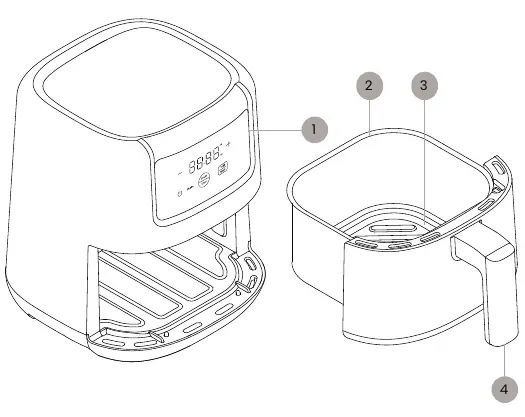
- Control panel: Used to set time and temperature.
- Ceramic nonstick basket: Holds the food.
- Ribbed basket floor: Allows air to circulate under food.
- Basket handle: Used to remove and insert the basket.
Control panel
The control panel features a digital display and touch buttons:
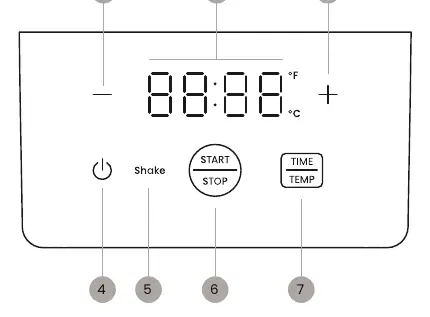
- Temperature | time display: Shows current settings.
- Minus/Plus sign buttons: Adjust time and temperature.
- Power button: Turns the unit on.
- START | STOP button: Begins or pauses the cooking cycle.
- TIME | TEMP button: Press to toggle between time and temperature settings. Press and hold for 3 seconds to switch between Fahrenheit and Celsius.
- Shake indicator: Illuminates to remind you to shake or flip food.
Before first use
- Remove all packaging materials, including plastic bags and foam inserts.
- Remove any stickers from the unit, except for the rating label.
- Wipe the interior and exterior with a damp cloth.
- Wash the basket with warm, soapy water and dry thoroughly.
How to cook
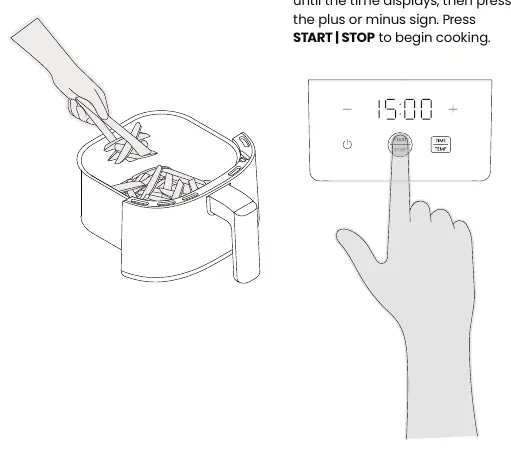
- Place the unit on a hard, flat, heat-resistant surface with at least 6 inches of clearance.
- Plug in the air fryer.
- Place food in the basket (do not fill past the MAX line) and slide it into the unit.
- Press the power button.
- Press the TIME | TEMP button to select temperature or time, then use the plus or minus buttons to adjust.
- Press START | STOP to begin cooking.
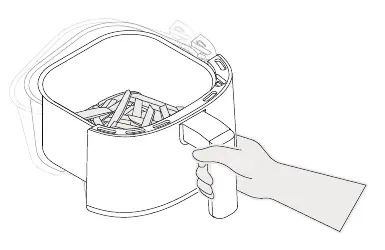
- If the Shake light turns on, remove the basket, shake or flip the food, and return the basket to the unit.
- When the timer finishes, the unit will beep and stop.
Cleaning and maintenance
- Unplug the unit and let it cool completely before cleaning.
- The basket is top-rack dishwasher safe, or it can be washed with warm, soapy water.
- Wipe the interior and exterior of the unit with a damp cloth.
- Do not use abrasive cleansers or submerge the unit in water.
Troubleshooting
- Food isn't crisp: Toss food with a small amount of oil (approx. 1/2 teaspoon) before cooking.
- Food cooked unevenly: Do not overcrowd the basket; shake or flip food halfway through cooking.
- Smoke from unit: Avoid cooking very fatty foods; ensure the basket and interior are clean.
- Error codes: If E3 displays, the unit has overheated; let it cool. If E1 or E2 displays, contact customer support.
Manufacturer information
Chefman
Practical help
Common problems
Food is not golden brown or crisp
Toss food lightly with oil (about 1/2 teaspoon per batch) before air frying.
Food cooked unevenly
Do not overcrowd the basket. Shake, toss, or flip food at least once during the cooking cycle.
Smoke coming from the unit
Avoid cooking very fatty foods (like sausages) and ensure the basket and interior are clean before use.
Error code E3 displayed
The unit has overheated. Allow the air fryer to cool fully and it will operate normally.
Error code E1 or E2 displayed
This indicates a malfunction. Please contact Chefman Customer Support.
Before use
- Remove all packaging materials (plastic bags, foam).
- Remove all stickers except the rating label.
- Wipe the interior and exterior with a damp cloth.
- Wash the basket with warm, soapy water and dry thoroughly.
Specs in practice
- Shake indicator
- A light on the control panel that turns on to remind you to shake or flip food for even cooking.
- Temperature/Time toggle
- Press the TIME | TEMP button to switch between adjusting time and temperature settings.
- Fahrenheit/Celsius switch
- Press and hold the TIME | TEMP button for 3 seconds to toggle between °F and °C.
Images and diagrams
- The control panel allows you to adjust time and temperature using the plus and minus buttons.
- The basket features a ribbed floor to facilitate air circulation.
- The unit requires 6 inches of clearance on top and back for proper airflow.
Model compatibility
- Do not use aerosol cooking spray in the basket, as it can damage the nonstick coating.
- Do not use wet batters (like tempura) as they will drip off.

Manual page author
Michael Turner
Technical manual editor
Reviews PDF manuals for structure, safety notes, and practical product details so readers can find the right information quickly.