Electronics / Monitors
Chord DL-50 Delay Effects Pedal User Guide
Quick guide for the Chord DL-50 delay pedal, covering battery installation, control functions, connection setup, and power requirements.
Table of contents
Quick guide from the manual
The Chord DL-50 is a classic delay effects pedal designed for slapback, doubling, and echo sounds. This guide covers the essential setup and operation of the device. Always ensure the pedal is handled correctly to maintain warranty coverage.
Battery installation
The pedal is supplied with a 9V battery. To install it:
- Locate the battery compartment on the underside of the pedal.
- Squeeze the clip and lever the plastic cover outwards to remove it.
- Connect the battery to the internal clip.
- Replace the cover securely.
Controls and connections
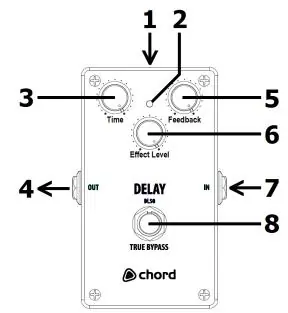
- 1. 9V DC Power Input: Optional input for an external power supply.
- 2. Effect Indicator: LED showing the on/off status of the effect.
- 3. Time: Adjusts the delay time between repeats.
- 4. Output: 6.3mm jack for connection to an amplifier.
- 5. Feedback: Controls the number of delay repeats (from single to near-infinite).
- 6. Effect Level: Mixes the amount of delayed sound with the original signal.
- 7. Input: 6.3mm jack for connection from your guitar.
- 8. Footswitch: Toggles the effect on and off.
Operation and maintenance
To preserve battery life, unplug the guitar input jack when the pedal is not in use. If the pedal will be stored for an extended period, remove the 9V battery to prevent leakage. For external power, use a 9V DC adaptor with centre-negative polarity and a rating of 100mA or higher.
Disposal
The product is classified as Electrical or Electronic equipment. Do not dispose of it with household waste; follow local council guidelines for proper recycling at the end of its useful life.
Manufacturer information
Chord
Practical help
Common problems
Battery draining quickly
Unplug the guitar input jack when not in use or remove the battery if storing for long periods.
Pedal not powering on
Check the 9V battery connection or ensure the external 9V DC adaptor meets the centre-negative polarity and 100mA rating requirements.
Before use
- Install the 9V battery in the underside compartment.
- Ensure the guitar is connected to the 6.3mm input jack.
- Connect the amplifier to the 6.3mm output jack.
- Verify the power source (battery or 9V DC adaptor).
Specs in practice
- 9V DC Adaptor
- Must be centre-negative polarity with a minimum rating of 100mA.
- Time Control
- Lower settings provide short slapback/doubling; higher settings provide long rebounding echoes.
Images and diagrams
- The pedal features a standard layout with input on the right and output on the left.
- The top panel contains three rotary knobs for Time, Feedback, and Effect Level.
- The footswitch at the bottom acts as a true bypass toggle.
Model compatibility
- Compatible with standard 6.3mm guitar and amplifier cables.
- Requires 9V power via battery or external centre-negative DC supply.

Manual page author
Emily Carter
User documentation editor
Prepares concise manual descriptions and highlights the most useful setup, operation, and maintenance information for readers.