Power / Batteries Chargers
Chord PT-12 Chromatic Pedal Tuner User Guide
Quick start guide for the Chord PT-12 chromatic pedal tuner, covering battery installation, power options, calibration, and tuning operation.
Table of contents
Quick guide from the manual
The Chord PT-12 is a chromatic pedal tuner designed for accurate instrument tuning. It features a backlit LCD display, a mute function during tuning, and adjustable A4 reference frequency calibration. The device can be powered by a 9V battery or an external 9Vdc power supply.
Device Overview
The tuner features the following controls and connections:
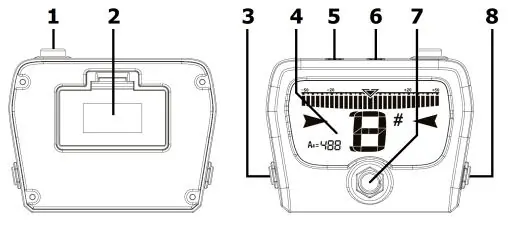
- A4 frequency calibration button
- Battery compartment (underside)
- Output jack
- Backlit LCD display
- DC power out (for daisy-chaining)
- DC power in
- Tuner on/off foot switch
- Input jack
Power and Setup
Battery Installation: To install the 9V battery, access the compartment on the underside of the pedal by squeezing the clip and levering the cover outwards. Ensure the battery is securely connected to the clip before replacing the cover.
External Power: The unit can be powered by an external 9Vdc power adaptor. The adaptor must have a centre-negative polarity and a rating of 100mA or higher. A DC power out jack is provided to daisy-chain power to other pedals.
Operation
The PT-12 is permanently set to chromatic mode, detecting notes between A0 and C8 (27.5 - 4186Hz). Press the foot switch to toggle the tuner on or off. When active, the output is muted, and the display shows the detected note and a virtual needle. When the note is in tune, the needle centers and the backlight turns green.
Calibration: The A4 reference note is set to 440Hz by default. You can calibrate this between 430Hz and 450Hz using the rear push button if you are tuning to instruments or tracks that are not at standard pitch.
Maintenance
To preserve battery life, unplug the guitar input jack when the pedal is not in use. If the pedal will not be used for an extended period, it is recommended to remove the 9V battery.
Manufacturer information
Chord
Practical help
Common problems
Tuner does not turn on
Check if the 9V battery is installed correctly or if the external 9Vdc power supply is properly connected and meets the 100mA/centre-negative requirement.
Tuning is inaccurate
Verify that the A4 reference frequency is set to 440Hz. If tuning to non-standard tracks, adjust the calibration button between 430Hz and 450Hz.
Battery drains quickly
Ensure the guitar input jack is unplugged when the tuner is not in use, as the battery remains active while the jack is inserted.
Before use
- Install the 9V battery or connect a compatible 9Vdc centre-negative power supply.
- Ensure the guitar input jack is connected to the input jack.
- Verify the A4 reference frequency is set to 440Hz for standard tuning.
- Press the foot switch to activate the tuner.
Specs in practice
- A4 Reference Frequency
- The pitch standard for the note A4, adjustable between 430Hz and 450Hz.
- Tuning Range
- Detects notes between A0 (27.5Hz) and C8 (4186Hz).
- Power Requirements
- 9V battery or 9Vdc centre-negative adaptor (100mA or higher).
Images and diagrams
- The diagram illustrates the underside battery compartment and the top-facing controls including the display, foot switch, and input/output jacks.
- The display shows the virtual needle and note indicator, which turns green when the note is in tune.
Model compatibility
- Compatible with any instrument producing notes between A0 and C8.
- DC power out jack allows daisy-chaining power to other compatible pedals.

Manual page author
Michael Turner
Technical manual editor
Reviews PDF manuals for structure, safety notes, and practical product details so readers can find the right information quickly.