Electronics / Monitors
Chord ULTIMA Pro Mono User Manual
Quick guide for the Chord ULTIMA Pro Mono power amplifier. Learn about connections, operation, safety, and technical specifications.
Table of contents
Manual images
Click an image to enlargeQuick guide from the manual
The Chord ULTIMA Pro Mono is a high-performance power amplifier. Before making any connections, ensure all system devices are switched off and volumes are set to zero. If the amplifier enters protection mode, unplug the mains cable, wait 30 seconds, and re-insert it.
Safety and care
- Do not allow the device to come into contact with water or liquids.
- Do not spray cleaning products directly onto the device; use a clean microfibre cloth.
- The device does not contain user-serviceable components; do not attempt to open or dismantle it.
- Ensure the unit is used in a well-ventilated setting, away from direct sunlight and heat sources, with sufficient space around the unit.
Connections and controls
The rear panel features the following connections:
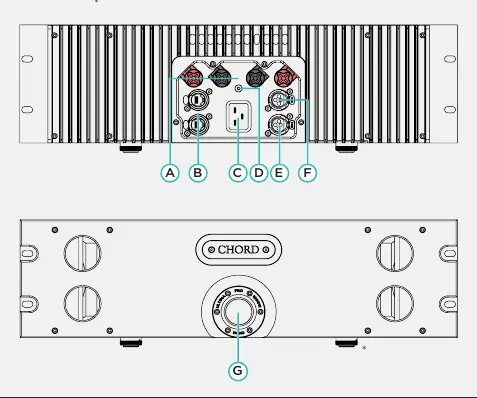
- A: 2 x sets of speaker outputs.
- B: Pair of RJ45 network sockets (for future upgrades).
- C: 15a IEC AC inlet.
- D: Grounding post.
- E: Negative phase input.
- F: Positive phase input.
The front panel features the power button (G).
Operation
Power on/off: Press the large power button once until you feel a click. The button will change to green during initial safety checks and display a teal colour once the amplifier is ready.
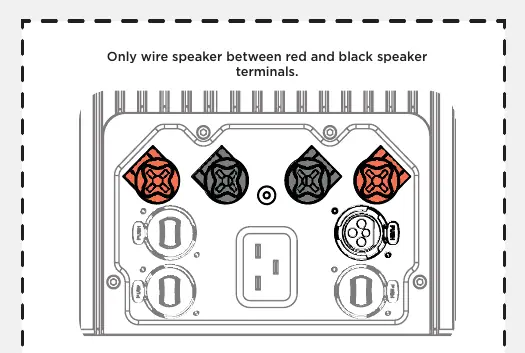
Input selection: The unit is equipped with balanced XLR inputs. There is no ability to switch between inputs, so only one must be used.
Output selection: Use high-quality loudspeaker cable terminated with 4mm banana plugs or 6mm spades. Bare wire is not recommended.
Technical specifications
- Dimensions: 483 mm (W) x 176 mm (H) x 377 mm (D) (1 ½ Rack mount).
- Frequency response: 5 Hz - 180 kHz.
- Output power (RMS): 1000W at 4Ω (<1% THD).
- Signal-to-noise ratio: -84 dB (A-weighted).
- THD: 5 Hz - 20 kHz (0.0008% to 0.003%).
- Output Impedance: 0.090 Ω.
Manufacturer information
Chord
Practical help
Common problems
Amplifier enters protection mode
Unplug the mains cable, leave for 30 seconds, and re-insert.
Cleaning the device
Use a clean microfibre cloth. Do not spray cleaning products onto the device.
Before use
- Ensure all system devices are switched off.
- Set all volumes to zero before connecting or removing speakers.
- Ensure the unit is in a well-ventilated setting.
- Use high-quality loudspeaker cable terminated with 4mm banana plugs or 6mm spades.
Specs in practice
- Output power (RMS)
- 1000W at 4Ω load with less than 1% Total Harmonic Distortion.
- Frequency response
- The range of frequencies the amplifier can reproduce (5 Hz - 180 kHz).
Images and diagrams
- The rear panel diagram identifies speaker outputs, grounding post, and power inlet.
- The front panel diagram identifies the main power button.
Model compatibility
- Compatible with 4mm banana plugs or 6mm spades.
- Balanced XLR inputs only.
- Feet are removable for rack-mount systems.

Manual page author
Emily Carter
User documentation editor
Prepares concise manual descriptions and highlights the most useful setup, operation, and maintenance information for readers.