Music / Guitar Effects
User manual for Chord OD-50 Overdrive Distortion Pedal
Quick guide for the Chord OD-50 Overdrive Distortion Pedal. Learn how to install the battery, connect your guitar, adjust gain, tone, and level settings, and use external power.
Table of contents
Quick guide from the manual
The Chord OD-50 is an overdrive and distortion pedal for electric guitars. To get started, install the included 9V battery in the underside compartment or use an external 9V DC power adapter. Always unplug the guitar input jack when the pedal is not in use to preserve battery life.
Controls and Connections
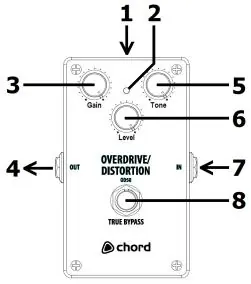
- 1. Optional 9V DC jack power input: For external power supply.
- 2. Effect on/off indicator: Shows if the effect is active.
- 3. Gain: Adjusts the amount of drive or distortion.
- 4. 6.3mm jack output: Connects to your amplifier.
- 5. Tone: Adjusts the tonal character of the effect.
- 6. Level: Adjusts the output volume of the effect.
- 7. 6.3mm jack input: Connects to your guitar.
- 8. Effect on/off footswitch: Engages or bypasses the effect.
Operation
The OD-50 emulates an over-driven amplifier. To shape your sound:
- Increase Gain: For more distortion. If the volume increases too much, back off the Level control.
- Use Tone: To tame edgy sounds or help the guitar cut through the mix during solos.
Battery and Power
The pedal is supplied with a 9V battery. To install it, squeeze the clip on the plastic cover in the underside battery compartment and lever it outwards. If using an external power supply, ensure it is a 9V DC adapter with centre-negative polarity and a rating of 100mA or higher.
Disposal
This product is classed as Electrical or Electronic equipment. Do not dispose of it with household waste; follow local council guidelines for disposal.
Manufacturer information
Chord
Practical help
Common problems
No sound output
Check that the battery is installed correctly or the power adapter is connected. Ensure the guitar is plugged into the input jack and the amplifier is connected to the output jack.
Battery drains quickly
Unplug the guitar input jack when the pedal is not in use. Remove the battery if the pedal will not be used for long periods.
Before use
- Install the 9V battery in the underside compartment.
- Connect your guitar to the input jack (7).
- Connect the output jack (4) to your amplifier.
- Ensure the power source (battery or adapter) is ready.
Specs in practice
- Power Requirement
- 9V DC, centre-negative polarity, 100mA or higher.
Images and diagrams
- 1: 9V DC power input
- 2: Effect status indicator
- 4: Output jack
- 6: Level knob
- 7: Input jack
Model compatibility
- Requires 9V battery or external 9V DC adapter (centre-negative, 100mA+).

Manual page author
Emily Carter
User documentation editor
Prepares concise manual descriptions and highlights the most useful setup, operation, and maintenance information for readers.